Why Is My Website Not Getting Traffic? A Diagnostic for New Sites (2026)
Galyna ArikhMay 23, 202625 min read
A diagnostic across 3 layers (Google Search Console state, real-world context, foundation quality) with honest month-by-month timelines for small business sites.
Try IvaBot for your site
Find what's hurting your SEO and what to fix first. Free to start, no credit card.
Why is my website not getting traffic? The reason is usually one of three: something is technically broken, your site is too new for Google to trust, or the foundation (content, backlinks, positioning) is too thin to rank. This guide walks through all three, with what to check first, what is normal at month X, and what actually moves traffic for a small business.
Around 90% of websites get little to no traffic from Google. If you have no traffic on your website, the cause is in one of three areas: a technical problem, the site's age and niche, or content and backlinks.
Layer 1: what's happening right now in Google Search Console. Four possible states: not indexed, indexed without impressions, impressions without clicks, ranking outside top 20. Each needs a different fix.
Layer 2: where your site stands in real life. Domain age (the Google sandbox or trust box), domain history, niche competition, and positioning clarity.
Layer 3: what foundation you've built. Content quality, backlinks, trust signals, page speed.
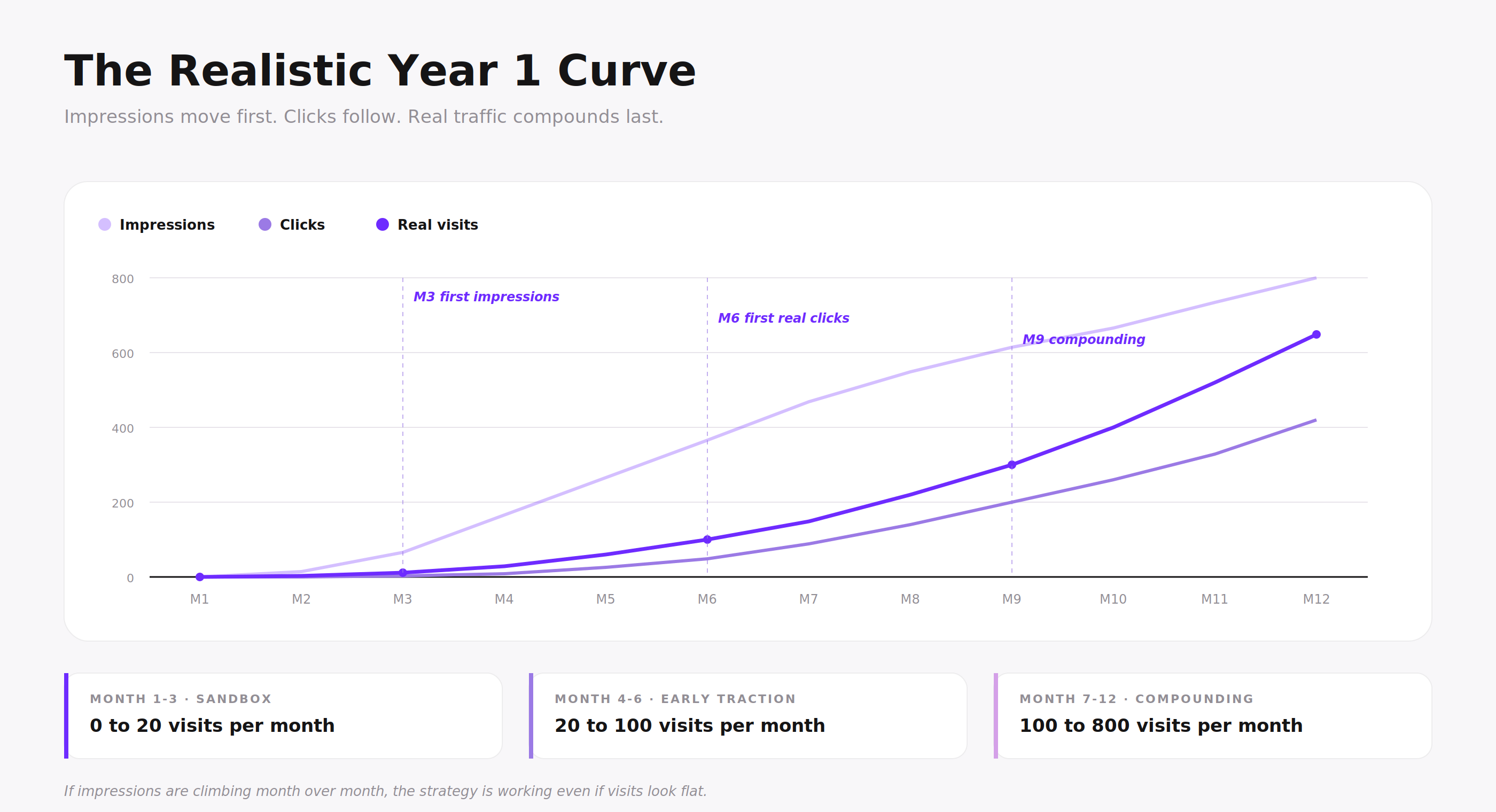
Realistic timeline for a new small business site: month 1 is zero (normal), first impressions around month 3-4, first real clicks at month 6-9, real growth starts around month 9-12. Year 1 result of 500-1500 monthly visits is a success.
Traffic isn't the goal. Revenue is. 50 visitors converting at 5% beats 1000 visitors at 0.1%. For most small businesses, qualified traffic matters more than volume.
Content and outreach go together. Writing alone rarely works without backlinks and consistent technical foundation in parallel.
"For a new site, low traffic in the first 3 months is expected. Beyond month 12 with consistent work and still no traffic, the issue is no longer time."
Layer 1: What's happening right now
Short answer: open Google Search Console, check four numbers, and you will know which of four buckets your site is in. Each bucket needs a different fix.
Open Google Search Console first. If you don't have it set up, go to search.google.com/search-console, add your site, verify ownership through DNS or HTML tag, and submit your sitemap.xml. The setup takes 15 minutes.
Once you have GSC, give it 2 to 4 weeks to start collecting data. New Search Console accounts show nothing on day one. After that, the diagnostic is fast:
Open the Performance report, set the date range to the last 28 days
Look at two numbers: total impressions and total clicks
Open Indexing > Pages and check how many pages are indexed versus not indexed
These two screens tell you which of the four buckets below you're in.
GSC Performance report, last 28 days. Two numbers tell you most of what you need: total clicks and total impressions.
For deeper technical checks (broken pages, schema issues, missing alt text, robots blocks, AI crawler access), IvaBot Core Audit runs a full check in 2 minutes. One free run is included. We won't repeat technical fixes in this guide; the audit covers them.
The 4 GSC buckets
Bucket 1: Not indexed. Your pages are not appearing on Google at all. GSC shows 0 indexed pages, or only your homepage. Type site:yourdomain.com into Google to confirm. If the only result is your homepage, your inner pages aren't reaching Google.
Common causes:
Missing or broken sitemap (the file that lists your pages for Google)
robots.txt blocking key pages (a file telling Google what to skip)
Leftover "noindex" tag from when the site was being built
JavaScript-heavy pages Google can't read
If these terms mean nothing to you, run a free IvaBot Core Audit: it checks all of these in 2 minutes and tells you in plain English which one is the problem.
If you've launched in the last 30 days, give it 2 to 4 weeks; Google's first crawl takes time. After 30 days with no indexation, it's a real problem, not a wait problem. See our SEO basics guide for the full indexation setup.
GSC Indexing > Pages report. The two numbers at the top (Not indexed vs Indexed) confirm whether your inner pages have reached Google at all.
Bucket 2: Indexed but zero impressions. GSC shows pages indexed, but the Performance report shows 0 impressions across 28 days. This is the most common state for new small business sites in months 1-3.
It usually means one of two things:
Your domain is too new for Google to trust enough to show in results
You're targeting keywords no one is actually searching
Run your main keywords through Google autocomplete: if nothing suggests the phrase you're targeting, almost no one types it. Pivot to long-tail keywords (longer, more specific phrases with less competition, like "dog groomer in Brooklyn that handles anxious dogs" instead of "dog groomer"). Our guide on how to choose keywords for a new website covers exactly how.
What Bucket 2 looks like in practice: a small number of impressions and almost no clicks across 28 days. Common in months 1-3 for any new domain.
Bucket 3: Your site is getting impressions but no clicks. GSC shows hundreds or thousands of impressions, but clicks stay at single digits. Google is showing your pages, but no one is choosing them.
Three common reasons:
Your titles and meta descriptions don't compel a click
You rank on page 2 or 3 (positions 11-30, where CTR drops below 2%)
AI Overviews are summarizing the answer above your result
Click-through rate drops sharply with position: around 30% at position 1, 6% at position 5, 2% at position 10, under 1% on page 2. When Google shows an AI Overview, organic CTR drops another 30-60%.
The fix: rewrite titles, improve content depth so you climb positions, and structure content so AI Overviews cite you instead of replacing you. See our GEO guide for the AI side, and the dedicated impressions but no clicks diagnostic for fixing CTR by position.
Bucket 4: Rankings stuck at position 20+. Your pages appear in search but stay on page 2 or worse. Your page exists for a query, but Google judges other pages more useful or more trusted.
Two fixes:
Rewrite the page with substantially more depth (real examples, original data, structured answers)
Build credible backlinks to it
Often both. Position movement from 25 to 8 takes 2-6 months of consistent work, not weeks. Our backlinks for small business guide covers the link side.
Read the SERP before you write. Before publishing for any keyword, look at who currently ranks in the top 10. If you see Reddit threads, Quora answers, small personal blogs, or YouTube videos alongside or above the big brands, the SERP is weak and a new site can realistically reach the first page. If you see only major SaaS brands, Forbes, Wikipedia, and .gov sites with no small players in sight, the SERP is locked and your effort is better spent on a long-tail variation.
If your traffic dropped after a Google core update
Short answer: a core update can move your rankings even when nothing on your site changed, because Google reweighs which type of page best fits each search.
Google ran a core update that started rolling out on May 21, 2026 and continued for about two weeks. The clearest pattern was that visibility moved toward pages that let a visitor complete the task, and away from pages that only describe it. Broad explainers and forum threads lost ground, while pages where users finish the job held or gained.
If your traffic fell during a core update, the useful question is not only whether your page is authoritative. It is whether your page is still the best default result for that search, in that market, in the format people expect. A page that explains a task competes against pages that let the reader act on the spot, through a tool, a calculator, a template, or a clear next step.
Diagnostic question: for this query, in this market, in this result format, is my page still the best default destination, or only one more page describing the topic?
To recover, match the page to what the result now rewards: confirm the search still wants your page type, add a way to act on the page, and strengthen local signals if the search is local. The local SEO guide covers the local side, and the GEO guide covers how the same fit logic applies to AI answers.
Layer 2: Where you actually are
Short answer: if Layer 1 looked fine, the next question is whether you're too early to expect traffic. Many new sites are not broken, just too young or too narrow for Google to rank them yet.
Three questions clarify this fast.
How old is your domain (the Google sandbox question)
Domain age matters more than most guides admit. Google extends very little trust to brand-new domains until they prove themselves through consistent content, real backlinks, and time on the web. This effect has an unofficial name in the SEO community: the Google sandbox, sometimes called the trust box. Google has never officially confirmed it exists, but the pattern is consistent enough that every SEO with experience launching new sites recognizes it.
A rough framework:
Under 3 months: sandbox territory where low traffic is expected
Months 3-6: first impressions appear in GSC, not necessarily clicks
Months 6-12: first real clicks, your earliest articles start ranking
Beyond 12 months with still close to 0 traffic: the issue is not time, look back at Layer 1
One caveat: this is about Google search only. If you have ad campaigns, social media presence, a unique product getting press coverage, or word-of-mouth from existing customers, you can get traffic from day one. The "wait 3 months" rule is specifically about ranking in Google organic search.
Did you buy this domain or start fresh
If you bought an aged domain to "skip the sandbox," check its history before assuming it has equity:
Open archive.org and look at the Wayback Machine snapshots
If the previous owner ran spam, adult content, gambling, or anything that triggered a Google penalty, your domain may carry that history forward
Check the Manual Actions report in GSC. If there's a penalty, you'll see it there
Penalties survive ownership changes.
GSC Manual Actions. "No issues detected" with a green checkmark is what you want to see.
Fresh domains take longer to rank but carry no baggage. Bought domains can be faster or slower depending on history.
How competitive is your niche, really
Small businesses lose more time to this question than any other. Two opposite traps:
Too competitive. If your keywords have major SaaS brands, .gov sites, or Forbes in the top 10, you cannot beat them in year one. "Best CRM," "small business SEO," "fitness coach": these are dominated by established players with hundreds of backlinks and thousands of pages. Going head-on means publishing into a void. Target long-tail variations the big sites ignore: "best CRM for a one-person consultancy under €50," "dental clinic for children with autism in Bucharest sector 3."
Too narrow. If your keyword is so specific that only 5-50 people search it per month, low traffic is the realistic ceiling, not a bug. An artisan beeswax candle shop in a small city will rarely cross 200 monthly visits from organic search. If this is your situation, success means converting most of those 200 visitors, not chasing 5,000.
Niche speed matters too. Low-competition local niches (specialized services, hyper-local businesses) grow 2-3x faster than the average. High-competition online niches (SEO tools, finance, CRM) grow 2-3x slower.
Is your positioning clear enough for Google
"Coffee shop with vibes in Brooklyn" doesn't rank for anything specific. "Pet-friendly specialty coffee shop in Bushwick with weekend brunch" ranks for several real searches. Google needs a clear signal of what you are, who you serve, and what makes you specific.
The test: read your own homepage out loud as a stranger. Can you name what the business does, who it's for, and one specific thing that makes it distinct? If not, neither can Google.
Layer 3: What foundation you have
Short answer: Layer 3 is what determines whether you'll be growing in 12 months or still at 0. Four areas matter most for small business sites.
Content quality and freshness
Three signals Google reads:
Is the information current? A 2026 article quoting 2021 data and citing tools that no longer exist underperforms. Google demotes outdated content quickly. Refresh dates, update statistics, add recent examples. A page never updated loses an average of 2.5 ranking positions in 76 days. Cosmetic edits don't reverse this; you need 30 to 100% new content per refresh.
Does each article have a real reason to exist? The most common small business mistake is publishing because "we need content," producing 500-word generic pieces that say what every other site says. Google measures dwell time, return visits, and how much value users get from your page. Thin content gets buried within weeks. One genuinely useful 2000-word article will outperform five 600-word fillers.
Would anyone come back? Return visits are a strong trust signal. Topical depth gives readers a reason to return: if you run a small bakery and write 5 articles about sourdough that all link to each other, that's stronger than 5 random articles on different topics.
Backlinks
For a brand-new site, backlinks are the strongest external trust signal Google has. Without them, your pages can rank for ultra-specific long-tails but almost never for anything competitive.
The rough realistic target for year one:
Local service business: 5-10 quality links (industry directories, local chamber, partner businesses)
Online product or SaaS: 15-30 links (guest posts, industry mentions, niche directories)
Content site or blog: 30-50 links (citations from other content sites, niche media)
Google uses E-E-A-T (experience, expertise, authoritativeness, trustworthiness) heavily for small business sites where it's harder to verify legitimacy. What matters:
Visible owner or author info with a real photo and a real story
A clear About page
Complete contact info (not just a form)
Customer testimonials with specifics
Consistent business information across your site, Google Business Profile, and social profiles
Local businesses get a separate playbook in our local SEO guide.
Technical UX: speed, intrusive ads, mobile
Page speed. Sites that load in over 3 seconds on mobile lose more than half of users before the page renders. Mobile traffic is 70-80% for most small businesses.
Intrusive ads and popups. Pages that throw popups, modals, or ad networks at users within seconds of landing get demoted by Google's intrusive interstitial penalty, lose return visits, and hurt conversion. Popups capturing email at the cost of trust is almost always a bad trade.
Mobile usability. Tap targets too small, text too small to read, navigation broken on phones. Easy to fix, and Google checks all of them.
IvaBot Core Audit checks all four (speed, ads, mobile, technical SEO) in 2 minutes.
The realistic timeline for a new small business site
Short answer: most online SEO guides quote "3-6 months" for new sites, which is too optimistic. The honest small-business numbers, assuming consistent quality publishing and basic technical hygiene:
Month 1: 0 visitors. This is correct, not a failure. Google is barely crawling your site.
Month 2: 0-5 visitors. First impressions may start appearing in GSC for your branded name.
Month 3: 5-20 visitors. First non-branded impressions begin. Clicks still rare.
Month 4-6: 20-100 visitors. First real clicks. Long-tail articles begin showing up.
Month 7-9: 100-300 visitors. Earlier articles start adding up. Topical depth (writing several connected articles on one subject) pays off.
Month 10-12: 300-800 visitors. Authority builds, more queries reach you.
Year 1 total result: 500-1500 monthly visits is a strong outcome for a small business in an average niche.
Two important multipliers:
Low-competition local or hyper-specific niches reach these numbers 2-3x faster (500 visits by month 6 is realistic)
High-competition online niches reach them 2-3x slower (still 100/month at month 12 is normal)
If you're 14+ months in with consistent work and still close to 0, the issue isn't the timeline. Go back to Layer 2 and Layer 3.
What to track in the first 6 months: impressions, then average position, then clicks. In that order. Traffic is the last metric to move, not the first. If your impressions are climbing month over month, the strategy is working even if visits look flat.
Is this normal at month X?
But wait, do you actually need more traffic?
Short answer: for a small business with a real product or service, traffic isn't the goal. Revenue is. Before chasing more visits, answer two questions.
Is your traffic problem actually a conversion problem? If you have 200-500 monthly visitors and almost no enquiries, sales, or bookings, more traffic won't fix it. Doubling 0.2% conversion to 0.4% gets you twice as many sales from the traffic you already have. Multiplying traffic 10x at 0.2% just costs you more time, more hosting, more support emails, and the same revenue.
Typical conversion rates for small business sites:
Local "near me" searches: 2-5% (high intent, ready to call or visit)
Generic informational searches: 0.5-2% (browsers, not buyers)
Branded searches (someone Googling your business name): 8-15%
If your conversion is well under these ranges, fix the landing page, the offer, the trust signals, or the pricing before optimizing for more traffic.
Are you making money from ad impressions? If yes (a blog monetized by display ads, a content site), raw traffic volume matters and the rest of this guide applies. If no (which is true for nearly every small business), then 1000 visits at 0.1% conversion is worse than 100 visits at 5%: fewer sales, more noise, more support burden.
For most small businesses, the right question isn't "how do I get more traffic." It's "how do I get more of the right traffic, from people ready to buy, ready to call, or ready to walk in." That changes the SEO playbook: less generic blogging, more specific intent matching, more local optimization, more focus on long-tail commercial keywords.
How many articles, how often, what cadence works
Short answer: depends on what kind of business you are. The realistic baseline:
Local service (dentist, plumber, lawyer): 8-12 quality articles in year one. 1000-2000 words each. About 1 article per month. Most traffic will come from Google Business Profile, not the blog.
Local shop (cafe, bakery, salon): 6-10 articles in year one. 800-1500 words each. About 1 per month. Most traffic comes from local search and social media.
Online product or SaaS: 20-30 articles in year one. 1500-3000 words each. About 2-3 per month. Content is your primary acquisition channel.
E-commerce store: 15-25 buying guides and category content in year one. 1000-2000 words each. About 1-2 per month, plus product pages.
Content site or blog: 40-60 articles in year one. 1500-2500 words. 4-5 per month minimum.
Update cadence
Touch your site at least once a week. A new post, a refresh of an old one, a Google Business Profile update, or a meaningful page edit. Site activity is a freshness signal Google notices.
Refresh at least one older article per month. Pick one with impressions but low clicks, add real new content (target 30-100% new material), and update the date and stats. Refreshes often outperform new articles for ranking gains because they leverage existing indexation.
Day of writing, day of outreach
Content without backlinks is a slow path that often doesn't get there. Backlinks without content have nothing to point to. The sustainable rhythm for a solo founder or small team:
4-8 hours per week on content (1-2 articles or a substantial refresh)
2-4 hours per week on outreach (one targeted backlink opportunity, one guest post pitch, one directory submission)
1-2 hours per week on housekeeping (GSC checks, GBP updates, internal linking)
About 10 hours per week minimum to move metrics consistently. Skipping outreach is the most common failure pattern.
Should you run paid ads on a new website?
Short answer: generally no, but there are three exceptions. Paid ads on a brand-new site without a working conversion path is mostly burning money.
Three situations where ads make sense:
You have a unique product with low competition. A niche physical product no one else sells, an artisan offering with limited supply, a service in an underserved geographic area. Demand exists, competition for the same keywords is thin. Cost per click is low, conversion is decent.
You have urgent local intent. Emergency plumber, 24-hour locksmith, same-day pet grooming, last-minute photographer. The searcher books within hours, ad cost is justified by single-call revenue. Local Service Ads (Google Guaranteed) often work better than standard Google Ads for these.
You're catching a short-term trend. A viral product, a moment-driven service. Ads grab early traffic before SEO has time to compound. Use for 4-8 weeks while you publish the SEO content that will hold rankings long-term.
When ads don't work for a new site:
Generic competitive niches (CRM, fitness, agency services, productivity tools) where established brands outbid you on every keyword
Sites with a vague offering or unclear conversion path, where you're paying for traffic that has no reason to convert
As a long-term SEO substitute: ads stop the moment you stop paying, while SEO keeps building on itself month after month
One honest rule: if your conversion rate from organic traffic is below 1%, paid ads will be worse, not better. Fix the conversion path first.
A free tool as your first traffic channel
Short answer: for brand-new sites, one well-built free tool often pulls more organic traffic than the first 20 blog posts combined.
The pattern: a free tool ranks on a query with clear intent ("free VAT calculator," "macro calculator," "meta tag checker"). The visitor types it because they want a result, not an article. They use the tool, get a number or a checklist, and the page does its job in 30 seconds. That kind of page earns three things at once:
Targeted search traffic
Backlinks from "best free X tools" roundups
Word-of-mouth shares in Reddit threads and Slack groups
Examples of free tools that fit specific small businesses:
Accountant or bookkeeper: a free invoice generator or VAT calculator
Fitness coach: a free calorie calculator or training plan template
Wedding photographer: a free shot list generator
Marketing consultant: a free meta tag checker or headline analyzer
Property manager: a free rental yield calculator
The tool doesn't need to be complex. A single-page calculator with inputs and one output is enough. What matters is that the result is real and useful, not gated behind an email signup. Optional email capture after the result is fine; mandatory capture kills the channel.
IvaBot works this way: the first Core Audit is free, no paywall or long form before it. People run it because they want the result, then look around. That's the model for any small business willing to invest a few days into a single useful tool.
What actually moves the needle (priority order)
Short answer: when my website is not getting search visits, here are the actions in priority order, with realistic effort and timing for a small business.
Fix indexation if broken. 1 day, free. Run Core Audit or check GSC Coverage. If pages aren't indexed, nothing else matters.
Clarify your positioning. 1 week of homepage and About page rewrites. Specific beats broad every time for small business.
Build a topical cluster around one specific niche. 2-3 months. One main page plus 4-8 connected articles on related questions, all linking to each other. For a bakery: one main page on "sourdough basics" plus articles on starter, flour types, hydration, and troubleshooting.
Ship one free tool that fits your business. 2-4 weeks. A calculator, a generator, a checklist. One useful tool often outranks ten blog posts on a new domain.
Get 3-5 quality backlinks. 1-3 months of consistent outreach. One real industry mention outweighs 30 directory listings. See our backlinks guide.
Update existing pages with impressions but no clicks. Ongoing. GSC shows you exactly which pages to fix. See the dedicated impressions but no clicks diagnostic.
Maintain the cadence. Day article, day outreach, weekly site touch. Real growth starts around month 8-12.
What doesn't move the needle: redesigning the whole site, panic-buying ads, generic directory submissions in bulk, switching CMS, paying for "submit to 500 search engines" services, adding more popups to capture leads, publishing 30 thin articles a month, chasing high-volume head terms in year one.
Common mistakes when troubleshooting no traffic
Redesigning the entire site. A redesign doesn't fix indexation, content quality, or backlinks. It often hurts by changing URLs and losing the rankings you had.
Adding popups to capture leads. Killing your bounce rate and search rankings to capture 1-2% more emails is a bad trade. Especially intrusive on mobile.
Publishing 30 thin articles to "feed the algorithm." The algorithm penalizes thin content. Five strong articles beat 30 weak ones for ranking, every time.
Targeting high-volume head terms. "Best CRM" or "fitness coach" sends a new site straight to page 8 forever. Long-tail with clear intent is the only path that works in year one.
Cosmetic-only refreshes. Updating the date and changing two sentences doesn't recover rankings. You need 30-100% new content.
Buying bulk directory submissions. Most are spam directories Google ignores or penalizes. Five real industry mentions are worth 500 of these.
Optimizing for traffic when conversion is broken. More traffic to a page that doesn't convert just costs more. Fix the landing page, the offer, and the trust signals first.
Switching CMS or hosts in frustration. Almost never the actual problem, and migration risks breaking what's already working.
Mistaking bot traffic for real traffic. Seeing visits in Shopify or GA4 that aren't in GSC usually means bots. See the FAQ below.
The Website Traffic Diagnostic Checklist
Fifteen things to check, in priority order. Do not try to do everything at once. Section 1 first, then Section 2, then Section 3. If Section 1 is broken, nothing else matters yet.
Fix this first · critical · do this week
Google Search Console is set up for your site.
Your pages show up in Google when you type site:yourdomain.com.
No "noindex" tag or robots.txt block is stopping Google from seeing your pages.
Your domain is at least 3 months old. If not, you have a timeline, not a problem.
Your homepage tells a stranger in 5 seconds what you do, who you serve, and what makes you specific.
Check this next · important · do this month
You bought your domain new, or you checked archive.org and the previous owner did nothing spammy.
The keywords you target are things real people type into Google. Check Google autocomplete.
When you Google your target keyword, the top 10 results include some smaller sites (Reddit threads, small blogs), not only big brands.
You have at least 5 to 10 quality articles or pages, not just a homepage.
Your site loads in under 3 seconds on a phone.
Build this slowly · foundation · do over 6 to 12 months
You publish or refresh something every week, even a small update.
You have 3 to 5 real backlinks from sites in your industry, not directory spam.
Your About page has a real photo and a real story.
You answer specific questions people ask, not generic topics every other site covers.
You track impressions in Google Search Console, not just visitor counts.
Use this checklist once now, then again in 30 days, then in 90 days. Most small business sites need 2 to 3 passes over 90 days to clear the basics.
Bing Webmaster Tools (free). Bing indexes faster than Google and feeds ChatGPT search. Skip and ChatGPT can't find you.
IvaBot Core Audit. Technical SEO and AI readiness check in 2 minutes. One free run included, then pay-as-you-go from $5.
archive.org Wayback Machine (free). Check domain history before assuming bought domains carry equity.
For a small business in year one, this is the full tool stack. Paid SEO suites (Ahrefs, Semrush) become useful around month 8-12.
FAQ: why is my website not getting traffic
How long does it take for a new website to get traffic?
For a small business website on a new domain, month 1 is realistically 0 visitors. First impressions in GSC appear around month 3, first real clicks around month 6, and meaningful growth around month 9-12 as your earlier articles add up. A year one result of 500-1500 monthly visits is a strong outcome for an average niche. Low-competition local niches grow 2-3x faster, high-competition online niches 2-3x slower.
How do I get my website to show up on Google search?
Set up Google Search Console, submit your sitemap, and use URL Inspection to request indexing for your most important pages. Verify your site is not blocked in robots.txt and has no leftover noindex tags from staging. Then publish quality content with clear keyword targeting. The first appearance in search results usually happens within 1-4 weeks of GSC setup, but ranking competitively for any keyword takes months.
Why is my website indexed but not ranking?
Indexation gets your pages into Google's database, but ranking depends on relevance, content quality, and authority. New sites with 0 backlinks rarely rank for anything competitive in year one. Focus on long-tail keywords with weak SERPs (Reddit threads, small blogs in top 10), build content depth around one specific topic, and start outreach for 3-5 quality backlinks. Position improvement from 25 to 8 typically takes 2-6 months of consistent work.
Is no traffic normal for a new website?
In months 1-3, yes, "no traffic on my website" is the expected state for almost every new domain. Beyond month 6 with continued zero traffic, the cause is usually one of three things: pages not properly indexed, niche too competitive for your current authority, or content too thin to rank. Beyond month 12 with still zero traffic, something is genuinely wrong; go through the three-layer diagnostic.
What is the Google sandbox?
The Google sandbox (also called the trust box) is the unofficial name for the period when new domains rank poorly regardless of content quality. Google has never officially confirmed it exists, but every SEO who has launched new sites observes the same pattern: roughly the first 3-6 months a new domain is held back even with strong on-page work and a few backlinks. The fix is time plus continued publishing, plus a few real backlinks earned during that period.
How to increase website traffic organically for a small business?
For most small businesses, the priority order is: fix indexation, clarify positioning, build a topical cluster around one specific niche, ship a single free tool that fits your business, get 3-5 quality backlinks, update existing pages with impressions but no clicks, maintain a weekly publishing and outreach cadence. Maintain this for 8-12 months. Volume isn't the goal; qualified traffic that converts is.
Why is my website not showing up on Google Chrome, Squarespace, Wix, Shopify, account, or app?
These are all variations of the same root question: the website is not appearing on Google search results. "Not showing up on Chrome" usually means the site isn't indexed by Google (Chrome is just the browser). "Not on Squarespace" usually means the Squarespace site has the SEO settings hidden or noindex enabled by default; check Settings > SEO and uncheck "Hide Site from Search Engines." "Not on Shopify" usually means the same setting in Shopify's Preferences (uncheck "Restrict search engines from indexing"). "Not on Wix" usually means the same thing in Wix Settings > SEO > "Let search engines index your site" toggle, which has to be on. "Not in Google account" typically means you haven't claimed the Google Business Profile. "Not in Google app" means the mobile search app isn't finding indexed pages, same root cause as Chrome.
My analytics shows traffic, but GSC shows zero. Is this fake?
Often, yes. New small business sites and new Shopify stores regularly see visits in their dashboard from Ashburn, Virginia or Council Bluffs, Iowa. These are not real customers. Ashburn and Council Bluffs are major Google Cloud and AWS data center hubs; the "visits" are bots, uptime monitors, security scanners, and the platform itself crawling your store. Cross-check against Google Search Console: if GSC shows 0 clicks but Shopify or GA4 shows 200 visits, almost all of those visits are bots. Filter bot traffic in GA4 (Admin > Data Streams > Configure Tag Settings > Define Internal Traffic, enable "Exclude known bots and spiders").
What if I have traffic but no sales?
That's a conversion problem, not a traffic problem, and it deserves its own diagnostic. We cover it in a separate guide.
What should I NOT do when my website has no traffic?
Don't redesign the site. Don't buy bulk directory submissions or "submit to 500 search engines" services. Don't add popups to capture emails from the few visitors you have. Don't publish 30 thin articles in a month. Don't switch CMS or hosting in frustration. Don't run paid ads to compensate for a broken organic strategy. The fixes that work are slow and unglamorous: indexation, positioning, topical depth, a few real backlinks, time.
Does domain age matter for SEO?
Yes, especially for new sites. Google extends limited trust to brand-new domains regardless of content quality. Under 3 months, you're in sandbox territory and zero traffic is expected. Domain age adds up with content velocity and backlinks; a 3-year-old domain with consistent publishing dramatically outranks a 6-month-old domain with the same content.
How do I check if my domain has bad history?
Open archive.org and look at Wayback Machine snapshots: does it show legitimate previous content, or spam, adult content, or gambling? Check Google Search Console > Manual Actions for active penalties. If you bought a domain with bad history, recovery is possible but takes 6-12 months of consistent clean work.
How do AI Overviews affect my website traffic?
When Google shows an AI Overview at the top of search results, organic click-through rate drops 30-60%. The fix is structuring your content so AI Overviews cite your site instead of replacing it: clear question-and-answer sections, extractable passages of 100-180 words, comparison tables, real statistics. Informational queries are most affected; commercial and transactional queries are still relatively safe.
What's a realistic conversion rate for a small business website?
It depends on intent. Local "near me" search traffic converts at 2-5%. Generic informational search converts at 0.5-2%. Branded search (someone Googling your business name): 8-15%. Direct return visits convert at 5-10%. If your overall conversion is well below these ranges, the issue is the landing page, offer, or trust, not the traffic volume.
What's Next
If your domain is under 90 days old and you have low traffic, the answer is patience plus consistent publishing. Don't change anything strategic; keep the cadence. Re-check in 30 and 60 days.
If your domain is 3-12 months old and you have low traffic, work the three layers in order: confirm GSC shows indexation and impressions, verify your niche and positioning, audit content quality and backlinks. Use the checklist.
If your domain is 12+ months old and you're still close to 0, the issue isn't time. It's Layer 2 or Layer 3. Most often: niche is too competitive (pivot to long-tail), positioning is too vague (rewrite the homepage), or you've never built backlinks (start there).
If you have traffic but no revenue, stop optimizing for more visits. Fix the conversion path first.
This guide is long because SEO has many moving parts. You don't have to do everything this week. Bookmark the page, follow the priorities, give it 10 minutes a day. Over a few weeks the picture gets clear.
You now have the three-layer diagnostic and a priority order. The point is to act on it, not only read about it: work through the checklist and run the free Core Audit to see what is actually broken on your specific site.
IvaBot Content Builder generated the structure and SEO meta for this guide.
This article was written using IvaBot Content Builder for the structure and brief, then rewritten and edited based on real experience auditing small business sites. The IvaBot suite (Core Audit, Content Coverage, Content Builder) is built for small businesses and content creators who want SEO insights without agency pricing. Try it free at ivabot.xyz/app.
 25 min read