Why Am I Getting Impressions But No Clicks on My Website? (2026)
Galyna ArikhMay 25, 202613 min read
Impressions but no clicks usually means one of three things, depending on your average position. A diagnostic by position with real examples for small business sites in 2026.
Try IvaBot for your site
Find what's hurting your SEO and what to fix first. Free to start, no credit card.
Impressions but no clicks is one of the most common questions in Google Search Console, and the answer almost always sits in one number: your average position. The fix for a page ranking at position 2 is completely different from the fix for a page ranking at position 25. This guide walks through the diagnostic by position, then shows real examples of titles, meta descriptions, and snippets that earn the click in 2026.
This guide covers organic Google Search results, the regular blue links visible in Search Console. Google Shopping, Google Ads, Amazon, Fiverr, and other marketplaces follow similar logic but use different platforms and different fixes.
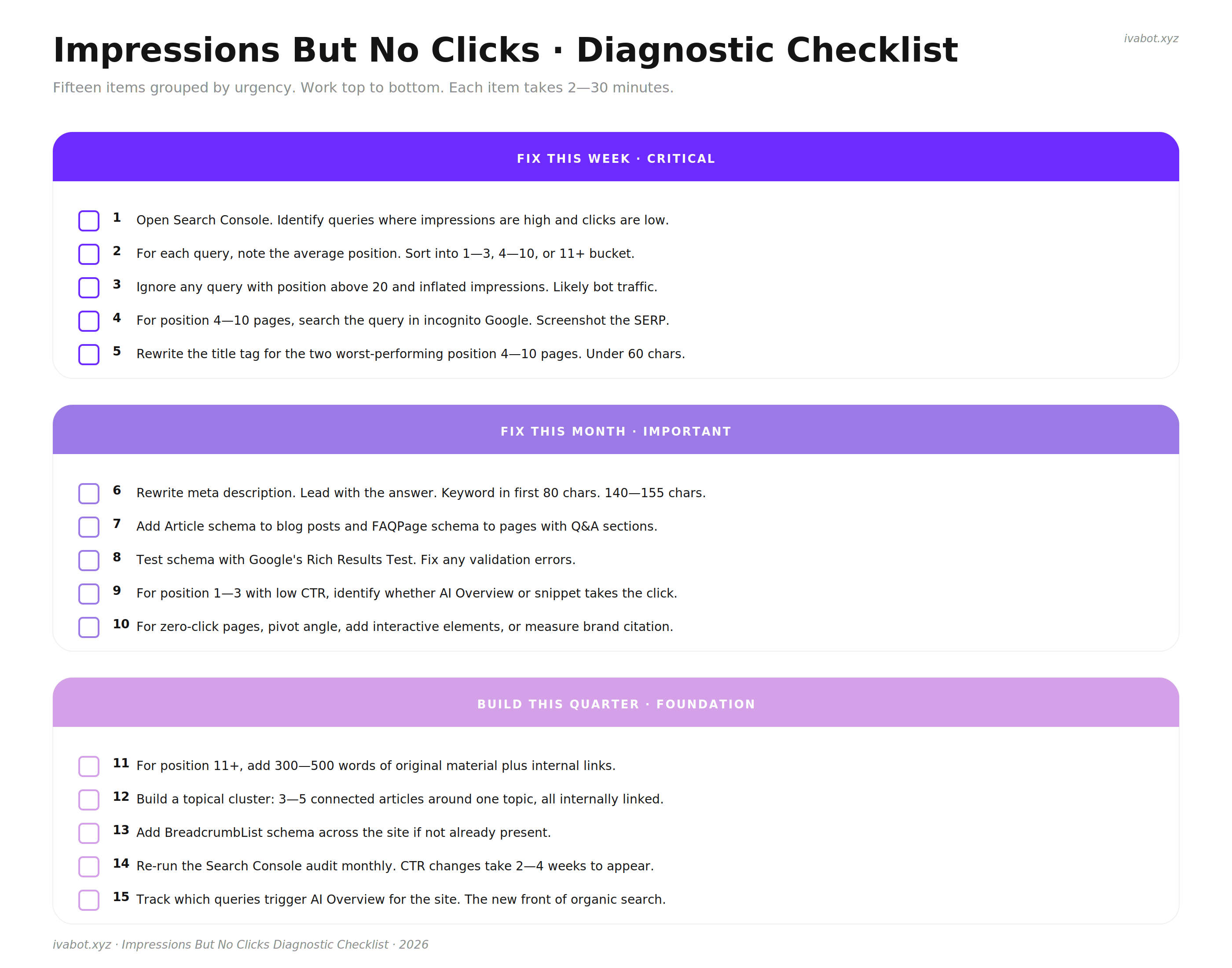
Impressions But No Clicks Diagnostic Checklist·Download
TL;DR (Quick Summary)
Impressions but no clicks usually means one of three things, depending on average position. Position 1-3 with no clicks is almost always a zero-click problem (AI Overview, featured snippet, People Also Ask answering the query). Position 4-10 is usually a title or meta description problem. Position 11+ is a visibility problem, and rewriting the title will not fix it.
Check average position in Search Console before changing anything. Two minutes of diagnosis saves weeks of rewriting things that were never the problem.
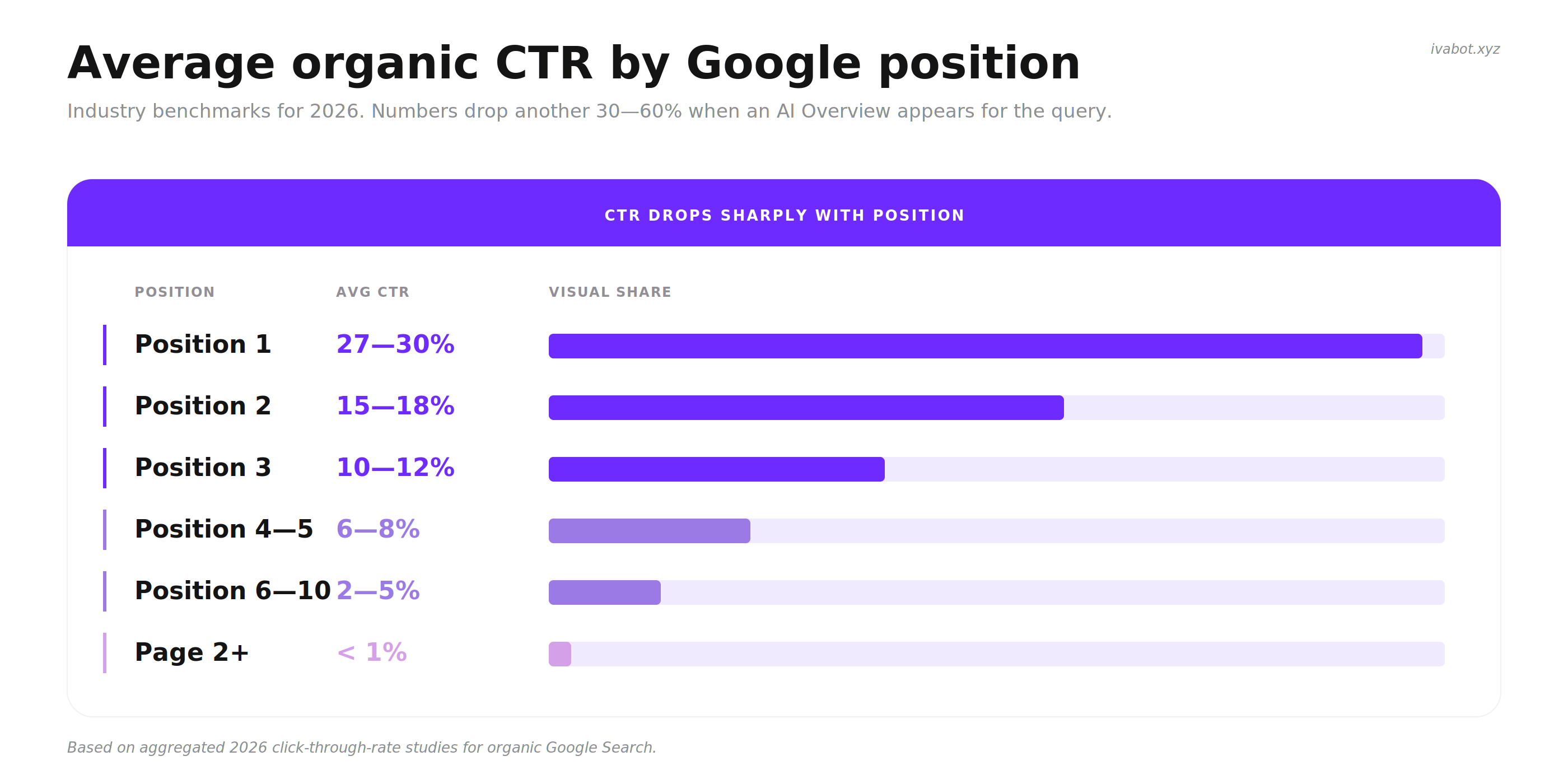
Normal CTR depends on position. Position 1 averages around 27-30%, position 5 around 6%, position 10 around 2%, page 2 under 1%. AI Overviews on the query reduce these numbers by another 30-60%.
A real title that gets clicks contains a specific number, a year, a clear benefit, or a named outcome. Generic titles lose to specific ones almost every time.
A real meta description that survives Google rewriting it leads with the answer, repeats the search phrase naturally, and stays under 155 characters. Marketing fluff gets replaced.
For pages already at the top with AI Overview taking the click, the path forward is different. Pivot toward nuance, comparisons, original data, or interactive elements that an AI summary cannot replicate.
Schema markup, sitelinks, and rich snippets are free CTR multipliers that most small sites skip.
"Impressions go up first. Clicks follow when the title gives someone a reason to choose your result over the others."
What impressions and clicks actually mean
Short answer: an impression is Google showing your page in search results. A click is someone choosing it. CTR is the ratio between the two.
Most of the confusion around impressions but no clicks comes from not knowing exactly what each term means. The definitions in Search Console are precise, and once you have them clear, the rest of the diagnostic gets much easier.
Impression. Google showed your page on a search results page for some query. It does not mean the person scrolled to it, noticed it, or read it. It means the link was on the page. If your result appears at position 12, the user has to scroll to page 2 to even see it, but Search Console still counts the impression.
Click. Someone clicked the link and went to your site. Search Console counts this when the user leaves Google and lands on your page.
CTR (Click-Through Rate). The percentage of impressions that turned into clicks. The formula is simple: clicks divided by impressions, multiplied by 100. If your page got 1,000 impressions and 30 clicks, your CTR is 3%.
Average position. The average ranking of your page for all queries it appeared on, over the date range you picked. If your page ranked at position 3 for 100 queries and position 20 for 100 queries, the average is 11.5. This is why average position alone can hide problems, and why the diagnostic in this guide looks at queries one at a time.
Search Console performance overview. Total impressions and total clicks across three months tell the high-level story before any diagnostic.
Why CTR matters beyond the obvious: Google uses CTR as a signal of relevance. A page that ranks at position 2 with low CTR over time tends to get demoted. A page that rises in CTR tends to rise in position. The two metrics feed each other.
Is your CTR actually low? A quick check
Short answer: before assuming there's a problem, calculate the actual click-through rate and compare it to the benchmark for your position. Low absolute click numbers can hide a perfectly healthy CTR.
A page with 87 impressions and 5 clicks looks underwhelming at first glance. Run the math: 5 divided by 87, multiplied by 100, equals 5.7%. For a page ranking at position 5 to 7, that's above the average. For position 2 to 3, it would be low. The number that matters is CTR for the position the page actually ranks at, not the raw click count.
A real example: 87 impressions, 5 clicks. CTR of 5.7%. Whether this is good or bad depends entirely on the position.
The next section gives the benchmarks. Run the calculation for each of your low-performing queries first, then compare to the position-by-position numbers below. Many "impressions but no clicks" panics turn out to be normal behavior at the page's actual ranking.
The first thing to check: your average position
Short answer: open Search Console, look at the average position for the queries where you get impressions but no clicks. The fix changes completely based on that number.
Open Search Console, go to Performance, set the date range to the last 28 days, and click the "Queries" tab. Sort by impressions, descending. Look at the top 10-20 queries with the most impressions and the lowest clicks. The "Position" column tells you which of three diagnostic paths to follow.
The Queries tab in Search Console. Sort by impressions, then check the Position column for each row. That number routes the diagnostic.
The diagnostic path changes based on average position. Each zone has a different root cause and a different fix.
Position 1-3 with low CTR. The result is showing at or near the top, and people are still not clicking. This is almost always a zero-click problem. Google is answering the query directly through an AI Overview, a featured snippet, a People Also Ask box, or a knowledge panel, and the user gets what they need without leaving the results page. Rewriting the title will not fix this. The fix is structural.
Position 4-10 with low CTR. The result is on page 1 but below the most visible positions. People see it but pick something above or below. This is the classic title and meta description problem. The fix is rewriting the snippet to earn the click against competing results.
Position 11+ with high impressions. The page is on page 2 or beyond, where almost no one scrolls. Impressions accumulate because Google shows the page for many adjacent queries, but actual visibility to humans is close to zero. Rewriting the title will not help. The fix is improving ranking, which is a content and authority problem, not a snippet problem.
The same page can sit in different zones for different queries. A page might rank at position 2 for one term (zero-click problem) and position 18 for another (visibility problem). That is why the diagnostic looks at queries, not whole pages.
What "normal" CTR looks like
Short answer: CTR drops sharply with position. Knowing the benchmarks lets you tell a real problem from normal behavior.
Click-through rate is not a single number. It depends heavily on where the page ranks, what type of query the user typed, and what else is on the search results page. The chart below gives realistic ranges based on industry data for 2026.
Average organic CTR by position, based on 2026 industry benchmarks. These numbers drop another 30-60% when an AI Overview appears for the query.
CTR also varies by the type of search. The same position can produce very different clicks depending on what the user wanted.
Query type
Realistic CTR range
What drives it
Brand search (someone typing your business name)
8-15%
High intent, the user already knows you
Local "near me" search
4-7%
Ready to call, visit, or buy; less competition above the local pack
Commercial search (best X, top X, X vs Y)
3-6%
Active comparison, users click multiple results
E-commerce product search
2-5%
Heavy competition from Amazon and major retailers
B2B / SaaS search
2-4%
Longer decision cycle, more research, fewer impulse clicks
Informational search after AI Overview
0.5-2%
The summary answers the question directly; click only if user wants more detail
A page sitting at position 5 with a 2% CTR for an informational query that triggers AI Overview is roughly normal. A page sitting at position 5 with a 0.4% CTR for a commercial query is a real problem worth fixing.
Are these impressions even real?
Short answer: for many sites, a significant portion of impressions come from rank-tracking tools, scrapers, and bots rather than real users. This is especially true at positions below 20.
In September 2025, Google removed support for the &num=100 parameter that let third-party tools fetch 100 results at once. Sites that had inflated impression numbers from rank trackers saw a sudden drop. If your impressions fell sharply in late 2025, the cause was almost certainly this change, not a Google penalty.
For a small site ranking at position 30+ for competitive keywords, a portion of the impressions in Search Console likely come from:
Rank tracking tools used by other SEOs in the industry
Scrapers building keyword databases
Uptime monitors and security scanners
Bots crawling for AI training data
Country breakdown in Search Console. Sudden spikes from regions where the site does not normally rank are a sign of bot or scraper traffic, not real users.
None of these will ever click. They inflate the impression count without converting to a single human visitor. This is why a brand new site with 5,000 impressions at average position 35 looks like a CTR problem but is actually a visibility plus bot-traffic situation.
A practical filter: ignore queries with high impressions and average position above 20. Focus the CTR analysis on queries where the position is 1-10 and clicks are still low compared to the benchmarks above.
Position 11+: the visibility problem
Short answer: at position 11 or worse, the issue is ranking, not the title. Rewriting the snippet wastes time. The fix is content depth, internal linking, and credible backlinks.
If average position is above 10, the page is on page 2 or beyond for most of those queries. CTR at this depth is structurally close to zero because almost no one scrolls. Less than 1% of Google searchers click past page 1.
What moves position from page 2 to page 1:
Content depth. Pages on page 2 are often thinner than the pages above them. Adding original data, a clear comparison table, a real example, or a how-to section often shifts a page 2-3 positions over a few weeks. Aim for 30-100% new material on the page, not cosmetic edits.
Internal linking from authoritative pages. If the homepage, the most-trafficked article, or a related cluster page links to the underperforming page with descriptive anchor text, ranking can improve in weeks. Internal links are free and underused.
A small number of real external backlinks. Three to five links from sites in the relevant industry move position more than dozens of directory submissions. One mention in a niche newsletter or one citation from a related blog often does what 50 directory listings cannot. See how to get backlinks for small business for the full method.
Topical clustering. A single article on a topic competes alone. Five connected articles linking to each other, with one main pillar page, ranks higher because Google reads them as a coherent body of work.
What does not move position from page 2: rewriting the title, adding more keywords, changing the meta description. Those help once the page is already on page 1 in positions 4-10. At position 18, they do nothing.
Position 4-10: the title and snippet problem
Short answer: at position 4-10, the page is visible but losing the click to other results on the same page. The fix is the title, the meta description, and the visual elements of the snippet itself.
This is the most common impressions-but-no-clicks situation for small sites, and the most fixable. A change to the title alone often shifts CTR within two weeks without any change to the page content.
What's on the modern Google SERP
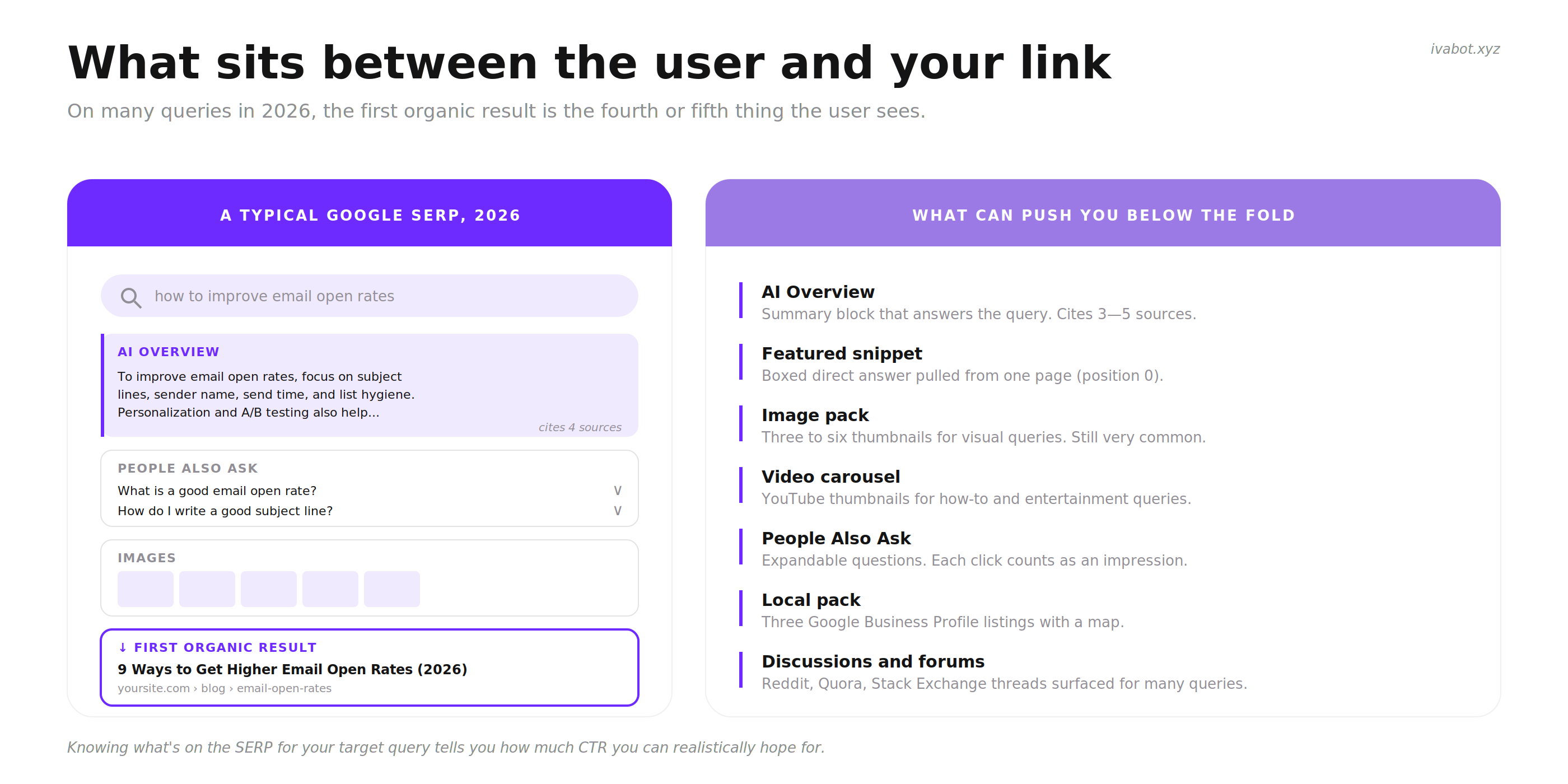
Before fixing a snippet, look at what the user actually sees when they search the target query. The Google results page in 2026 is crowded.
On many queries, the first organic result is the fourth or fifth thing the user sees. AI Overview, image pack, and PAA push the blue links further down.
A real example. For visual queries like interior design, Google still surfaces an image carousel above any organic results. Knowing this changes how to think about position 1.
What can sit above an organic result in 2026:
AI Overview. A summary block generated by Google that answers the query directly. Takes 300-600 pixels on desktop, often more on mobile. Cites 3-5 sources.
Featured snippet. A direct answer pulled from one page, displayed in a box at position 0.
Image pack. A row of thumbnails for visual queries (recipes, products, places, designs). Still very common in 2026, often three to six images horizontally.
Video carousel. YouTube and TikTok thumbnails for how-to and entertainment queries. Pushes organic results below the fold.
People Also Ask. Expandable question boxes. Each click counts as an impression and pushes other results down.
Local pack. Three Google Business Profile listings with a map. Always appears for local-intent queries.
Discussions and forums. A section that surfaces Reddit, Quora, and Stack Exchange threads. Appears for many informational and how-to queries.
Shopping pack. For commercial queries, product listings appear before organic results.
If the first organic result on a query is below three or four of these features, even position 1 organic gets less attention than it used to. Knowing what is on the SERP for the target query tells you how much CTR is realistically possible.
Titles that earn the click
A title tag has one job: make the user choose your result over the others on the page. The most effective title tags share a few patterns.
Five elements that turn a generic title into one users actually choose.
Lead with the specific value, not the brand. The first 4-6 words decide whether the rest gets read. A brand name at the front pushes the value to the end where it gets cut off in the snippet.
Before / After
Before (position 6, generic): Sunshine Dental Clinic - Trusted Family Dentistry in Bucharest
After (position 6, specific): Family Dentist in Bucharest Sector 1 with Saturday Hours - Sunshine Dental
The keyword the user is searching ("family dentist Bucharest") is now in the first five words, the differentiator (Saturday hours) is visible, the brand is at the end where Google can truncate it without losing meaning.
Include a number, a year, or a count when the page is a list or a comparison. Specificity signals depth. A title with "7 Methods" or "Updated 2026" outperforms one without.
Before / After
Before: How to Get More Email Subscribers
After: 9 Ways to Get Email Subscribers Without Paid Ads (2026)
The number tells the user the page is actionable. The year signals freshness. "Without paid ads" sets the page apart from generic advice.
Match the search intent precisely. If the user typed an informational query and the title sounds commercial, the click goes to a result that sounds informational. Read the query out loud, then ask whether the title promises exactly what that user wants. The keyword guide covers intent matching in depth.
Before / After
User query: what is content coverage in seo
Before (informational query, commercial title): Content Coverage Tool - Boost Your SEO Today | Acme Tools
After (informational query, informational title): What Is Content Coverage in SEO? A Plain-English Explanation
The user wanted to understand a concept, not to buy a tool. The new title delivers exactly that.
Add brackets, parentheses, or a year tag when relevant. Brackets like [Free Template], (Updated 2026), or [With Examples] often raise CTR because they promise extra value beyond the page itself.
Keep the full title under 60 characters when possible. Google truncates titles around 60 characters on desktop and shorter on mobile. The most important words go first. Anything past 60 characters is a bonus that may not show.
Meta descriptions in 2026
Meta description is the short text below the title in search results. Google does not always use it. As of 2026, Google rewrites the meta description for more than half of all results, especially when the original description does not match what the user searched for. The descriptions that survive Google's rewriting share a few traits.
Four traits that make Google keep the original meta description instead of rewriting it.
Lead with the answer or the outcome, not with marketing. Google rewrites descriptions that read like ad copy. Descriptions that lead with a useful sentence tend to stay.
Before / After
Before: Welcome to our blog! We share tips on email marketing and how to grow your business. Subscribe today for weekly insights.
After: How to write subject lines that get opened, build a list from scratch, and stop ending up in spam. Updated guide for 2026 with real subject line examples.
The new version answers what the page actually delivers. Google is more likely to use it as-is.
Include the primary search phrase in the first 80 characters. If the user searched "how to write meta description", and the description starts with "Writing a good meta description takes...", Google has a strong signal that this page is relevant. The phrase often gets bolded in the snippet.
Stay between 140 and 155 characters. Shorter descriptions tend to be rewritten by Google because they leave space empty. Longer descriptions get cut off mid-sentence.
End with a clear next step, not a sales line. "See the full checklist below" works better than "Sign up today to learn more". The user is choosing a result based on whether it answers their question, not on whether it asks for their email.
Schema markup for richer snippets
Schema markup is hidden code that tells Google specific facts about the page. It does not change how the page looks to a visitor, but it can change how the page appears in search results. A page with the right schema can show stars, FAQ accordions, breadcrumbs, prices, and other visual elements that make the snippet larger and more clickable.
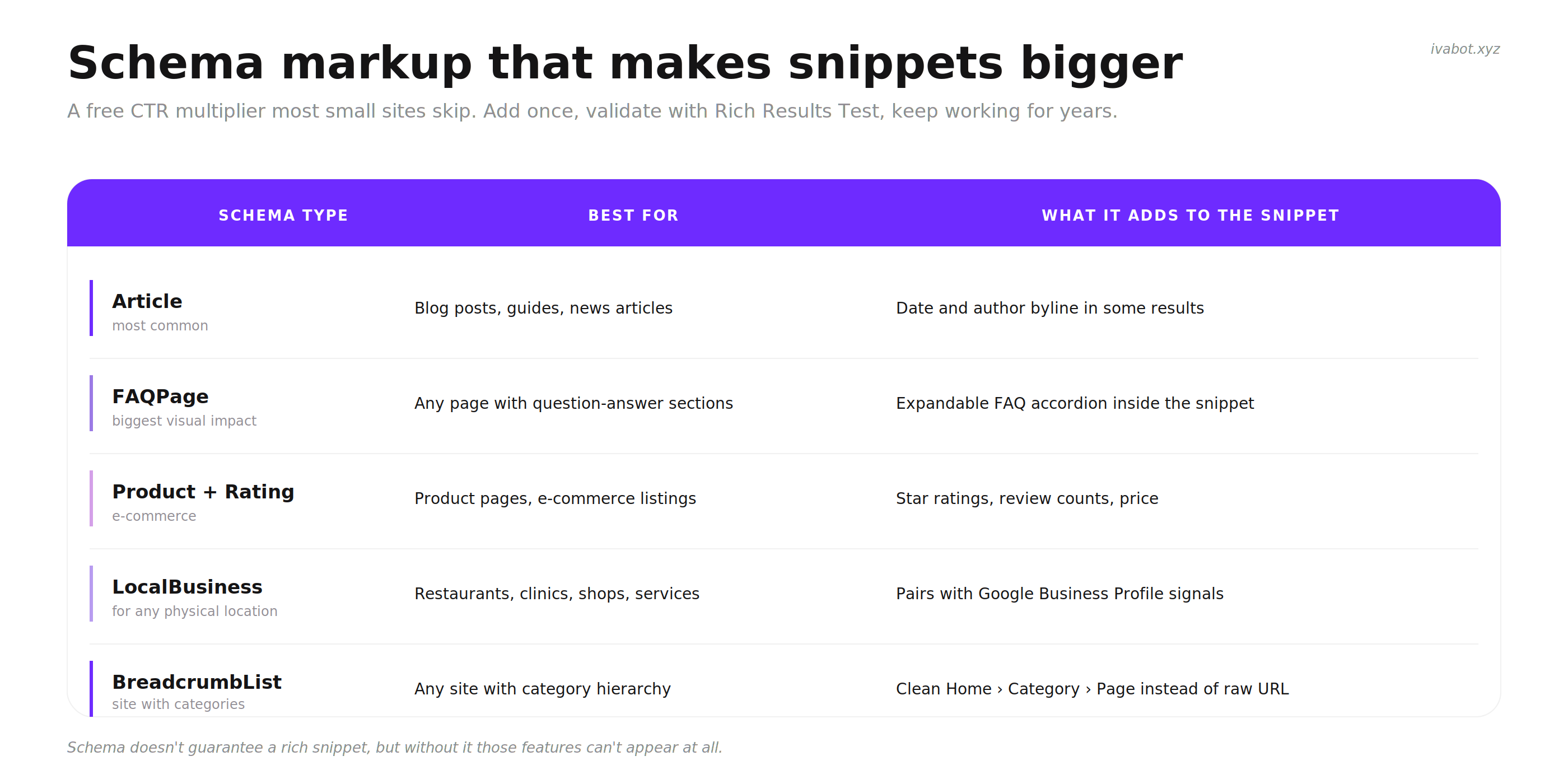
The most useful schema types for small sites and what each one adds to the snippet.
The most useful schema types for small sites:
Article for blog posts and guides. Adds the date and author byline in some results.
FAQPage for any page with question-and-answer sections. Can produce an expandable FAQ accordion directly in the snippet, doubling its visual size on the SERP.
HowTo for step-by-step instructions. Less common since Google reduced its use in 2023, but still occasionally surfaced.
Product combined with AggregateRating for e-commerce. Adds star ratings and review counts below the title.
LocalBusiness for any business with a physical address. Pairs with Google Business Profile signals. See local SEO for small business for the full local setup.
BreadcrumbList for any site with category structure. Replaces the plain URL with a clean Home > Category > Page breadcrumb.
Google's Rich Results Test. Paste any URL, see which schema types are detected and whether each is valid. Free, takes 30 seconds.
Schema does not guarantee a rich snippet. Google decides which features to show based on the query, the page quality, and many other signals. But without schema, those features cannot appear at all. Add it once, test it with Google's Rich Results Test, and forget about it. It is one of the rare SEO actions that takes 30 minutes and keeps paying for years.
Side-by-side: pages that earn the click, and pages that do not
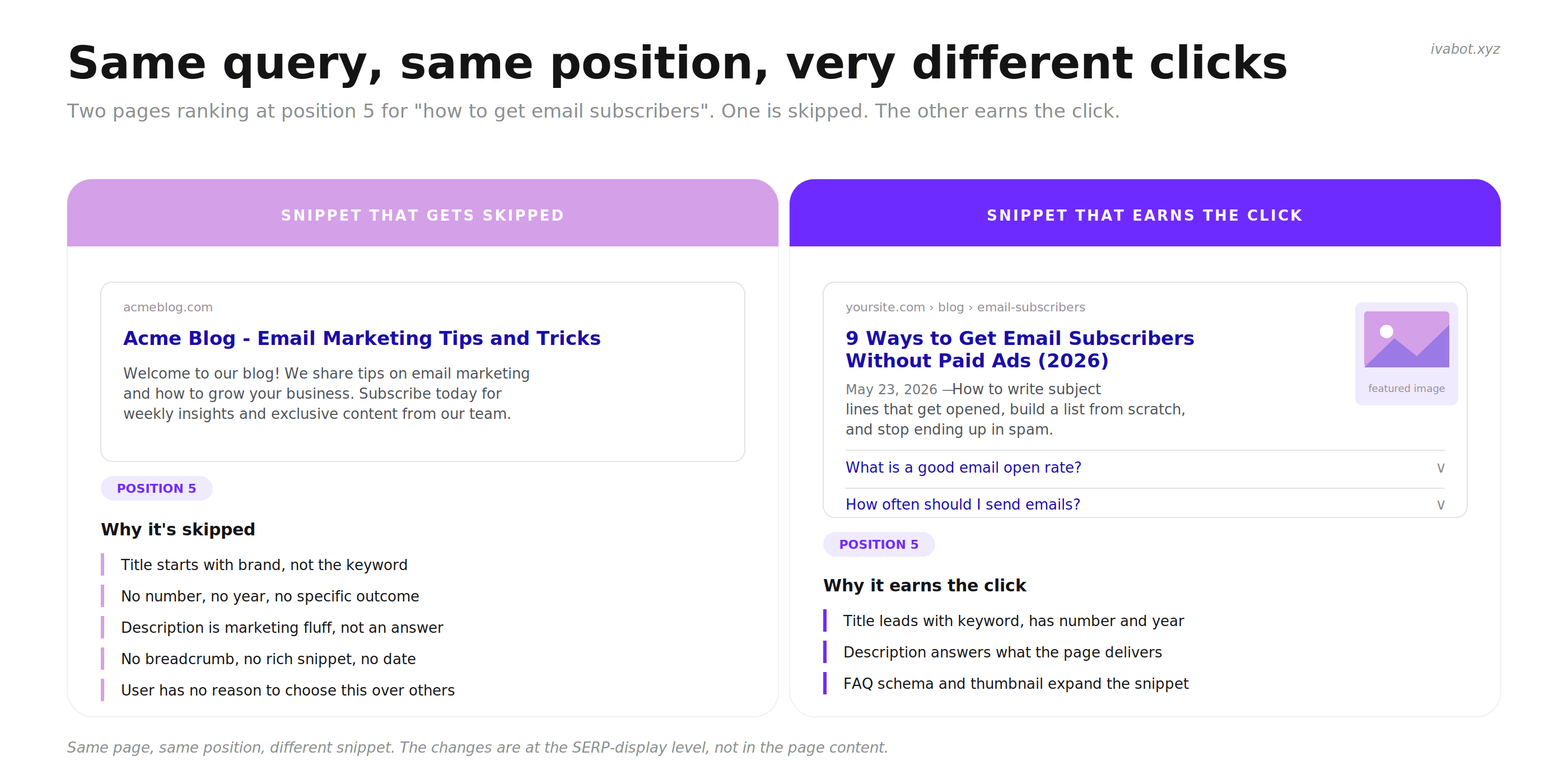
Two pages can rank in the same position for the same query and have very different CTR. The difference is usually visible in the snippet itself, before the user clicks. Below is what each tends to look like in Google.
Same query, same position, completely different click-through. The left snippet looks like every other result. The right snippet stands out by being specific.
What separates the two:
The right title leads with the keyword and adds a number plus a year. The left title leads with the brand.
The right description answers what the page delivers. The left description is generic marketing.
The right snippet has a breadcrumb, an FAQ accordion, and a fresh date. The left snippet is plain text.
The right snippet has a small thumbnail next to it (image schema on the article). The left has nothing visual.
None of these changes require new content. They are snippet-level adjustments that change how the same page looks in search results.
Getting multiple results from your site on the same query
When Google shows two or three results from the same domain for one query, the share of attention going to that domain rises significantly. The user does not need to click yours specifically; they just need to click any of yours.
This happens through a few mechanisms:
Sitelinks. Below the main result for a brand or high-authority query, Google sometimes shows 4-6 sub-page links. These appear automatically when Google sees a clean site structure with clear navigation. There is no markup to request them, but a logical menu and good internal linking make them more likely.
Indented results. Google sometimes shows a second page from the same domain directly below the first result, indented slightly. This signals topical authority on the query.
Multiple separate listings. For some queries, Google shows two unrelated results from the same domain at different positions. This is most common when both pages are genuinely useful for the query.
Topical depth makes this more likely. A site with one article on a subject competes alone. A site with five connected articles, all internally linked, often takes 2-3 of the top 10 spots for related queries.
Position 1-3: the zero-click problem
Short answer: at the top of the page with no clicks, Google is answering the query without sending the user to any site. Rewriting the title will not change this. The fix is structural.
This is the hardest version of impressions but no clicks because most standard advice does not apply. The page is already winning the ranking battle. The problem is that the user gets the answer inside the search results page itself.
A real AI Overview at the top of Google results. The user gets the answer in the summary itself. Even position 1 organic below this often loses most of the clicks it would have had two years ago.
The four most common zero-click causes in 2026:
AI Overview. Google's AI-generated summary at the top of the page. It cites 3-5 sources, presents a synthesized answer, and answers the question completely. The user clicks one of the sources only if they want to verify a detail or read further. For informational queries, AI Overview can reduce organic CTR by 30-60%.
Featured snippet. A boxed answer pulled directly from one of the ranking pages. Often combined with the source page's URL, but the user already has the answer.
People Also Ask. Expandable boxes with related questions. Each expansion reveals an answer pulled from a page, and again the user often gets what they need without clicking through.
Knowledge panel. The right-side panel on desktop that shows quick facts about a topic, business, or person. For navigational and definitional queries, the panel often satisfies the search entirely.
What still works at position 1-3 when AI Overview takes the answer
The honest answer is that some informational queries have lost most of their click traffic permanently. For those queries, the page can still rank, but the practical traffic from it is much lower than it was a few years ago. The realistic responses are:
Pivot toward queries that AI summaries struggle with. AI Overviews are good at extracting facts. They are weak on nuance, comparisons, opinions, and edge cases. Pages that explore "which is better and why", "what to avoid and why", "what changed and what it means" tend to keep their clicks because the summary cannot replace the depth.
Add elements to the page that no summary can replicate. A free calculator, an interactive tool, a downloadable template, a comparison filter, original data the page collected itself. The user reads the AI summary, then clicks through specifically because something on the page cannot be summarized.
Become a source AI cites. If AI Overview cites the page as a source, the brand still earns visibility even without the click. Over time, this builds the kind of authority that returns later as branded search traffic. This is what Generative Engine Optimization (GEO) is about, and it is becoming a real channel separate from traditional SEO. The GEO playbook covers the citation-side tactics in depth.
Accept the shift for some queries. Not every page can or should fight the AI Overview. For some informational queries, the click is gone permanently, and the right response is to measure differently. Brand visibility inside AI summaries, citation share, and downstream branded traffic become the metrics, not raw clicks.
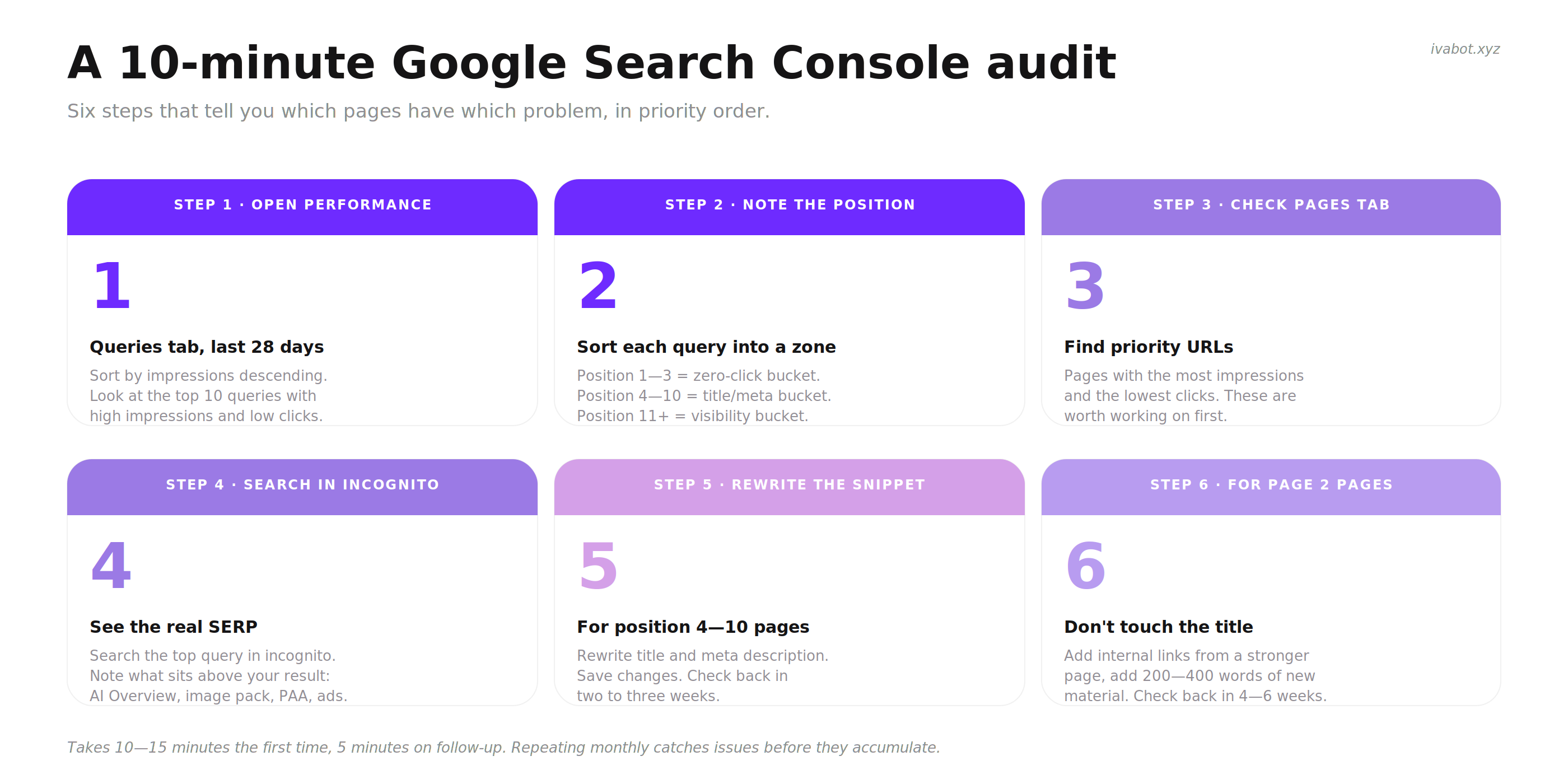
A 10-minute Google Search Console audit
Short answer: a focused 10-minute look at Search Console tells you which pages have which problem, in priority order.
Six steps that tell you which pages have which problem, in priority order.
1
Open Performance, last 28 days, click the Queries tab. Sort by impressions, descending. Look at the top 10 queries with high impressions.
2
For each top query, note the Position and CTR columns. Anything with position above 11 goes into the visibility bucket. Position 4-10 with CTR below the benchmark goes into the title/meta bucket. Position 1-3 with low CTR goes into the zero-click bucket.
3
Click the Pages tab. Find the URLs that show the most impressions with the lowest clicks. These are the pages worth working on first.
4
For each priority page, search the top query in an incognito Google window. Look at what is actually on the SERP: AI Overview, image pack, PAA, sitelinks, ads. The visible competition tells you what the snippet has to overcome.
Related Searches at the bottom of the SERP. These are queries Google associates with the original search. Useful for understanding how Google sees the topic and which adjacent queries to target.
5
Rewrite the title and meta description for the two pages with the worst CTR-to-position ratio. Apply the patterns from the title and meta sections above. Save the changes and check back in 2-3 weeks.
6
For pages at position 11+, do not touch the title. Add internal links from at least one stronger page on the site, add 200-400 words of useful new content to the page, and check back in 4-6 weeks.
This audit takes 10-15 minutes the first time and 5 minutes on follow-up. Repeating it monthly catches new issues before they accumulate.
The Impressions But No Clicks Diagnostic Checklist
Fifteen items, grouped by urgency. Section 1 first, then Section 2, then Section 3.
The full checklist on one page. Work top to bottom. Each item takes 2-30 minutes.
Fix this week · critical
Open Search Console and identify the queries where impressions are high and clicks are low.
For each query, note the average position. Decide which bucket the page is in: 1-3, 4-10, or 11+.
Ignore any query where position is above 20 and impressions look inflated. Likely bot traffic.
For pages at position 4-10, search the query in incognito Google and screenshot the SERP. See what competing snippets look like.
Rewrite the title tag for the two worst-performing pages at position 4-10. Lead with the specific value, include a number or year if relevant, stay under 60 characters.
Fix this month · important
Rewrite the meta description for the same pages. Lead with the answer, include the primary search phrase in the first 80 characters, stay between 140-155 characters.
Add Article schema to blog posts and FAQPage schema to any page with question-and-answer sections.
Test schema with Google's Rich Results Test. Fix any validation errors.
For pages at position 1-3 with low CTR, identify whether AI Overview, featured snippet, or PAA is taking the click.
For zero-click pages, decide whether to pivot the angle, add an interactive element, or accept the shift and measure brand visibility.
Build this quarter · foundation
For pages at position 11+, add 300-500 words of original material per page, plus internal links from at least one stronger page.
Build a small topical cluster: 3-5 connected articles around one topic, all internally linked, with one main pillar page.
Add BreadcrumbList schema across the site if not already present.
Re-run the Search Console audit monthly. CTR changes take 2-4 weeks to appear in the data.
Track which queries trigger AI Overview for the site. This is the new front of organic search.
Short answer: clicks are no longer the only signal that organic search is working. Brand visibility inside AI Overviews and direct branded search are becoming meaningful complements.
The biggest change in organic search over the past two years is structural. A growing share of search demand is being satisfied without anyone clicking through to a website. AI Overviews, featured snippets, knowledge panels, and direct answers handle the question, and the user moves on. Click-through rates are not coming back to 2020 levels.
The practical response is to measure differently:
Citation share. How often the brand or domain appears as a cited source inside AI Overviews and AI search tools like ChatGPT, Perplexity, and Gemini.
Branded search volume. How often people search the brand name directly. This is a downstream signal of visibility everywhere, including AI summaries that the brand was cited in.
Direct traffic. Users who type the URL directly or arrive without a referrer. Strong direct traffic suggests the brand is reaching people through channels beyond the click.
Engagement on the clicks you do get. Higher dwell time, more pages per session, and return visits matter more than raw click volume.
None of this replaces CTR as a metric. It complements it. A site that lost 30% of organic clicks but gained citation share inside AI Overviews and a 50% rise in branded search is not failing, even if Search Console looks worse than it did two years ago.
Tools you actually need
Short answer: free tools from Google cover most of what is needed to fix impressions but no clicks.
Free
Google Search Console. The single most important tool. Performance, queries, pages, average position, CTR, indexing.
Google's Rich Results Test. Validates schema markup. Tells you whether a page is eligible for rich snippets.
Incognito Google search. The most honest way to see what a snippet actually looks like in SERP, without personalization.
Schema.org documentation. Reference for all schema types and properties.
Paid (optional)
Ahrefs or Semrush. Start around $99/month. Useful around month 8-12 when there is enough ranking data to act on. Lifetime free trials require a credit card; both companies cancel access if you forget to unsubscribe.
SE Ranking. Lower-cost alternative starting around $49/month with similar rank tracking and CTR analysis.
IvaBot
IvaBot Core Audit flags title length, meta description length, schema markup gaps, and AI readiness signals that affect how AI Overview cites the page. The first run is free, then pay-as-you-go from $5. Useful for catching the title and snippet issues in this guide without manual audits.
Common mistakes when fixing impressions but no clicks
Rewriting titles before checking position. If the page is at position 25, the title is not the problem. Time spent rewriting it is wasted.
Adding clickbait to boost CTR. Short-term CTR rises, bounce rate destroys rankings within weeks, and the net result is worse than before.
Comparing 2026 CTR to 2020 benchmarks. The pre-AI-Overview world is gone. Lower CTR is now structural for many informational queries.
Ignoring schema markup because it feels technical. A 30-minute setup with Google's Rich Results Test can change how every page appears in search for years.
Treating all queries on a page as one number. The same page can be at position 2 for one query and position 18 for another. The fix changes per query.
Republishing or redesigning instead of editing. The page already ranks. Throwing it out resets months of trust signals. Small targeted edits work better.
Chasing impressions instead of clicks. 50,000 impressions at 0.1% CTR is worse than 5,000 impressions at 3% CTR. The first costs more time and gives nothing back.
FAQ: impressions but no clicks
Why am I getting impressions but no clicks on my website?
The most common cause depends on the average position of the pages getting impressions. At position 11 or higher, the page is on page 2 of Google where almost no one scrolls, so impressions accumulate without clicks. At positions 4-10, the page is visible but the title and meta description are not compelling enough to win the click against competing results. At positions 1-3, the cause is usually a zero-click feature on the search results page (AI Overview, featured snippet, People Also Ask) that answers the user's question without them needing to click through to any site.
What is a good CTR for a small website in 2026?
It depends heavily on position and query type. As a rough guide: position 1 averages 27-30%, position 5 averages 6%, position 10 averages 2%, page 2 averages under 1%. For brand searches expect 8-15%, for local "near me" searches 4-7%, for commercial searches 3-6%, and for informational queries where AI Overview appears expect 0.5-2%. A CTR below the bottom of these ranges suggests a real problem worth fixing.
Do AI Overviews count as impressions in Search Console?
Yes. When the page is cited as a source inside an AI Overview, Search Console counts the impression. But the click-through rate from AI Overview citations is much lower than from a normal organic result because the user often gets the answer from the summary itself. This is why pages cited in AI Overviews often see high impressions with low clicks.
Are my impressions from bots?
For new sites with positions above 20 and high impression counts, a significant share of impressions often comes from rank tracking tools, scrapers, and automated systems rather than real users. In September 2025, Google removed support for the &num=100 parameter, which sharply reduced this kind of bot impression for many sites. If a site shows 5,000+ impressions at average position 35 with zero clicks, the impressions are likely not from humans who would have ever clicked.
Why did my impressions spike but my clicks did not?
Two common causes. First, Google is testing the page at higher positions to evaluate user response; impressions arrive before clicks while the test runs. Second, the page is now appearing in AI Overview citations or other SERP features that count as impressions but rarely produce clicks. Look at the queries driving the spike: if they are informational and AI Overview appears, the second cause is more likely.
How do I write a meta description that gets clicks?
Lead with the answer or outcome rather than marketing language. Include the primary search phrase in the first 80 characters. Stay between 140 and 155 characters. End with a clear sense of what the page delivers, not a sales line. Google rewrites more than half of meta descriptions in 2026, and the ones that survive are direct, specific, and match the user's intent.
How long does it take for CTR changes to show in Search Console?
Two to four weeks for most title and meta changes. Google takes a few days to re-crawl the page, then needs enough impressions on the new snippet to register a meaningful CTR change. Smaller sites with fewer impressions per query may need 4-6 weeks to see clear results.
Can low CTR hurt my rankings?
Yes, indirectly. Google uses click-through rate as one signal of relevance among many. A page that ranks at position 3 with consistently low CTR over time tends to drift down to position 5-7 because Google reads the low CTR as a sign that users prefer other results. The reverse is also true: a page whose CTR rises tends to rise in position over time.
Should I rewrite all my titles right now?
No. Start with the two or three pages that have the worst CTR relative to their position. Rewrite those, wait 3-4 weeks, measure the change, and only then move to the next batch. Rewriting everything at once makes it impossible to tell what worked and what did not.
What is the difference between impressions and visibility?
An impression means the page appeared in search results for a query, regardless of whether the user noticed it. Visibility is whether the user actually saw the result, which depends on position, scroll behavior, and what else is on the page. A page at position 12 racks up impressions on page 2 of Google but has almost zero real visibility because almost no one scrolls there.
Why does Google rewrite my meta description?
Google rewrites meta descriptions when it thinks the original does not match what the user searched for. Marketing copy, generic descriptions, and ones missing the search phrase get replaced most often. Descriptions that lead with a direct answer, include the search phrase naturally, and stay focused on user intent are more likely to survive.
How is GEO (Generative Engine Optimization) different from SEO?
SEO targets ranking in Google's blue links. GEO targets being cited as a source inside AI-generated answers (Google's AI Overview, ChatGPT, Perplexity, Gemini). The two overlap in fundamentals (clean structure, real expertise, schema markup, trust signals) but diverge on tactics: GEO prioritizes extractable passages, comparison tables, clear question-answer sections, and original data that an AI summary can quote directly.
What's next
If position is the first thing to check, then fixing CTR comes second. Open Search Console today, find the queries with the highest impressions and lowest clicks, note the average position for each, and start with the two pages where rewriting the snippet is most likely to work (position 4-10).
For pages stuck on page 2, snippet rewrites will not help. Add internal links, add original material, and give the page 4-6 weeks. For pages losing clicks to AI Overview, the answer is different again: pivot the angle, add what no summary can replicate, or shift the success metric to citation share.
 13 min read