Learning how to choose keywords for a new website is the highest-impact SEO skill in your first six months. If your site is 3-6 months old, has no backlinks, and brings near-zero traffic, the standard SEO advice does not apply to you. You cannot rank for "best CRM" or "small business SEO" yet. What works for a new site without authority is one thing: low-competition long-tail keywords your competitors are ignoring.
If your site is indexed in Google (type site:yoursite.com to check) and has no manual penalties in Search Console, low competition keywords for new sites with high traffic potential give you a near-guaranteed path to page-one rankings within 1-3 months. This guide on keyword research for small business covers how to find them, how to verify low competition without paid tools, how to choose keywords for SEO at the right depth, where to place them, and what traffic to expect month by month.
Every example uses a fictional vegan store in Brooklyn so the logic transfers to any small local or niche business.
TL;DR (Quick Summary)
- How to choose keywords for a new website: target long-tail and NCH (low search volume) keywords. For a brand new domain with no backlinks, this is the only path that rank within 6-12 months.
- How to find best keywords for your website without paid tools: Google autocomplete, related searches at the bottom of the SERP, "People also ask" box, Google Trends, Google Search Console once you have first impressions, plus free Chrome extension Keyword Surfer for live volume estimates.
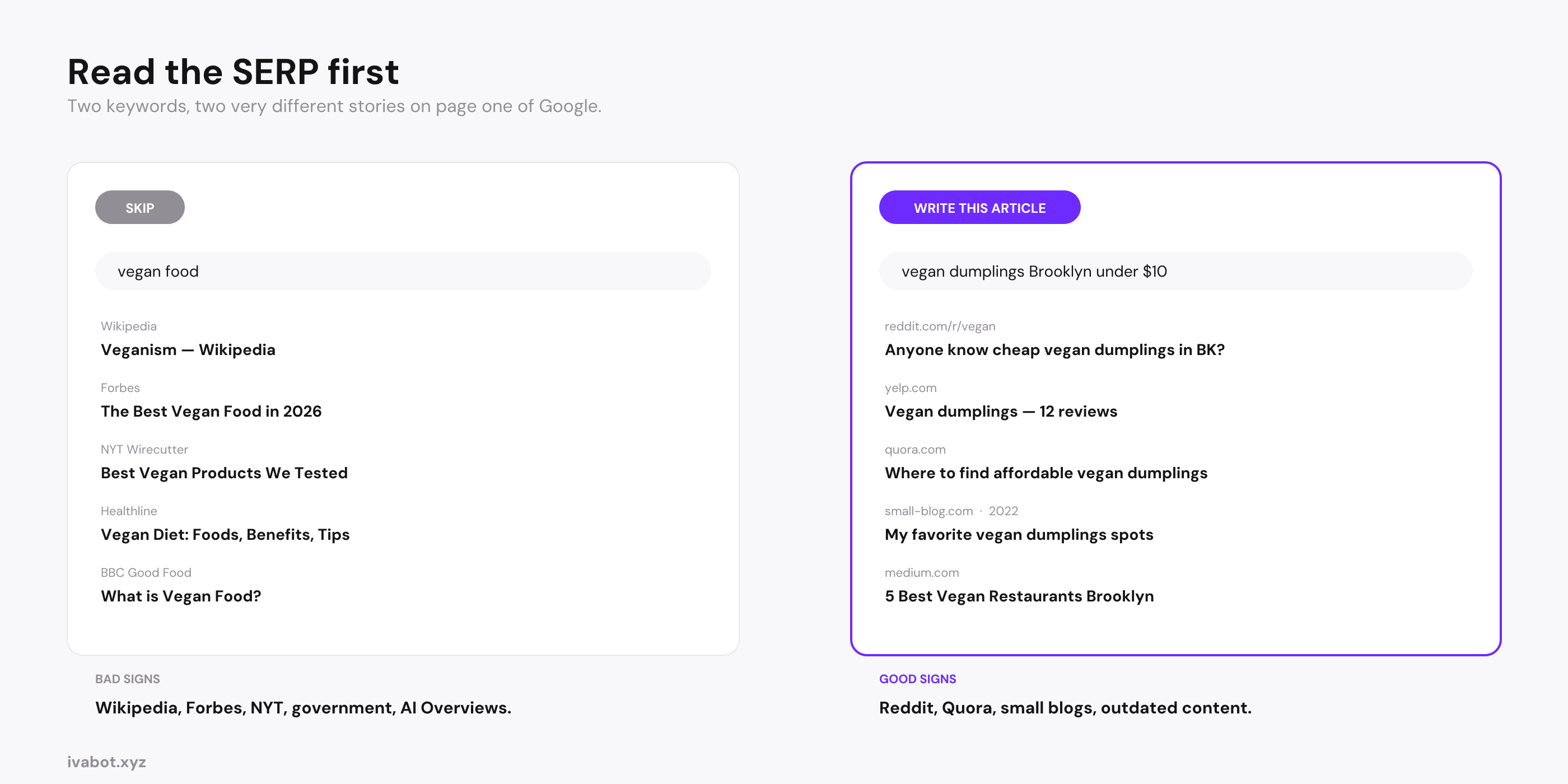
- How to verify low competition without paid tools: open the SERP for your target keyword in incognito mode. If you see Reddit threads, Quora answers, small personal blogs, or outdated posts from 2020-2022 in the top 10, you can rank. If you see Wikipedia, Forbes, or government sites, skip the keyword.
- Why is my website not getting traffic: one of four reasons. No keywords on your pages, only high-volume keywords you cannot rank for, thin content, or technical problems (not indexed, robots.txt blocks, broken pages).
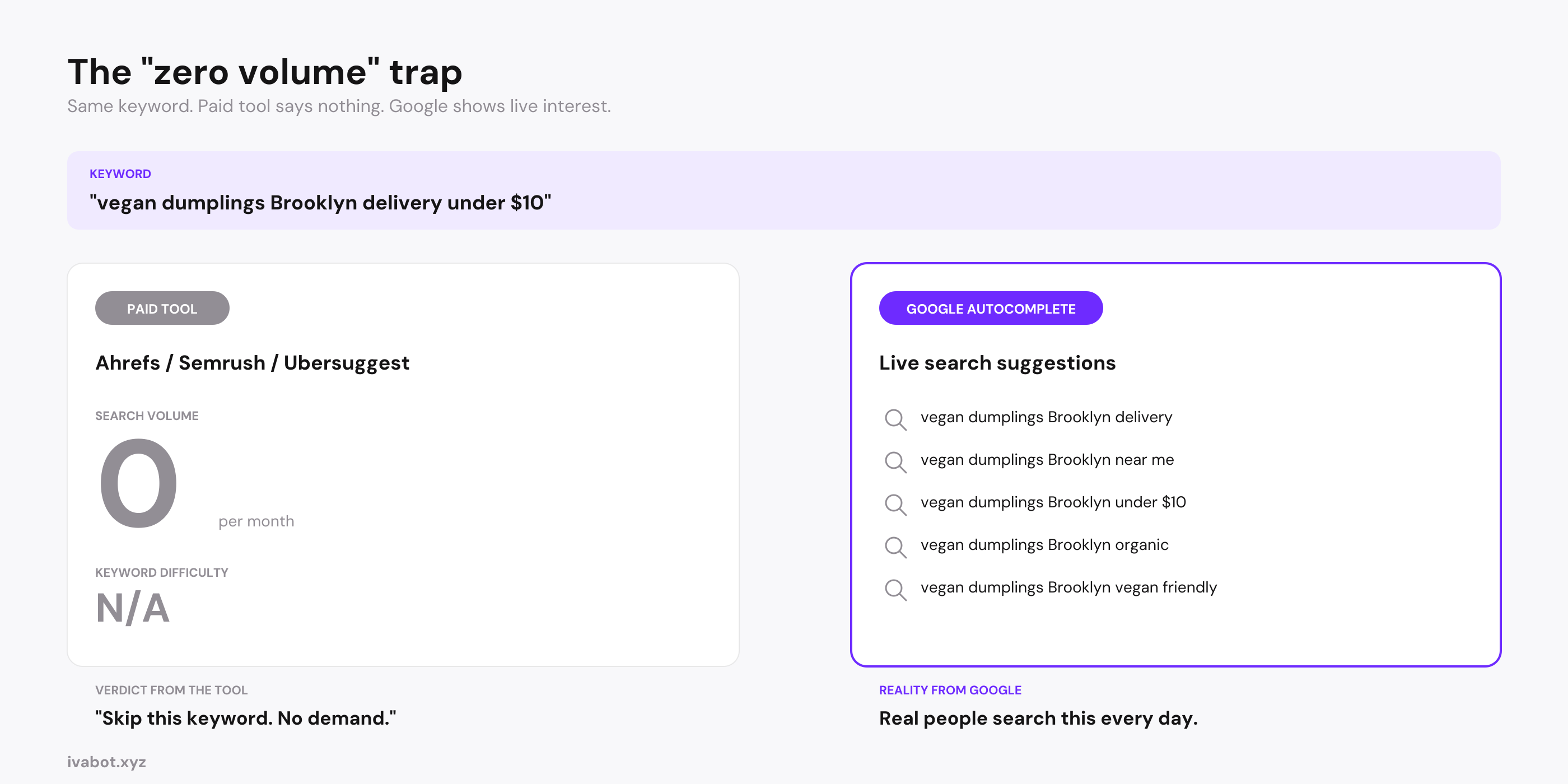
- "Zero volume" is not always zero. Long-tails like "slot machine crazy monkey bet now" show 0 in Ahrefs but bring real revenue. If Google autocomplete suggests the phrase, demand is real.
- Realistic traffic timeline: months 1-2 bring zero or near-zero traffic. First ranking movement appears around month 3-4 for long-tails on weak SERPs. By the end of year 1, 1,000+ monthly visits is a good result for a small business site with consistent quality content.
"For a new site, the right keyword is not the one with the most searches. It is the one with the fewest stronger competitors."
What a keyword is and what VCH / SCH / NCH / long-tail mean
A keyword is the phrase someone types into Google when they look for something. Some keywords are single words ("pizza"), but most are short phrases of 2-7 words ("best vegan dumplings Brooklyn delivery"). Every page on your small business website is associated with the keywords it tries to rank for, and Google sends you visitors only when your page appears in the search results for one of those keywords.
The traffic a keyword brings depends on three things: how many people search it per month, what position your page reaches, and whether the searcher's intent matches your content. Click-through rates drop fast as you move down the page: position 1 gets around 30% of clicks, position 5 gets 6%, position 10 gets 2%, page 2 gets under 1%.
The math that matters for a new site: a keyword with 50 monthly searches at position 1 sends 15 visits per month. A keyword with 100,000 searches at position 8 sends about 3,000 visits, but a new domain cannot reach position 8 for a high-volume term in the first year. Long-tail keywords compound instead: 50 different long-tail keywords each bringing 10-30 visits is 500-1,500 visits per month, more than any single competitive head term gives a brand new site.
The four types of keywords: VCH, SCH, NCH, long-tail
Keyword research splits search terms into four groups by length and search volume. Each group has different competition and a different chance of bringing traffic to a new site.
Here is what each type looks like for one niche (a vegan store in Brooklyn):
- VCH (high volume), 1-2 words. Example: "vegan food." 200,000+ searches per month. Dominated by Wikipedia, Forbes, Healthline. Difficulty 80+. New sites cannot rank here in the first two years. Skip.
- SCH (mid volume), 2-3 words. Example: "vegan store Brooklyn." 5,000 searches per month. Dominated by established local blogs, Yelp, and big plant-based brands. Difficulty 50. A new site might reach page 2 in 12 months. Worth attempting only after the site has traction.
- NCH (low volume), 4+ words. Example: "best vegan store in Brooklyn for dumplings." 80 searches per month. Difficulty 15. A new site can rank on page 1 within 1-3 months.
- Long-tail (very low volume, very specific), 5+ words with clear intent. Example: "best vegan dumplings Brooklyn under $10 delivery same day." 10-20 searches per month, sometimes "0" on paid tools. Difficulty 5. New sites can rank in 4-6 weeks. Conversion rate often 8-15% because the searcher knows exactly what they want.
What "long tail" means in SEO
The term "long-tail keywords in SEO" comes from a chart that plots all search keywords by volume. A few have huge volume (the "head"). Millions have tiny volume (the "long tail"). Each long-tail brings 5-50 visits per month on its own, but together they make up most search traffic on Google. Big sites ignore them because the individual volume is too small. A small business site can pick up dozens and build real traffic from queries no one else is targeting.
The new-site rule
Forget head terms for the first 12 months. Focus only on NCH and long-tail. A head term ranking you never reach sends 0 visits. A long-tail page ranking #1 sends 5-30 visits per month. Build 50 of them and the result compounds.
How to find best keywords for my website with free Google tools
Google itself is the best free keyword research tool for a new site. Five built-in features show you what real people are searching right now. No paid tool needed for the first 6-12 months.
1. Google autocomplete (suggestions in the search bar)
Start typing a topic into Google's search bar without pressing Enter. Each suggestion that drops down is a real query people searched today, pulled from live Google data.
Try this: type "how to find keywords for" and watch the dropdown. You will see "how to find keywords for seo," "how to find keywords for seo free," "how to find keywords for a website," "how to find keywords for google ads," "how to find keywords for my website," "how to find keywords for youtube channel." That is 6+ separate article opportunities in 5 seconds, each a real search.
Apply the same trick to your niche. Type "vegan store with," "vegan store for," "best vegan store," "cheap vegan store." Each combination shows different long-tails. Spend 15 minutes and you will have 30-50 keyword candidates for your small business website, free from Google.
2. Related searches at the bottom of the SERP
Run a Google search and scroll to the bottom of the page. Google shows 8 to 10 "Related searches" boxes. Each is a phrase people commonly search after your original query, and these surface long-tails you would never think of.
For "vegan store Brooklyn," related searches might include "best vegan grocery store Brooklyn," "vegan supermarket NYC," "vegan food delivery Brooklyn," "where to buy vegan cheese Brooklyn." Each is a separate article opportunity for a small business site.
3. "People also ask" (PAA) box
In most SERPs, Google shows a "People also ask" box with 4 to 8 expandable questions. Click one and Google loads more. These are real questions people search alongside your keyword, and they make perfect H2 sections or FAQ entries in your articles.
4. Google Trends
Open trends.google.com and search any keyword. Trends shows popularity as a relative 0-100 index, not absolute searches. It works from real Google search data rather than a sampled database, so it plots even tiny niches that Ahrefs and Semrush mark as 0.
Four uses for a new site:
- Predict trends early. A sharply climbing curve in the last 30-90 days means publishing within that window lets a new site catch the wave first.
- Identify seasonality. A "vegan birthday cake delivery" curve will spike in summer and December.
- Compare variations. Does "vegan store" or "plant-based grocery" get more traction in your city?
- Validate "zero volume" keywords. If Ahrefs shows 0 but Trends shows a steady curve, the keyword is real.
5. Google Search Console (for existing pages)
If your site has been live for a month or more, GSC shows the exact queries bringing impressions to your pages. Two patterns matter: queries where you appear on page 2 (positions 11-20) with impressions but no clicks (optimize and they often move to page 1), and queries you never planned for that show impressions (topics you accidentally cover and could expand).
6. Keyword Surfer Chrome extension (lifetime free, no signup)
Install Keyword Surfer by Surfer SEO. It is fully free forever, no card, no account. Once installed, every Google search shows monthly search volume and CPC right next to each result, plus a sidebar of related keywords with their volumes. The fastest way to get a rough volume estimate without leaving Google.
Free is enough for the first year
For a brand new site, Google autocomplete + related searches + PAA + Google Trends + Google Search Console + Keyword Surfer is the full stack. No paid tool needed in the first 6-12 months.
How to verify low competition for new sites (without paid tools)
Picking a low-competition keyword is the most important step for a new site. Paid difficulty scores (KD in Ahrefs, KD% in Semrush) help but are often misleading, especially for long-tail keywords where these tools have thin data. The most reliable check is reading the SERP itself.
The 30-second SERP check
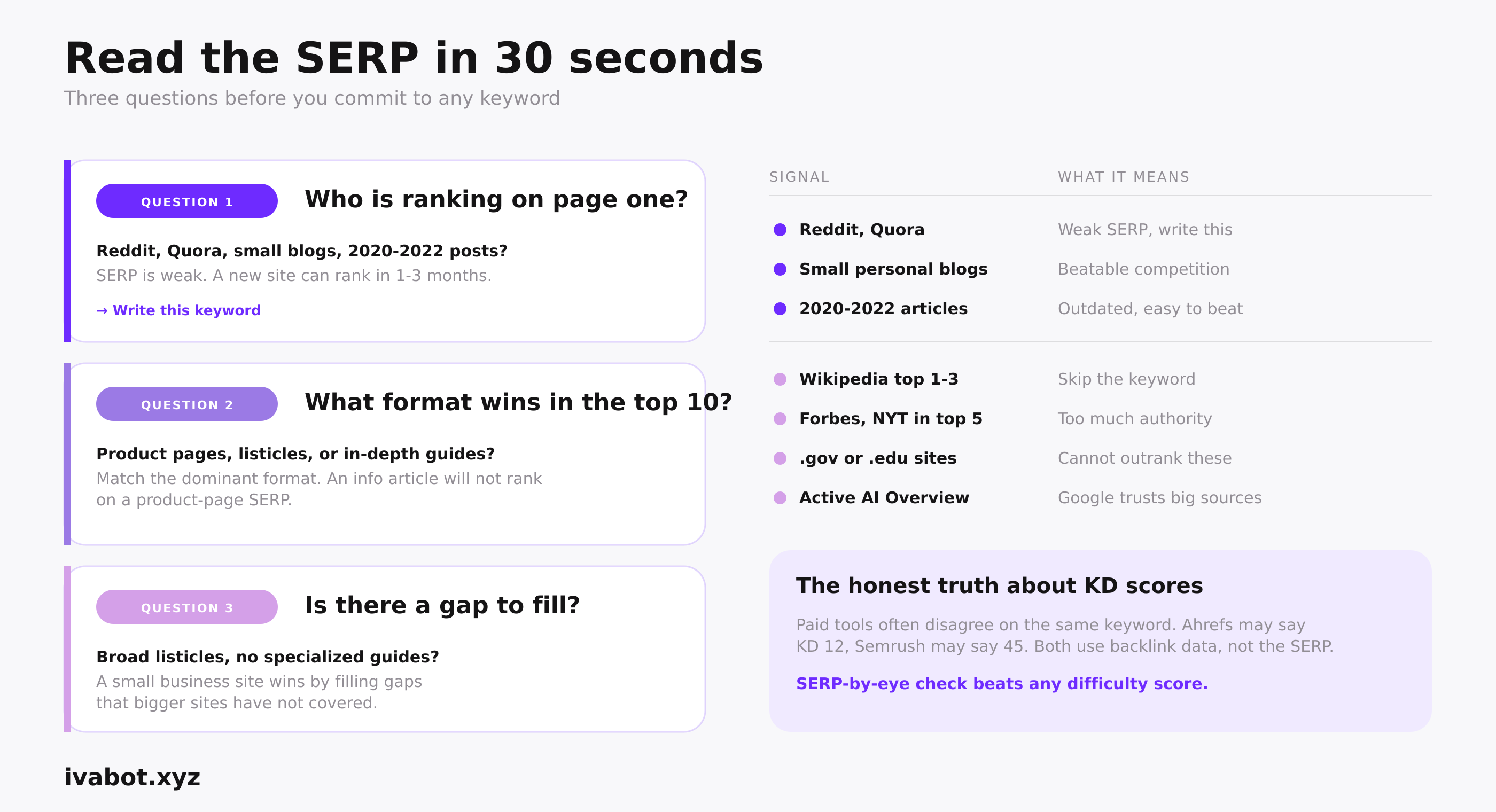
Open Google in an incognito window so personalized results do not skew the view. Type your candidate keyword. Look at the top 10 results and ask three questions:
- Who is ranking? If you see Reddit threads, Quora answers, small specialized blogs, no-name personal sites, or outdated articles from 2020-2022 in the top 10, the SERP is weak and a new site can rank within 1-3 months. If you see Wikipedia in positions 1-3, Forbes or NYT in top 5, .gov or .edu sites anywhere on page one, or an active AI Overview pulling from 4-5 major sources, skip the keyword.
- What format wins? If the top 10 is mostly product pages and e-commerce, an informational article will not rank. If it is listicles ("10 best X"), match that format. If it is in-depth single-topic guides, you need depth, not breadth.
- Is there a gap? Broad listicles but no specialized guides means an opening. Expert guides but no beginner content means another opening. A small business site wins by filling a gap that bigger sites have not covered.
Free tools that give you a difficulty number
Helpful as a second opinion, not as a primary signal. All have limits worth knowing upfront:
- Mangools KWFinder: 10-day free trial, requires credit card. $49/month after. Shows KD on a 0-100 scale. Clean UI for small business owners.
- Ahrefs Webmaster Tools: lifetime free, no card. Works only for sites you have verified ownership of in Google Search Console. Shows KD for keywords your own pages already rank for, not for competitor research.
- Ubersuggest: 3 free searches per day without registration. Shows volume and "SEO difficulty" score. Free tier is enough for occasional checks.
- Semrush: 10 free searches per day without account. Shows full KD% and SERP analysis. Paid tier starts at $140/month.
The honest truth about KD scores
Paid tools often disagree on the same keyword: Ahrefs may say KD 12, Semrush may say 45. Both are based on backlink data the tool has, not on the SERP a real user sees. For new sites, the SERP-by-eye check above beats any difficulty score. Use KD numbers as a quick filter, then always confirm with the SERP itself.
Why is my website not getting traffic: the 4 real reasons
If your site brings 0-30 visits per month after a few months, the cause is almost always one of four things. This is the answer to "why no traffic on my website" for most new domains, and each fix takes a few hours rather than months.
1. The site has no keywords (Google does not know what it is about)
If your pages do not include a clear primary keyword in the title, H1, URL, and first 100 words, Google cannot tell what to rank you for. Most common cause of zero traffic on small business sites. Fix: on-page keyword placement (covered below).
2. The site targets only high-volume keywords it cannot rank for
If every article chases head terms like "best CRM" or "small business SEO," none will rank in the first year. New sites cannot beat Forbes and Wikipedia. Fix: pivot to low-competition keywords for new sites with 4+ words and specific intent.
3. The content has no value (Google buries it after a few weeks)
Right keyword, perfect placement, generic article. Google sees the bounce rate within weeks and demotes the page. Useful content gives a clear answer, a practical action, or saves the reader time or money. If it does none of those, it is "thin content" and will not rank.
4. The site has technical problems
Not submitted to Google Search Console, sitemap.xml broken, robots.txt blocks crawlers, pages return 404, site is slow on mobile, or Webflow's "noindex" toggle is on by mistake. Check the Coverage report in GSC first. If 0 pages are indexed, no keywords will work.
Quick diagnostic
Type site:yoursite.com into Google. If you see 0 results, your site is not indexed and the fix is technical, not keywords. If you see results but no clicks, your keyword strategy is the problem. If you have keywords but pages still get no clicks, your content quality or titles need work.
On top of Google's own features, a few free and AI-powered tools add more long-tails to your list. The most useful for keyword research for small business is IvaBot Content Builder, built specifically for finding low-difficulty keywords for new sites.
- IvaBot Content Builder (free tier 1 generation, then $5-34 per pack): an AI-powered keyword research and article tool that surfaces low-competition long-tail keywords specifically for small business sites. Pulls real volumes and difficulty from DataForSEO and gives you priority labels (HV / MV / LV) so you don't have to interpret raw numbers. This article was drafted using IvaBot.
- AnswerThePublic (limited free tier, then paid): generates question-based keyword maps around any topic. Great for "what," "how," "why" variations you would not think of yourself.
- AlsoAsked (3 free searches per day): pulls from Google's PAA box and maps how questions branch into related questions. Useful for understanding the question hierarchy in your niche.
- Detailed SEO Extension (Chrome, lifetime free): on-page SEO breakdown for any URL in one click.
- Bing Webmaster Tools (free, no card): site indexing data plus a basic keyword research tool that pulls from Bing's index (which feeds ChatGPT search).
- Reddit (free): search
site:reddit.com [your topic] in Google to see how real people phrase questions. Reddit wording often surfaces long-tails that never appear in keyword tools.
For a new site, paid keyword tools are not needed in the first 6-12 months. The free Google methods above plus IvaBot already cover small business needs. Below are the main paid tools at 2026 prices, all of which require a credit card even for trials:
- Ubersuggest: $29/month. Decent first paid keyword research tool for small business. Free tier: 3 searches per day, no card.
- Frase.io: $45/month. Combines content optimization with keyword research. Useful only if you publish long-form articles weekly.
- Mangools (KWFinder): $49/month. Clean interface, focused on keyword research. 10-day trial requires credit card.
- Ahrefs: $129/month for Lite. Industry standard for backlinks and keyword research. Free Ahrefs Webmaster Tools cover your own verified sites only.
- Semrush: $139/month for Pro. Full SEO suite. Free tier: 10 searches per day without account.
If you eventually pay for one tool, Ubersuggest or Mangools is the best price-to-data ratio for a small business website. Ahrefs and Semrush are powerful but overkill for solo operators starting out.
The secret of "zero volume" keywords (and why they can be the most profitable)
Paid keyword tools report 0 or "N/A" for phrases real people search every day. The tools are not lying. They just cannot capture the keywords that bring the most money, because those keywords are too specific to fit into a sampled database. For a new small business site, this is where the highest revenue per visitor lives. These are low competition keywords with high traffic potential that bigger sites never see.
An example that pays
"Slot machine crazy monkey bet now" is a long-tail keyword. Ahrefs returns 0. Semrush also returns 0. But type the first three words into Google and autocomplete instantly suggests the full phrase. Someone searching that exact query is one click from depositing money on a casino site. The lifetime value of that one visitor can be hundreds of dollars. The tool said 0. Reality said high revenue.
The pattern repeats across every niche. Real-money long-tail keywords for small business sites look like this:
- "best vegan dumplings Brooklyn under $10 delivery tonight" (vegan store, ready to buy)
- "book massage near me 9pm tomorrow" (massage parlor, hot lead)
- "emergency plumber Bucharest Sunday open now" (plumber, urgent paid work)
- "vegan birthday cake Brooklyn delivery same day chocolate" (bakery, conversion 20%+)
None show meaningful volume in Ahrefs or Semrush. All convert at 15-25% because the searcher has already decided to buy and is one click away. Small volume, huge revenue per visitor.
Why paid tools miss these keywords
Paid tools build databases from samples. Keywords below 10-50 monthly searches get rounded to 0 or excluded. Hyper-local, urgency-based, and brand-new trending keywords all slip through. The most profitable long-tail keywords are exactly what gets filtered out.
How to find and use them
Find the keyword in Google autocomplete or related searches. If Google suggests it, real people are searching it.
Look for commercial intent words: "buy," "near me," "book," "delivery," "open now," "for sale," "rent," "price," "best under $X."
Check the SERP. Weak top 10 (Reddit threads, generic listicles, no in-depth content) means the keyword is worth writing for.
Write a short, focused article. 800-1500 words. The searcher needs a clear answer, not a thesis.
Track conversion, not traffic. 30 visits at 20% conversion beats 1,000 visits at 0.5%.
The secret
If Google autocomplete suggests the phrase, demand is real. The fact that paid tools show 0 just means nobody is competing for it. For a new site, that is the highest-value place to be.
How to place keywords in an article naturally (with example)
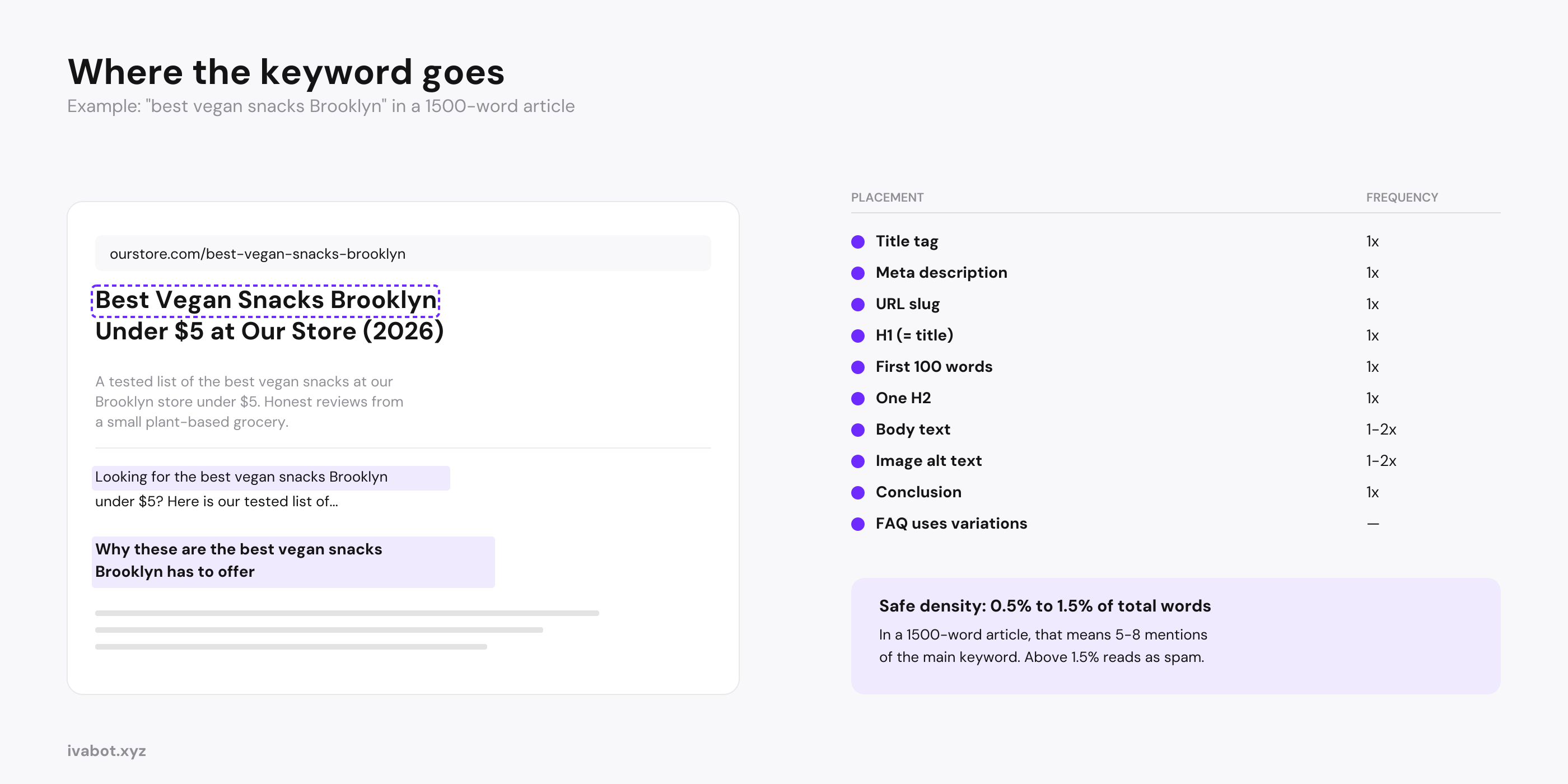
Picking the right keyword is half the job. The other half is placing it inside the article in a way that signals topic to Google without keyword stuffing. Safe zone: 0.5% to 1.5% density.
Example: 1500-word article, target keyword "best vegan snacks Brooklyn." Place the main keyword in these structural spots:
- Title tag: "Best Vegan Snacks Under $5 at Our Brooklyn Vegan Store (2026)" — keyword once.
- Meta description: "A tested list of the best vegan snacks at our Brooklyn store under $5." — keyword once.
- URL slug: /best-vegan-snacks-brooklyn — keyword once.
- H1: same as title.
- First 100 words: open with "Looking for the best vegan snacks in Brooklyn under $5? Here is our tested list..." Keyword in the first sentence.
- One H2: "Why these are the best vegan snacks Brooklyn has to offer." Other H2s use variations.
- Image alt text: 1-2 images include the keyword. The rest describe what the image shows.
- Body text: 1-2 more natural mentions. Variations and synonyms can appear 5-10 times (plant-based snacks, vegan grocery items, vegan treats Brooklyn).
- FAQ section: each FAQ targets a long-tail variation, not the same main keyword again.
Total: 5-8 mentions of the main keyword in a 1500-word article (around 0.4-0.5% density). Variations and synonyms push the topical density to 1-1.5%, still natural.
Bad vs good example
Stuffing: "Our vegan store Brooklyn is the best vegan store Brooklyn for vegan snacks Brooklyn..." Reads as spam. Bounce rate 90%+ within a week. Google demotes the page.
Natural: "We're a small plant-based market in the heart of Brooklyn, and customers keep asking which snacks are actually good and affordable. After tasting through our shelves, here are the best vegan snacks our Brooklyn store has under $5." Main keyword once, naturally.
Rule of thumb
If you would feel awkward saying a sentence out loud, it is keyword stuffing. Write for a real person, then make sure your main keyword shows up in the structural spots (title, URL, H1, first 100 words, one H2).
How to build a cluster of articles to beat bigger sites
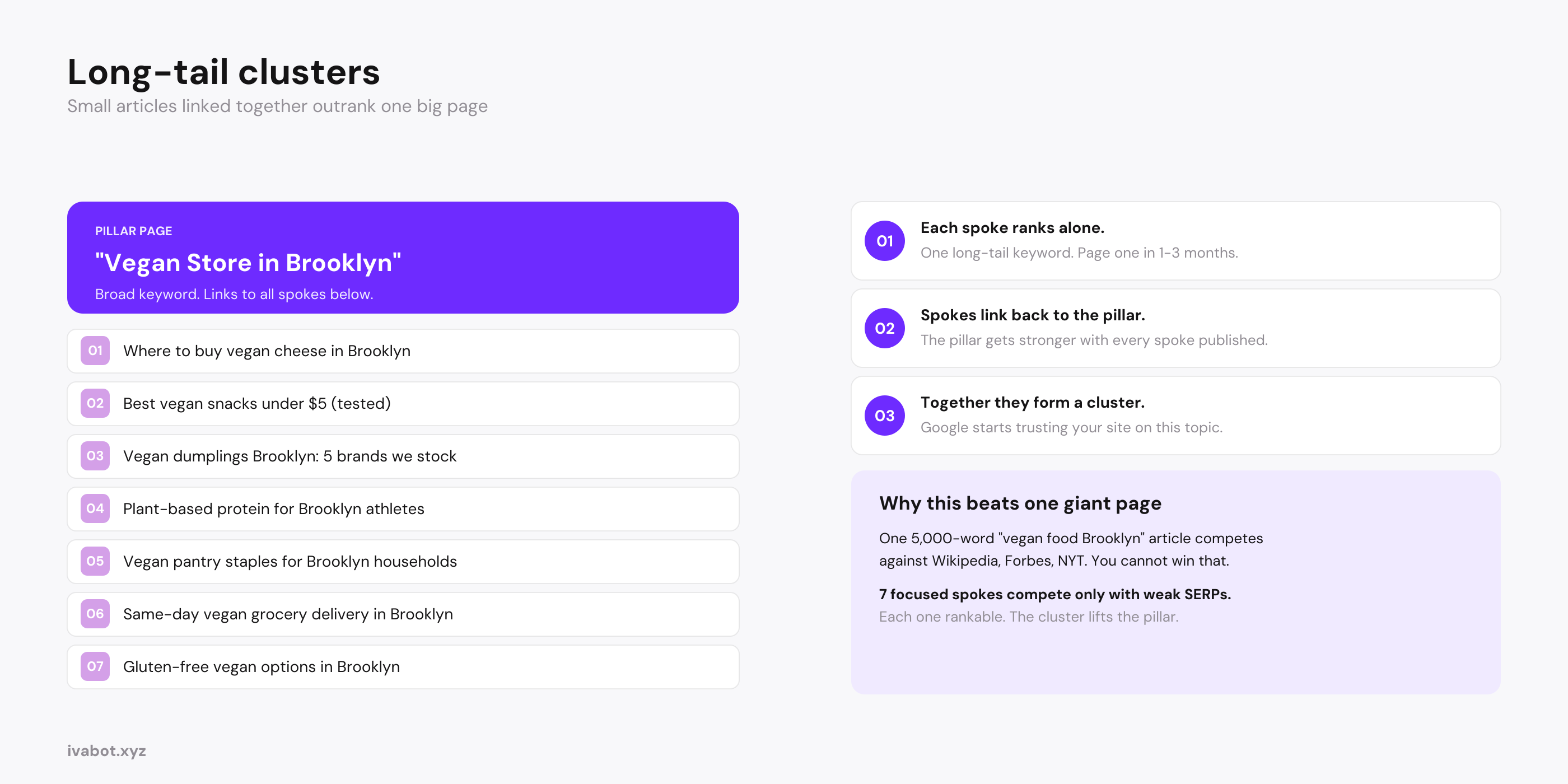
The topic cluster strategy: instead of one giant 5000-word page chasing a broad term, write 4-8 smaller articles each targeting a specific long-tail, then link them together. This is the most reliable way for a small business website to outrank larger competitors over 2-3 months.
Pillar page (homepage or hub): "Vegan Store in Brooklyn: Your Complete Plant-Based Grocery." Targets the broad term, links out to every spoke.
Spoke articles, one long-tail keyword each:
- "Where to Buy Vegan Cheese in Brooklyn (Tested)"
- "Best Vegan Snacks Under $5 at Our Brooklyn Store"
- "Vegan Dumplings Brooklyn: 5 Brands We Stock"
- "Plant-Based Protein Sources for Brooklyn Athletes"
- "Vegan Pantry Staples Every Brooklyn Household Needs"
- "Same-Day Vegan Grocery Delivery in Brooklyn: How It Works"
- "Gluten-Free Vegan Options at Brooklyn Vegan Stores"
Each spoke targets a low-competition keyword and links back to the pillar. The pillar links out to each spoke. Internal links flow both ways. Over 2-3 months, each spoke ranks for its long-tail individually. Google sees the topical depth and recognizes your site as an authority on Brooklyn vegan grocery. The pillar slowly climbs for the broad term as the cluster matures. For the off-site side, see how to get backlinks for small business.
How many articles per month a new site needs
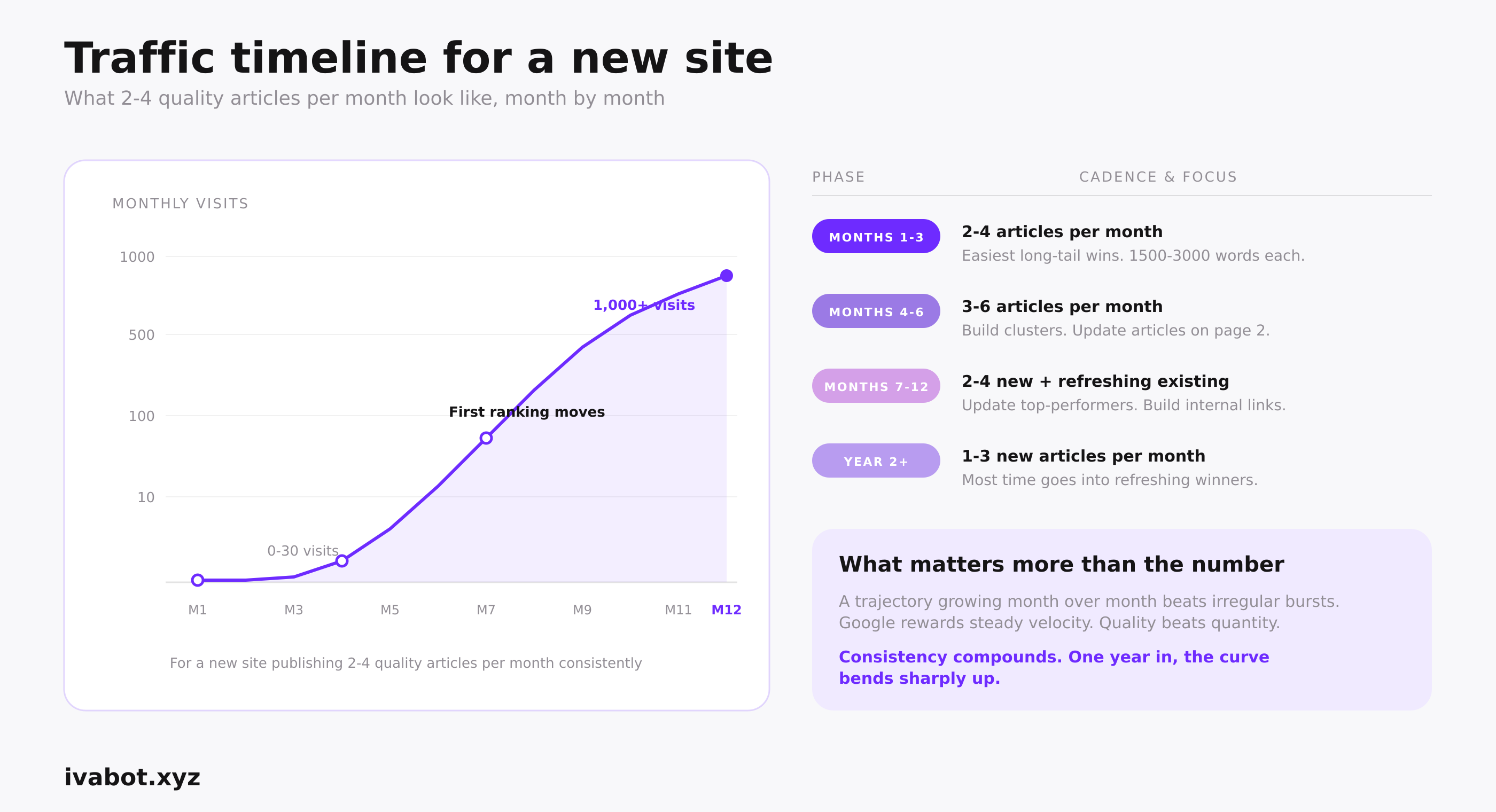
For the first 6 months: 2 to 4 quality articles per month is the realistic minimum for a new site. 4 to 8 is better. Consistency matters more than total count. Google rewards steady velocity over irregular bursts.
- Months 1-3: 2-4 articles per month, 1500-3000 words each. Focus on the easiest long-tail wins. Submit each to Google Search Console for indexing as soon as it goes live.
- Months 4-6: 3-6 articles per month. Build clusters around topics that show early traction. Update articles sitting on page 2.
- Months 7-12: 2-4 new articles per month plus time for updating existing pages.
- Year 2+: 1-3 new articles per month is enough. Most of your time goes into refreshing top performers.
Months 1-2 usually bring zero or near-zero traffic. Google needs time to crawl, index, and start trusting the site. The first ranking movement appears around month 3-4, and only for long-tails on weak SERPs. By the end of year 1, reaching 1,000+ monthly visits is a good result for a medium-competition niche with consistent quality content. Low-competition niches (hyper-local services, specialized hobbies) move faster. High-competition niches (CRM, SEO tools, finance) take much longer.
What matters more than the number is the trajectory: are visits growing month over month? If yes, the strategy is working.
Quality first
One 2500-word article that genuinely answers a real question beats five 600-word articles existing to hit a keyword. If you cannot write quality, slow down rather than publish thin pages.
How to pick keywords for an article that will go viral
One of the few ways a new site can rank for a high-volume keyword fast is by catching a trend early. When a viral moment or new product suddenly takes off, established sites haven't covered it yet, so Google ranks the freshest content highly. A new site can grab those rankings within 48-72 hours.
Examples: the Stanley cup viral moment, Labubu doll trend, Squishy dumpling videos, every new AI tool launch, every viral TikTok product. The first sites to publish strong content captured most of the early traffic and kept those rankings after the wave faded.
Where to spot trending keywords early
- Google Trends: set up alerts for your niche. A sharply climbing curve is your signal.
- Twitter/X search: sort by Latest. Viral products spike on Twitter days before Google.
- Reddit: posts climbing to thousands of upvotes within a day often turn into search queries within a week.
- TikTok: trending sounds and hashtags drive search behavior. "TikTok made me buy it" is now a major search modifier.
- Industry newsletters: niche-specific newsletters surface new tools and trends before mainstream coverage.
How to act on a trending keyword
Publish within 48-72 hours. Aim for a long-tail variation nobody has covered yet: not "Labubu doll" (big sites dominate), but "Labubu doll size comparison guide" or "where to find Labubu in Brooklyn." Specific angles win in the early window.
The risk
Most trends fade within weeks. Use them to grab early traffic, but don't center your editorial calendar on them. Quick check: pull the keyword in Google Trends, switch the date range to 5 years. Brand-new curve with no prior history means uncertain longevity. Seasonal or steady baseline means durable interest.
Why long-tail keywords matter for ChatGPT and AI search
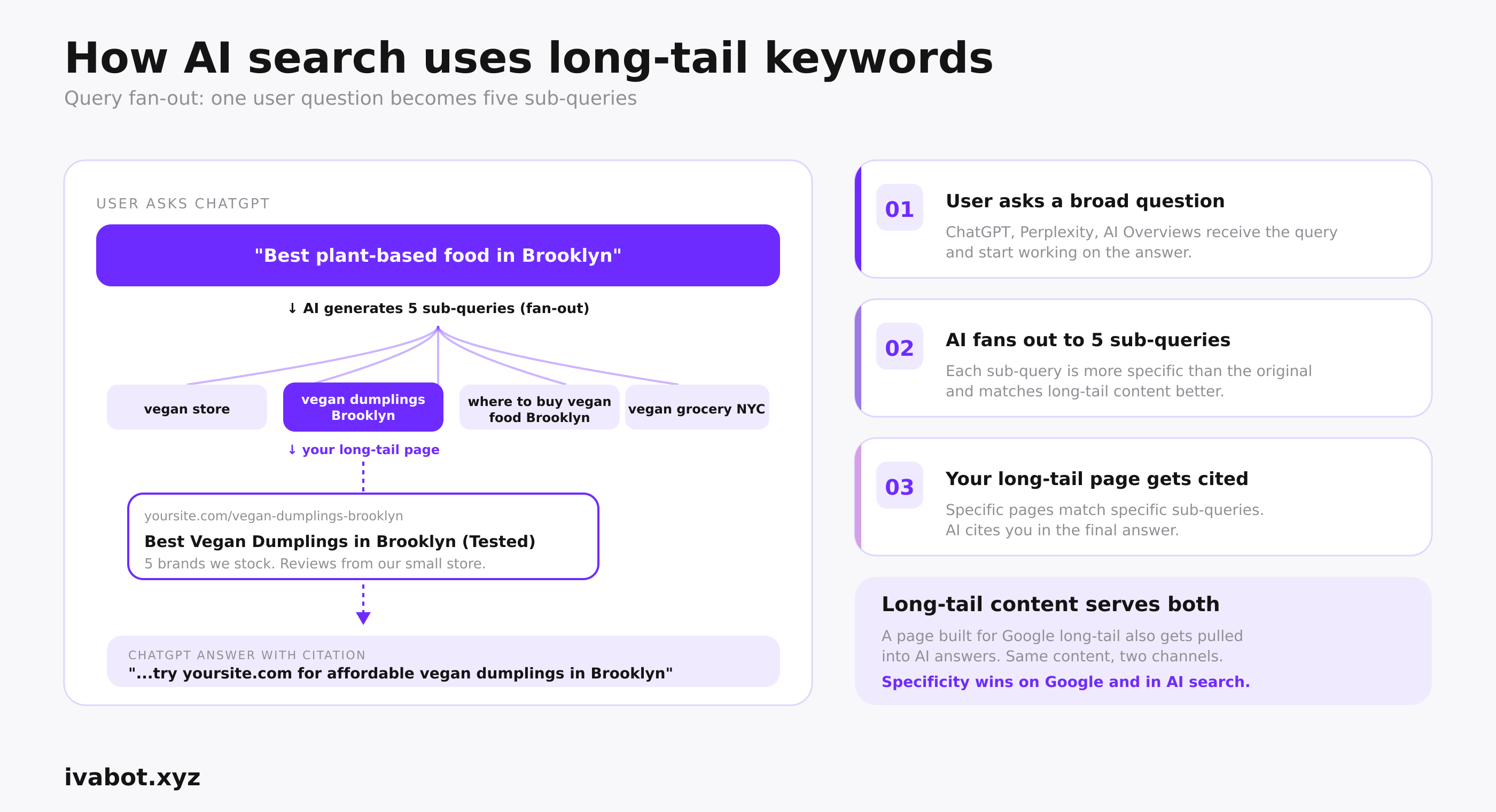
Google's AI Overviews, ChatGPT, Perplexity, and Claude all favor content that answers specific questions clearly. Long-tail keywords map directly to specific questions, so the more specific your content, the higher the chance an AI engine pulls a passage from your page.
In May 2026, Google published its first guide on optimizing for AI search. The core mechanic is "query fan-out": when a user asks a question, the AI generates related sub-queries and pulls candidates for each. Pages cited in the final answer best match the fan-out sub-queries, not just the original. A page tightly focused on "vegan dumplings Brooklyn delivery" can get pulled into an AI answer for the broader "best plant-based food Brooklyn." Long-tail content built for Google now also serves AI search. See Google's official AI search optimization guide for the full breakdown.
How to make Google and Bing find your new site
The most common technical problem is that Google has not indexed your site. Articles exist but are not in the search index, so they cannot rank. Setup takes 30 minutes and is free.
1. Google Search Console
Go to search.google.com/search-console, add your site, verify ownership (DNS or HTML tag), submit your sitemap.xml. For each new article, use URL Inspection and click "Request indexing." Crawling takes 1-7 days.
2. Bing Webmaster Tools
Go to bing.com/webmasters, verify your site, submit your sitemap. Bing indexes faster than Google (often within 24 hours), and Bing's index is what ChatGPT search uses. Skip this and ChatGPT cannot find your site even if Google has it indexed.
3. IndexNow
An open protocol supported by Bing, Yandex, and Naver. Pings search engines about new URLs instantly. Most CMS platforms have a plugin. One-time setup, indexing in minutes.
4. Check robots.txt for AI crawler blocks
Open yoursite.com/robots.txt. If you see User-agent: GPTBot followed by Disallow: /, AI crawlers cannot read your site. Allow: GPTBot (ChatGPT), ClaudeBot (Claude), PerplexityBot, Google-Extended, CCBot.
Trust signals that help your keywords rank faster
A new site has no backlinks yet, but trust signals from social mentions, real author info, and consistent brand presence still help long-tail pages rank against equally weak competitors.
Author info on every important article
Real author name, photo, short bio, link to a verified profile (LinkedIn or personal site). Google's E-E-A-T framework values clear authorship. Anonymous bylines rank lower.
Brand mentions across platforms
The same brand name appearing across LinkedIn, Twitter/X, Reddit, Instagram, and YouTube builds entity recognition for Google and AI engines. For a new site: pick 1-2 platforms where your audience exists, post consistently. Reddit and LinkedIn are the highest-impact starts.
Citations and consistent NAP
Articles that cite original studies, official documentation, or established publications rank higher. For local business: keep Name, Address, Phone number identical everywhere online. Inconsistencies hurt local SEO.
What to do this week
Three tasks, under 3 hours total, that take a new site from "no strategy" to "first article aimed at a real long-tail."
Map your first 10 long-tail keywords. Open Google. Type your business topic and explore autocomplete, related searches, and PAA. Write down variations with clear intent and 4+ words. Check each in the SERP: weak top 10 (Reddit, generic listicles) means real opportunity.
Pick the easiest 3 and plan articles. Easiest = clear intent + weak SERP + topic where you have real experience. Sketch the H2 outline. 1500-3000 words each.
Set up indexation. Google Search Console + Bing Webmaster Tools + IndexNow. Submit your sitemap. Check robots.txt for AI crawler blocks.
FAQ
How long does it take for a new website to start ranking on Google?
Months 1-2: zero or near-zero traffic. First ranking movement appears around month 3-4 for long-tails on weak SERPs. By the end of year 1, 1,000+ monthly visits is a good result for a medium-competition niche with consistent quality content. Low-competition niches move faster; high-competition niches (CRM, SEO tools, finance) take longer.
How do I find the best keywords for my website?
List 5-10 topics that match what your business does. For each topic, type it into Google and study autocomplete, related searches at the bottom of the SERP, and the People Also Ask box. Cross-check each candidate by running a Google search: Reddit threads and small blogs in the top 10 means reachable, Wikipedia and Forbes means skip. 30 minutes typically yields 10-15 solid long-tail candidates with no paid tool needed.
How to find best keywords for my website without paid tools?
Use Google autocomplete, related searches, and PAA as primary sources. Add the free Keyword Surfer Chrome extension for volume estimates inside Google results, AnswerThePublic for question-based ideas, and Google Search Console once your site has impressions. For a new site, these free sources cover keyword research for small business for the first 6-12 months.
Why is my website not getting traffic from Google?
One of four reasons. First, the site has no keywords in titles, H1s, or URLs, so Google does not know what to rank you for. Second, the site only targets high-volume keywords it cannot rank for. Third, the content has no value and Google buries it after a few weeks. Fourth, technical problems (not indexed, robots.txt blocks, broken pages). Type site:yoursite.com into Google: 0 results means technical, results without clicks means keyword strategy or content quality.
What is the 80/20 rule in SEO?
Roughly 80% of organic traffic comes from 20% of content. For a new site, 2-3 articles usually drive the majority of monthly visits. Once you identify which articles start gaining traction at month 4-6, double down by updating and expanding them rather than spreading effort equally across 50 articles.
What are VCH, SCH, NCH, and long-tail keywords?
VCH (high volume): 1-2 word head terms with hundreds of thousands of monthly searches, dominated by big brands. SCH (medium volume): 2-3 word body terms, dominated by established blogs. NCH (low volume): 4+ word phrases with under 100 monthly searches, where new sites can actually rank. Long-tail: very specific 5+ word phrases with clear intent, often "0 volume" in paid tools but real demand in Google. New sites should focus on NCH and long-tail almost exclusively.
Should I target keywords with zero search volume?
Yes, if Google autocomplete and related searches show variations and the SERP has weak competition. Paid tools often miss the long-tail entirely or report 0 for keywords real people search every month. Some of the most profitable keywords (urgent local searches, "near me" combinations, deposit-ready commercial phrases) show 0 in Ahrefs but bring direct revenue. If autocomplete suggests the phrase, the demand is real.
How many keywords per article, and how to place them naturally?
One primary keyword plus 3-5 closely related variations per article. Safe density: 0.5% to 1.5% (for a 1500-word article, 7-22 mentions including variations). Place the primary keyword in: title tag, meta description, URL slug, H1, first 100 words, one H2, 1-2 natural mentions in body. Other H2s and body text use variations. Targeting more than 5 keywords waters down focus and makes the page rank for none.
How often should I publish articles on a new website?
2-4 quality articles per month for the first 6 months. 4-8 is better if you have time. Consistency matters more than total count. After month 6, focus shifts to updating existing pages and building topical clusters. By year 2, 1-3 new articles per month is enough if you refresh top performers.
What's Next
Knowing how to choose keywords for a new website comes down to one principle: target NCH and long-tail keywords your competitors are ignoring. Use Google's own free tools plus IvaBot to find them, verify low competition by reading the SERP manually before committing, place keywords mechanically in the right spots, and publish 2-4 quality articles per month for at least 6 months. The compounding starts at month 4-6, not before.
If your small business website already exists and brings no traffic, run the 4-reason check: no keywords, only high-volume keywords, thin content, or technical problems. Fix the one that applies before doing anything else.
For the next step, see our guide on how to get backlinks for small business, which covers the off-site signals that amplify your on-site keyword work.
This article was drafted using IvaBot Content Builder, which surfaces low-difficulty long-tail keywords for new and growing small business sites. It pulls real search volumes and difficulty scores from DataForSEO. Free tier available at ivabot.xyz/app.
 15 min read