Google Preferred Sources in AI Overviews: Setup for Small Sites
Galyna ArikhJune 2, 20269 min read
Google added Preferred Sources to AI Overviews and AI Mode on May 27, 2026. What the feature does, who it helps, and how to set it up in 30 to 45 minutes if a site is eligible.
Try IvaBot for your site
Find what's hurting your SEO and what to fix first. Free to start, no credit card.
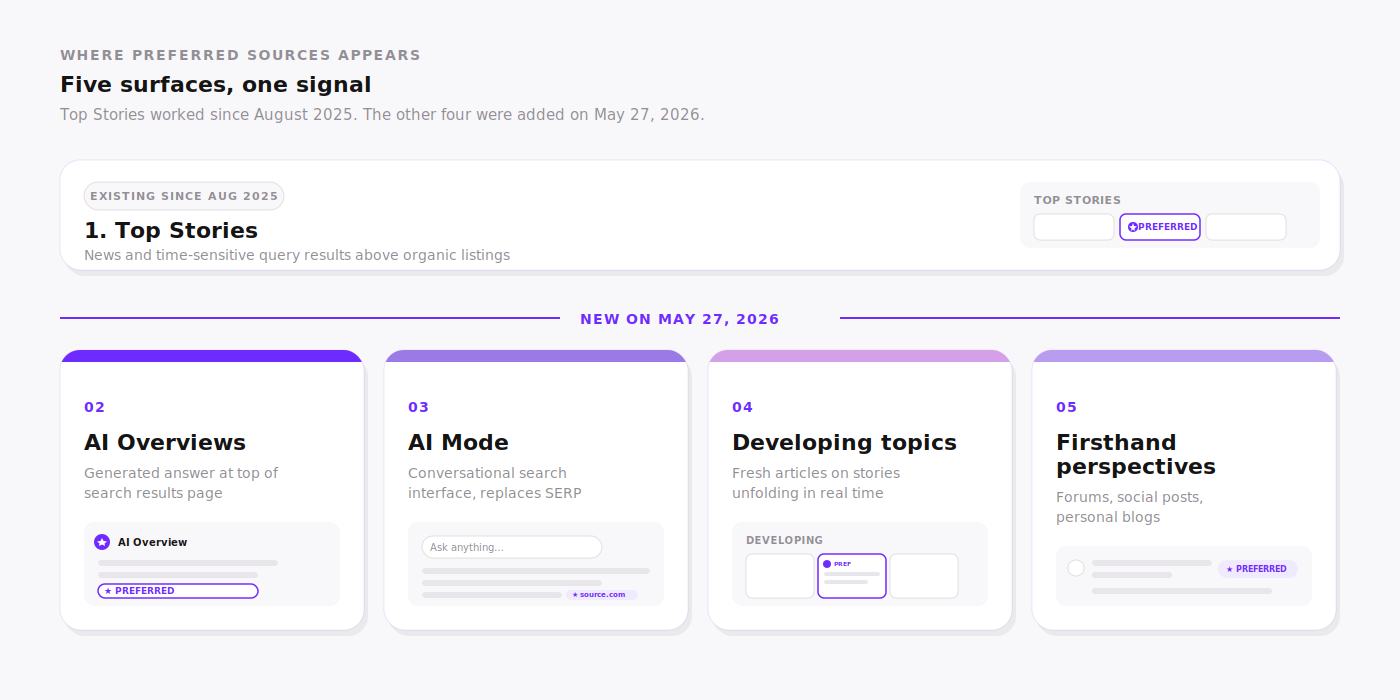
On May 27, 2026, Google announced that Preferred Sources now applies inside AI Overviews, AI Mode, the developing topics carousel, and the firsthand perspectives carousel. Before that date, the badge worked only inside Top Stories.
The expansion is a personalization signal, not a global ranking factor. A site appears with a 'preferred' badge only for users who marked it. Google reports those users click on a preferred source roughly twice as often as the same result without the badge.
This guide covers what the feature does, who benefits in practice, what the numbers say so far, and how to set it up step by step. It also covers what to do when a domain returns 'No results' in the source preferences tool, which is the case for ivabot.xyz right now and for most small sites.
TL;DR (Quick Summary)
What it is. A user-controlled signal that lets people mark websites they trust. Selected sites receive a visible badge and appear higher in personal Top Stories, AI Overviews, AI Mode, and two new carousels for developing topics and firsthand perspectives.
What changed on May 27, 2026. Google extended the feature from Top Stories alone to also cover AI Overviews, AI Mode, and the two new carousels.
Check eligibility first. Enter the domain in Google's source preferences tool before planning any work. Many small sites return 'No results' because the feature currently indexes mostly publishers that trigger Top Stories.
Who it helps most. Sites already eligible in the tool, with a returning audience through a newsletter, social following, or community. Sites not yet eligible benefit from focusing on publishing cadence and topical authority first.
What the numbers show. Google reports a 2x click-through rate for preferred sources. Over 175,000 sources have been selected by users since August 2025 according to Digiday. Search Console does not separate preferred source data yet, so independent verification is not available.
Time to set up if eligible. 30 to 45 minutes. Check the source preferences tool, add the deeplink button to the site, share with the existing audience through one owned channel.
The eligibility check takes 30 seconds and tells which of the four setup steps below are worth doing now.
What changed on May 27, 2026
Short answer: Google extended the Preferred Sources badge from Top Stories alone into AI Overviews, AI Mode, and two new carousels covering developing topics and firsthand perspectives.
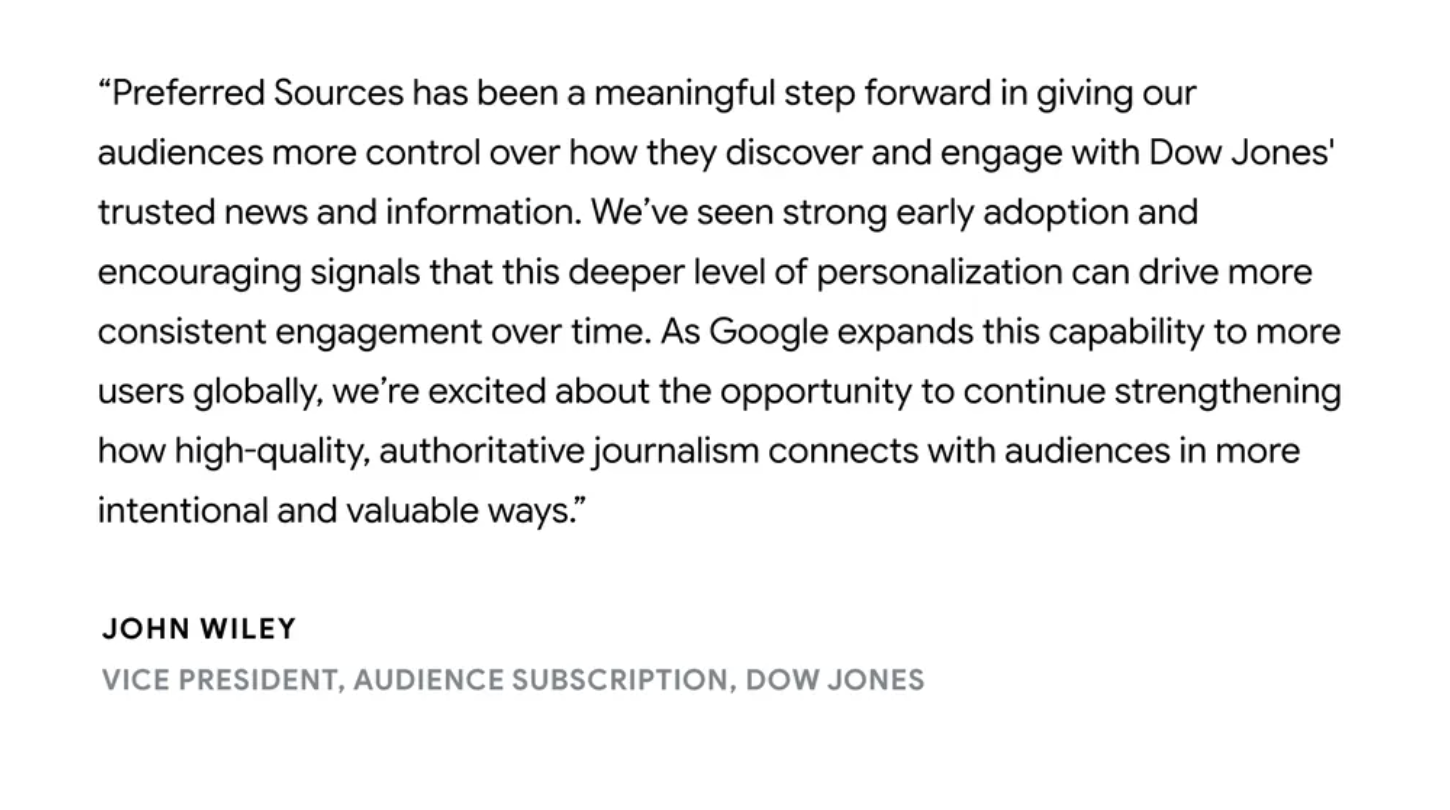
John Mueller from Google announcing the expansion on May 27, 2026.
Until May 27, 2026, a user who marked a site as a preferred source saw the badge only inside the Top Stories block on a Google search results page. Top Stories appears for queries that Google classifies as newsworthy or time-sensitive, which excludes most evergreen and informational searches.
After May 27, three new surfaces also show the badge for preferred sources.
AI Overviews and AI Mode. When a user marks a site as preferred and that site is cited inside an AI Overview or AI Mode answer, the citation appears with a 'preferred' badge. The user is more likely to click that citation according to Google's internal data.
Developing topics carousel. A new carousel format shows fresh articles on topics that are unfolding in real time, like product launches, political events, or breaking incidents. Preferred sources receive priority placement inside this carousel.
Firsthand perspectives carousel. Another new carousel highlights sources offering personal experience and direct observation, the type of content typically found on forums, social platforms, and personal blogs. Preferred sources are prioritized here too.
Five surfaces where the Preferred badge appears. Top Stories was the only surface from August 2025 until May 27, 2026.
The same day, Google updated its Search Central documentation with the new surface details and downloadable button assets in 16 languages including Russian, Ukrainian, English, German, French, Spanish, Portuguese (Brazil), Japanese, Korean, and Hindi.
What this does not mean
Preferred Sources is a personalization signal, not a global ranking factor. A site does not rank higher in search results for users who have not marked it as preferred. The effect is per-user, applied only to the people who actively selected the site. Search Engine Journal confirmed this when Google extended the feature globally in April 2026.
Who Preferred Sources is for
Short answer: sites already eligible in the source preferences tool, with a returning audience that recognizes the brand. Sites not yet eligible or without a returning audience get limited value from this setup right now.
Eligibility and audience fit are two separate filters. A site needs both to benefit.
Site has a returning audience: newsletter subscribers, LinkedIn followers, a community, or repeat blog readers.
Site publishes new content on a regular cadence and covers topics that come up in Top Stories, AI Overviews, or AI Mode.
Site uses a domain or subdomain structure, not a subdirectory. Per Google's documentation, only domain-level and subdomain-level sites appear in the tool. A blog hosted at example.com/blog is not separately selectable, but if the parent domain example.com is eligible, the whole site including the blog is covered.
Weak fit right now
Brand-new site without a returning audience yet.
Domain returns 'No results' in source preferences tool.
Site publishes evergreen content infrequently and does not appear in Top Stories.
Blog hosted entirely on a subdirectory of a parent domain that itself does not match the site's brand or topic focus.
To make this concrete: ivabot.xyz currently returns 'No results' in the source preferences tool. The site is too new and publishes too infrequently to be indexed by the tool yet. For ivabot.xyz the next 1 to 3 months focus stays on publishing consistency and topical authority, not on the Preferred Sources setup itself. Steps 1 to 4 below are still useful to read in advance, because the work to do becomes obvious the moment the tool starts returning the domain.
What the numbers say
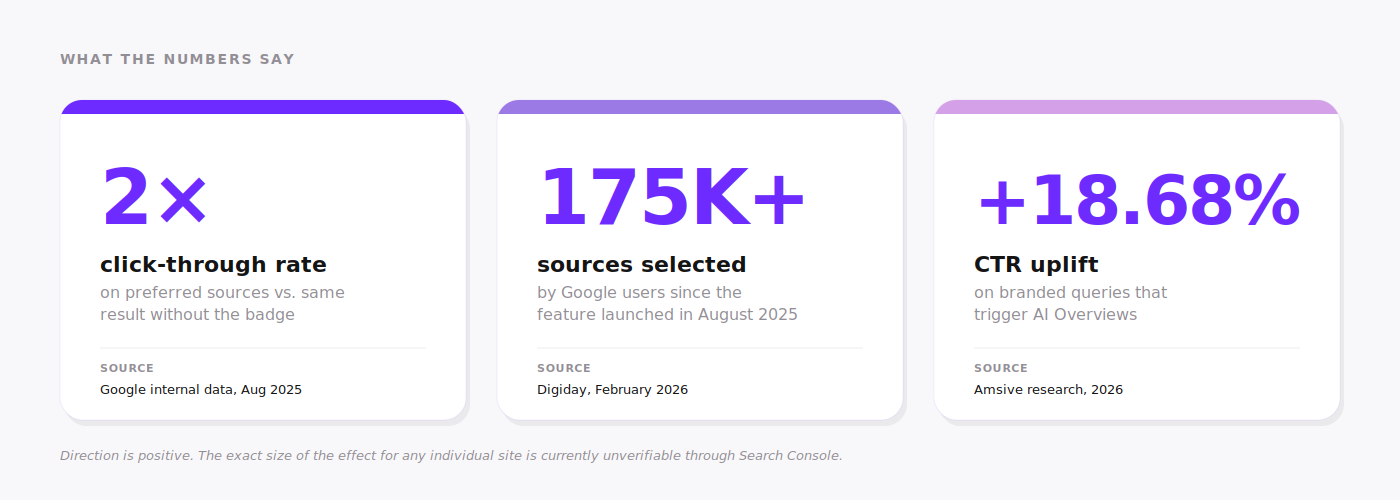
Short answer: Google reports a 2x click-through rate for preferred sources. Independent verification is not available because Search Console does not separate the data yet. Direction is positive, exact size of the effect per site is currently unknown.
Three data points form the public picture right now.
Three numbers that frame the impact. Direction is positive across all three sources.
Google's 2x click-through rate claim. Across both the August 2025 launch post and the May 27, 2026 announcement, Google has repeated the same metric: users click on a preferred source roughly twice as often as they click on the same result without the badge. The data is internal Google data and has not been independently audited.
Adoption: 175,000+ sources selected.Digiday reported in February 2026 that over 175,000 sources had been selected by Google users since the feature launched in August 2025. The same article documented publisher frustration: six months in, publishers could not verify the traffic uplift because Search Console does not break out Preferred Sources impressions or clicks as a separate metric.
Context: AI Overviews CTR uplift for brand recognition. Independent research from Amsive found that branded queries that triggered AI Overviews showed a 18.68 percent CTR uplift on average. The metric measures brand recognition rather than preferred-source selection, but the underlying mechanism overlaps: people click more often when they recognize and trust the source.
What can be verified independently right now
Nothing about a specific site's preferred source impressions or clicks. Search Console exposes Top Stories impressions through the Search Appearance filter, which catches a subset of the traffic but does not isolate the Preferred Sources contribution. Site owners are flying partially blind on attribution.
Step 1: Check if your domain is eligible
01
Eligibility check (30 seconds)
Problem: Setup steps 2 to 4 only matter if the source preferences tool returns the domain. Many small sites return 'No results', and there is no public list of eligible domains.
Fix: Open the source preferences tool and search for the domain. If results appear, the site is eligible. If 'No results' appears, the site is not yet indexed.
The check takes 30 seconds. Open the link, type the domain into the search box, read the result. There are three possible outcomes.
Domain appears as a clickable result. The site is eligible. Continue to Step 2.
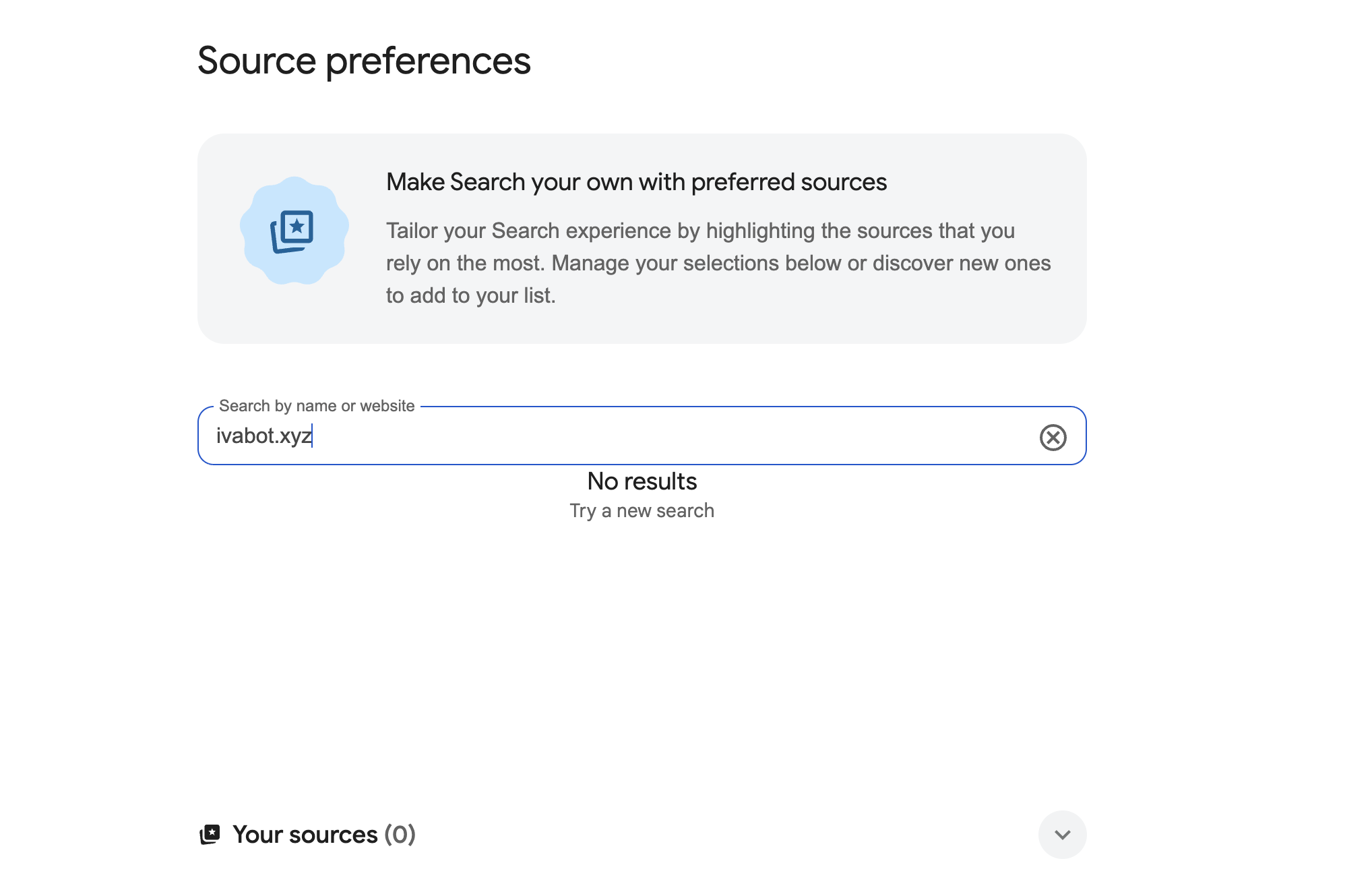
'No results' appears with a 'Try a new search' hint. The site is not yet indexed by the tool. This is the situation ivabot.xyz is in right now, and it is the most common situation for small SEO-focused or product blogs.
Tool itself returns an error or the URL does not open. This is the 'google preferences source link broken' complaint that shows up in Google autocomplete. Usually a temporary issue with Google's servers. Retry in a few hours.
Source preferences tool returning 'No results' for ivabot.xyz on June 2, 2026.
What to do if the domain is not eligible yet
The source preferences tool indexes sites primarily through Top Stories eligibility, which Google grants based on signals like publishing cadence, topical authority, and original reporting. The path to eligibility for a small site looks like this: publish consistently on a defined topic, get cited by other sites in the same niche, watch Search Console for Top Stories impressions, recheck the source preferences tool every 4 to 6 weeks. There is no submission form, no application, no shortcut.
Step 2: Get your deeplink and test it
02
Deeplink setup (5 minutes)
Problem: Readers will not find their way to the source preferences tool on their own. Without a direct link, adoption stays near zero.
Fix: Use Google's deeplink format with the site's domain. Test it in an incognito window logged into a Google account before promoting it.
Replace the domain with the actual site domain. No protocol prefix is needed, no trailing slash. The tool opens with the site pre-populated in the search box.
Testing the deeplink
Open an incognito or private browser window.
Log into a Google account inside that window.
Paste the deeplink and load it.
If the site appears as a clickable result with a checkbox, the link works.
If 'No results' appears, the domain is not yet eligible. Go back to Step 1.
Why test in incognito
A logged-in browsing session with a long search history may show different results than a clean session. Incognito with a fresh Google login gives a baseline test that matches what most readers will see.
Step 3: Add the button to your site
03
Button placement (15 minutes)
Problem: A deeplink shared once in a tweet or LinkedIn post reaches a small fraction of returning visitors. Most readers never see it.
Fix: Place a 'Make us your preferred source' button on the site, in a location where returning visitors naturally pass through.
Google provides downloadable button assets in 16 languages, listed in the Search Central documentation: Danish, English, Estonian, Finnish, French, German, Hebrew, Hindi, Japanese, Korean, Brazilian Portuguese, Russian, Spanish, Swedish, Turkish, Ukrainian. Custom designs are also permitted.
Recommended placements
Article footer. Below the article body, above the related-posts block. Works because readers who reach the end of an article have signaled real engagement.
Blog sidebar (if the design uses one). Stays visible on every blog post. Lower click rate per impression than article footer but higher reach.
Dedicated /preferred-source page linked from the main navigation. Useful for explaining what the feature does and why a reader might want to use it. Less direct but easier to share on social.
Newsletter footer. Reaches the most loyal segment: people who already subscribed. The link goes in the email signature, not inline in the body.
Minimal custom button HTML
If using a custom design instead of Google's downloadable assets, the markup is straightforward. Replace yoursite.com with the actual domain, and style the class to match the site's design system. The rel='nofollow' attribute is recommended because the link is a user action, not an editorial endorsement of Google.
<a href='https://google.com/preferences/source?q=yoursite.com' class='preferred-source-btn' rel='nofollow'>Make us your preferred Google source</a>
The button is not a ranking signal
Per Google's documentation, these methods are examples for building an audience and helping people find a site as a preferred source. The button is not required for a site to appear as a preferred source. Eligibility is determined on Google's side.
Step 4: Drive adoption through your audience
04
Promotion through owned channels (one hour spread across one week)
Problem: A button on the site only converts visitors who already came back. Most preferred source selections come from a direct ask through a channel the audience already follows.
Fix: Promote the deeplink through one owned channel, with a clear reason for the reader to act.
Three templates that match the channels most small sites already use. Each one is short, direct, and explains the benefit on the reader side, not on the publisher side.
LinkedIn post template
Google added a feature in 2025 that lets you mark which sites you trust. When you mark a site, articles from that site appear with a 'preferred' badge in Top Stories, AI Overviews, and AI Mode. Useful if you read [your topic] often and want to see [your site] more frequently. Link to add [your site]: https://google.com/preferences/source?q=yoursite.com Takes 10 seconds.
Newsletter line template
PS. If you find these emails useful, you can also mark [your site] as a preferred source in Google. Marked sites get a 'preferred' badge in Google's AI Overviews and Top Stories. Link: https://google.com/preferences/source?q=yoursite.com
Blog footer CTA template
Want to see more articles like this in Google? Mark [your site] as a preferred source in Google. Marked sites appear with a badge in AI Overviews and Top Stories for readers who selected them.
One channel at a time
Promoting through all three channels at once dilutes attention. Pick the channel with the largest engaged audience, run it for one week, measure response, then add the next channel. For a small site that often means LinkedIn first, newsletter second, blog footer permanently.
Drawbacks and limitations
Short answer: no Search Console attribution, eligibility gates many small sites out, filter-bubble concerns shape how users perceive the feature.
Three limitations matter when planning around Preferred Sources.
1. Search Console does not separate preferred source data. The Performance report shows total impressions and clicks for Top Stories, AI Overviews, and other appearance types, but does not isolate the share that came from users who selected the site as preferred. Digiday reported in February 2026 that publishers were six months into the rollout and still without attribution data. Google said it had received feedback on the gap but did not commit to a timeline for adding a dedicated metric.
2. Eligibility excludes many small sites. The source preferences tool indexes mostly publishers that trigger Top Stories. A solo-founder SEO blog, a small product site, or a niche personal blog often returns 'No results' even when the content is high quality and the site has steady readership. The path to eligibility is indirect: publishing cadence, topical authority, citations from other sites in the same niche.
3. Filter-bubble concerns affect adoption. Personalization amplifies what users already engage with, which limits exposure to new sources. One commenter on r/Android summarized the tradeoff: 'On the other, it really narrows a person's world-view to only the stuff they already agree with.' Another wrote that algorithmic personalization removes serendipity entirely: 'all it does is give you more of the same stuff you watched before, no variety anymore.' Some users actively avoid personalized search for this reason and route through privacy-focused engines or RSS feeds: 'An RSS reader is probably your best bet for a truly degoogled feed.'
For Preferred Sources specifically, this means the feature works as an audience-loyalty amplifier, not a new-audience acquisition tool. The setup helps a site appear more often to readers who already trust it. Reaching new readers still requires the standard mix of content, SEO, and distribution.
How to track results in Search Console
Short answer: filter the Performance report by Search Appearance and select Top Stories. AI Overviews has its own filter. Neither separates preferred source data, so the numbers approximate the trend, not the exact contribution.
Until Google adds a dedicated Preferred Sources metric, three proxy methods give partial visibility.
Top Stories impressions filter in Search Console. Open Performance, then Search results. Click '+ New' filter, choose 'Search Appearance', select 'Top Stories'. The report shows impressions and clicks for queries where the site appeared inside Top Stories. Increases over time correlate with growing preferred-source adoption, though brand search and freshness signals contribute too.
AI Overviews impressions filter in Search Console. Same Performance report, same '+ New' filter, choose 'AI Overviews' under Search Appearance. Shows impressions and clicks for citations inside AI Overviews. The metric is described in detail in how to track AI citations.
Branded query trend. Filter the Performance report by query containing the site's brand. Increases in branded query impressions over time suggest growing recognition, which is the precondition for preferred-source adoption.
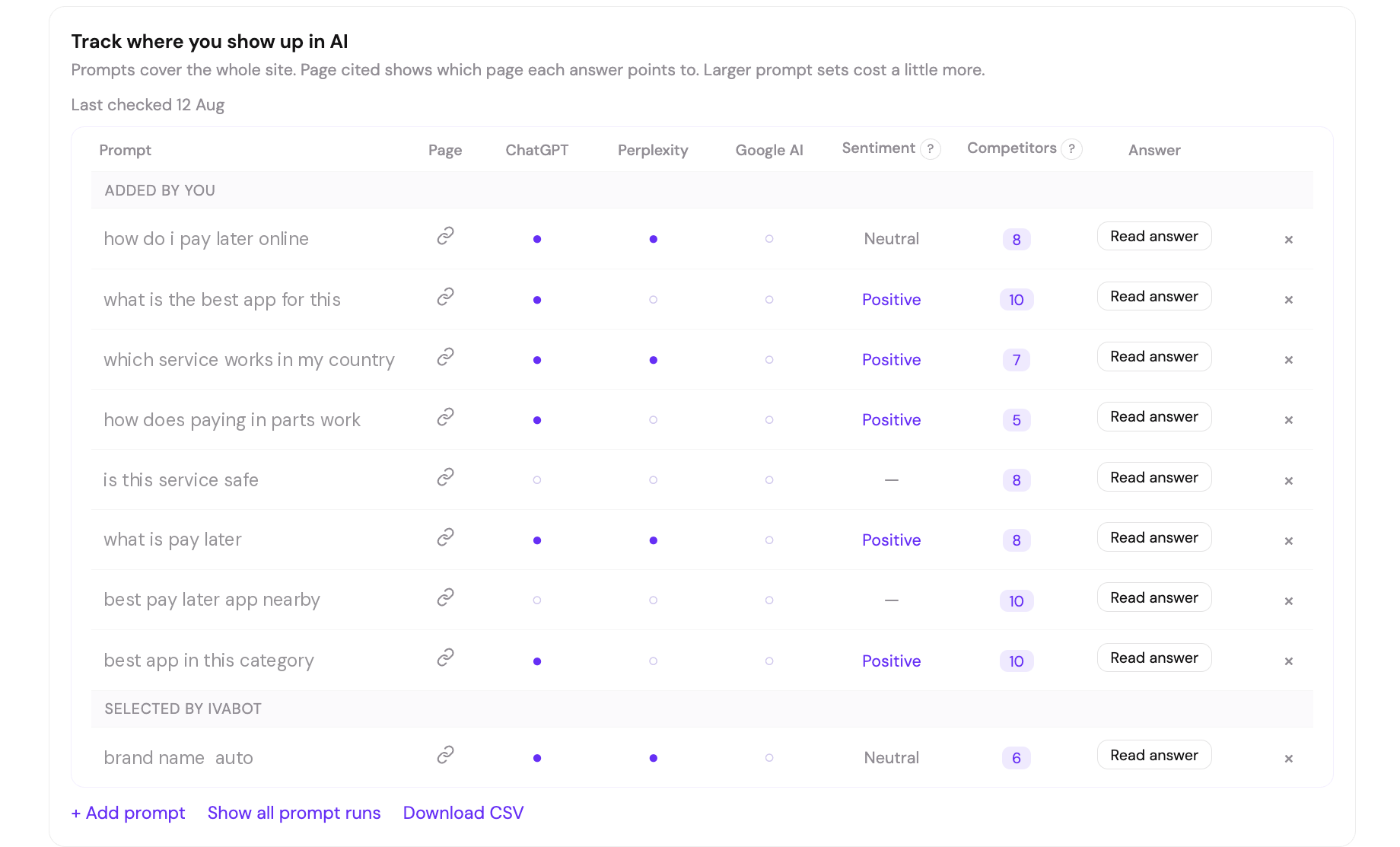
All three stop at Google's own surfaces. If the same readers also ask ChatGPT or Perplexity, none of these reports will show it. IvaBot runs your prompt list across ChatGPT, Perplexity and Google AI and records, for each one, whether the brand was mentioned, whether a page was cited and which page, the sentiment of the mention, the competitors named in the same answer, and the full answer text. Fifty prompts a month costs about five dollars, and new accounts get three free credits with no card. Run it on your page.
The part Search Console cannot show: which engines named you, and what the answer actually said.
What's normal
For a small site, Top Stories and AI Overviews impressions usually stay in the low hundreds per month for the first few months after eligibility, then grow gradually if publishing stays consistent. A doubling over a 90-day window is a strong signal. Daily spikes mean little because Top Stories rotates fast.
Common mistakes
Short answer: six mistakes that turn the setup into wasted effort. All fixable.
Skipping the eligibility check and going straight to the button. If the source preferences tool returns 'No results', the button does nothing. Always start at Step 1.
Promoting through all channels at once. Dilutes attention and makes it hard to know which channel converted. Pick one, run it for a week, then add the next.
Using vanity copy in the CTA. 'Support us by clicking this link' performs worse than 'Mark our site as a preferred Google source so you see it more often in AI Overviews'. The benefit explanation goes on the reader side, not the publisher side.
Treating Preferred Sources as a ranking signal. It is a personalization signal applied per user. A site does not rank higher in search results for users who have not selected it. Confusing the two leads to disappointment when global rankings do not change.
Forgetting to test the deeplink in incognito. A logged-in session with long history may show different results than a clean session. Always test in a fresh incognito window with a Google account logged in.
Giving up after two weeks. Adoption is slow because most readers see the button once and act later, or come back through email. The 90-day window is the right measurement period.
FAQ: Google Preferred Sources
What is a Google preferred source?
A Google preferred source is a website that a user has marked as trusted in Google's source preferences tool. Marked sites appear with a 'preferred' badge and rank higher in personal search results, Top Stories, AI Overviews, AI Mode, and two new carousels for developing topics and firsthand perspectives. The marking is per-user and does not affect rankings for users who did not mark the site.
How do I add a preferred source in Google?
Open Google's source preferences tool at google.com/preferences/source, search for the site by name or domain, and check the box next to the result. The change applies immediately for the logged-in Google account. One r/YouShouldKnow user summarized the manual path: 'you go to your profile, click more settings, then search personalization, then source preferences.'
How do I add a preferred source on Google as a website owner?
A site owner cannot mark their own site for other users. Eligibility is decided by Google based on signals like Top Stories appearance, publishing cadence, and topical authority. Site owners can encourage readers to mark them through a deeplink, a button, and promotion through owned channels. The setup is documented in Google's Search Central documentation.
Does Preferred Sources work for AI Overviews now?
Yes, as of May 27, 2026. Before that date the badge applied only inside Top Stories. After May 27, marked sites also appear with the badge in AI Overviews, AI Mode, the developing topics carousel, and the firsthand perspectives carousel.
Why is my Google preferences source link broken?
The 'google preferences source link broken' complaint shows up regularly in Google autocomplete. Three common causes: the user is not logged into a Google account in the current browser, the domain entered in the deeplink is not eligible (the tool returns 'No results'), or Google's servers returned a temporary error. Solutions: log into a Google account first, double-check eligibility through the manual search, or retry in a few hours.
Can a subdirectory blog be a preferred source?
No. Per Google's documentation, only domain-level and subdomain-level sites are eligible to appear in the source preferences tool. A subdirectory like example.com/blog is not eligible separately. If the parent domain is eligible, the blog content under that domain is covered indirectly because the whole site is included.
Is Google Preferred Sources an SEO ranking signal?
Yes, but a personalization signal rather than a global one. The feature ranks a site higher only for users who selected it. Other users see no change. Search Engine Journal described it as a global SEO signal in the sense that the mechanism is now active in every language Google Search supports, not in the sense that it affects rankings universally.
How do I get the preferred source badge?
The badge is awarded automatically when a user who has marked the site as preferred sees that site in their search results. There is no separate badge program to apply for. Eligibility for the underlying source preferences tool depends on Top Stories appearance, publishing cadence, and topical authority.
Does Google Preferred Sources work in all languages?
Yes. Search Engine Journal reported on April 30, 2026 that Google updated documentation to confirm the feature works in all languages where Google Search operates. Button assets are available in 16 languages including Russian, Ukrainian, English, German, French, Spanish, Brazilian Portuguese, Japanese, Korean, and Hindi.
Does Preferred Sources affect ChatGPT or Perplexity?
No. It is a Google feature and applies only to Google surfaces. ChatGPT and Perplexity choose sources through their own retrieval, so visibility there has to be measured separately, either by asking the questions yourself or with a tracker that keeps the answer text.
What's Next
For a site that returned 'No results' in the source preferences tool, the next 1 to 3 months focus on the inputs that drive eligibility: regular publishing on a defined topic, citations from other sites in the same niche, growing Search Console impressions for branded and topical queries. Recheck the source preferences tool every 4 to 6 weeks.
For a site that is already eligible, the next month focuses on a single channel push to drive initial selections, then measurement through the Top Stories and AI Overviews filters in Search Console.
IvaBot AI Readiness checks whether a page is structured well enough to be picked up by AI engines and returns the fixes, then tracks your prompts across ChatGPT, Perplexity and Google AI so you can see whether the fixes landed. Three free credits, no card. Check your page.
Researched and written by Galyna Arikh based on Google Search Central documentation, the May 27, 2026 Google announcement, public coverage in Search Engine Land, Search Engine Journal, Digiday, and PPC Land, and discussion threads on r/YouShouldKnow, r/Android, and r/SEO.
 9 min read