Google Business Profile Optimization Checklist: How to Rank Higher in 2026
Galyna ArikhMay 13, 202622 min read
A practical Google Business Profile optimization checklist for 2026. Setup, verification, photos, posts, ranking signals, and timeline expectations for small business.
Try IvaBot for your site
Find what's hurting your SEO and what to fix first. Free to start, no credit card.
Google Business Profile (GBP) is the single highest-return free tool for any business with a local component. When set up well, it puts your business in front of people who are already searching for what you offer, in Google Maps and in the local pack at the top of search results.
This guide is a practical Google Business Profile optimization checklist for 2026. It covers setup, verification, the parts of the profile that actually move rankings, and the parts that look important but do not. The goal is one weekend of focused work, then a small weekly habit.
By the end, you will know exactly what to fill in, which photos and videos to upload, how often to post, and how to track whether the work is paying off.
Google Business Profile is free and runs through google.com/business. Setup takes 30 to 60 minutes; verification takes 5 minutes to 14 days depending on method.
Five sections drive almost all ranking and conversion impact: primary category, services, description, photos, and posts. Reviews are critical and covered in our dedicated reviews guide: ask consistently, reply within 48 hours, never offer incentives.
Realistic timeline: 4 to 6 weeks for first ranking movement, 3 to 6 months for stable visibility in the local pack. Changes can take up to 2 weeks to reflect, so do not switch tactics in the first week.
Set up companion profiles on Bing Places, Apple Business Connect, Facebook, and Yelp. Together they cover ChatGPT search, Apple Maps, Siri, and Perplexity citations.
New in May 2026: Google now pulls Reddit threads into some Google Business Profiles. Reddit mentions are becoming a local ranking and reputation signal worth monitoring.
"The profile is free. The hard part is keeping it active."
Why GBP optimization matters in 2026
Short answer: Google Business Profile is now the entry point for local searches across Search, Maps, and AI Overviews. A complete, active profile is the difference between getting found and being invisible.
The numbers are clear and have been consistent for several years. Roughly 70% of local searches result in an interaction with a Google Business Profile, according to recent reporting from Google and several local SEO research firms. For businesses that complete their profile fully, engagement is typically 5x higher than for half-filled profiles.
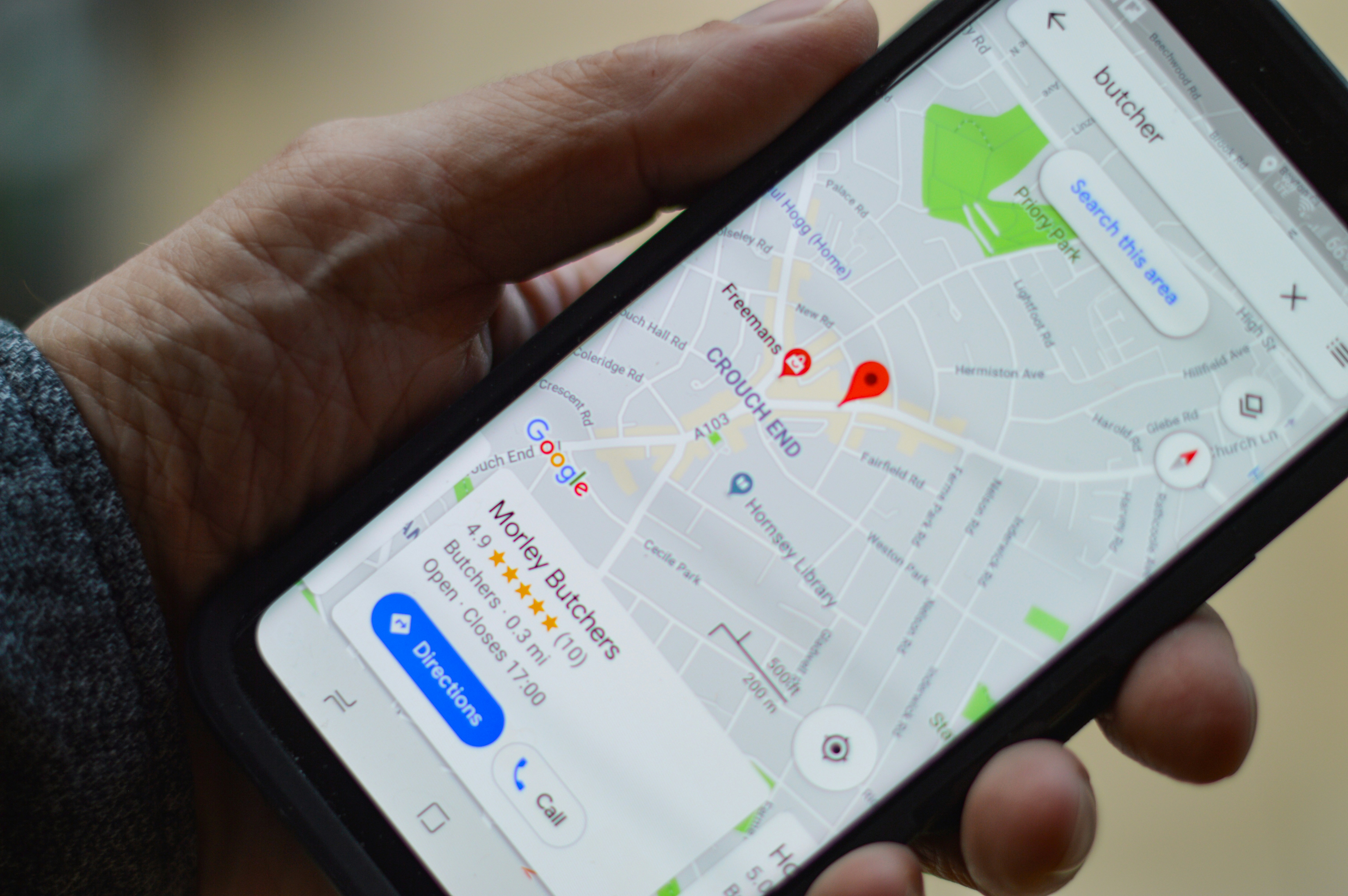
A typical local pack result for "barbershop near me": three Business Profiles with photos, ratings, hours, and direct actions. This is what an optimized profile gets you.
What changed in 2026 is how Google evaluates the profile. Static information matters less than ongoing activity. A profile that has not added a photo or post in 30 days starts losing visibility, even if all the fields are filled in. Local SEO researchers call this the "decay rate," and it is real.
The other shift is AI. Google's AI Overviews now pull local business information directly from GBP for many queries. ChatGPT search uses Bing's index, which is fed in part by GBP data via Bing Places. A well-optimized profile no longer just affects Google rankings; it affects whether AI assistants mention your business when someone asks for a recommendation.
None of this means the work is harder. It means the work is more continuous. A weekly 15-minute habit consistently outperforms a one-time setup, no matter how thorough that setup was.
How to set up Google Business Profile
Short answer: go to google.com/business, sign in with the Google account you want associated with the business, search for your business name to see if Google already has a listing for it, then either claim it or create a new one.
This is the foundation step. Once the profile is created and verified, the rest of the checklist is about filling it in well.
The five-step setup flow. Each step takes about 10 to 15 minutes.Inside the Business Profile dashboard, Google now embeds short walkthrough videos for setup and configuration. Use them when a field is unclear.
01
Sign in at google.com/business
Use a Google account you will keep long-term. Switching the owner of a profile later is possible but creates friction. Many small businesses use a dedicated business Gmail account rather than a personal one.
Go to google.com/business and click "Manage now". You can also access the profile directly from Google Search by searching for your business name once you are signed in.
02
Search for your business and claim or create
Type your business name in the search bar. One of two things happens:
Google already has a listing for your business. Common for businesses appearing in directories or suggested by users. Click "Claim this business" and follow the verification steps. Existing photos, hours, and reviews stay with the profile.
No listing exists. Click "Add your business to Google" and create a new one. You will fill in name, category, location, contact info, and choose how to be verified.
If you see a duplicate listing for your business after creating yours, do not delete the old one. Instead, claim it and submit a merge request to Google support. Deleting a duplicate sometimes wipes out the reviews attached to it.
03
Choose your business type and primary category
Google will ask whether you have a physical address customers visit, whether you travel to customers, or both. Choose accurately. Misrepresenting this can lead to suspension later.
Then choose a primary category. This is one of the strongest ranking signals on the profile, and we cover category selection in detail in the Categories section below.
04
Add location, contact details, and pick a verification method
Enter your address (or service area if you do not have a public location), phone number, and website. The name, address, and phone number you enter here should match exactly what is on your website and any other directory listings. This is called NAP consistency, and it matters more than most beginners think. "Exactly" means the same abbreviations, the same suite number formatting, the same phone format.
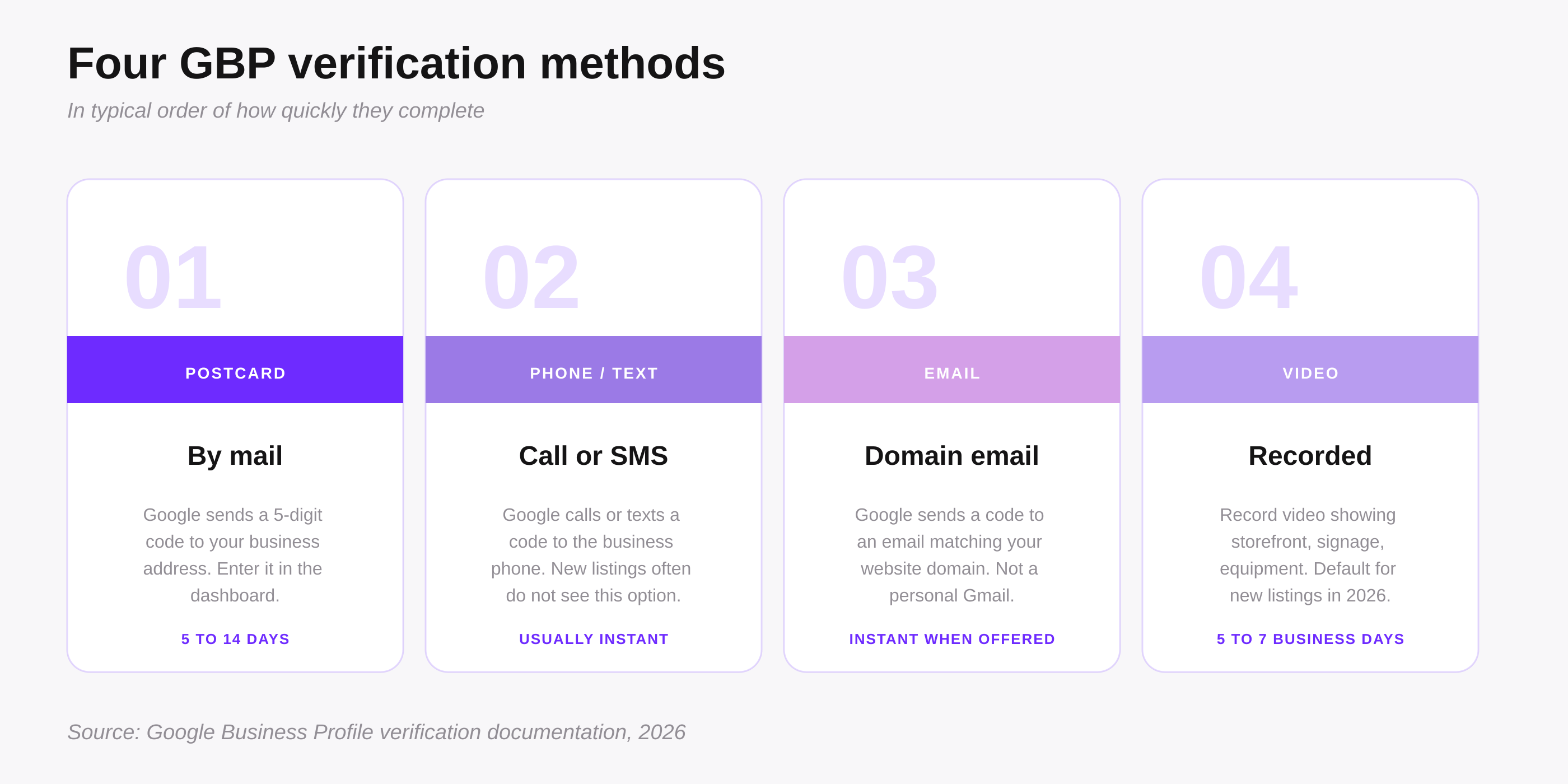
Then pick a verification method. Google offers one or more of postcard by mail, phone call, text message, email, or video, depending on your business type, category, and location. Pick the fastest one available. Postcard takes 5 to 14 days; phone, text, and email are usually instant; video verification takes 5 to 7 business days for Google to review. Full walkthrough in the next section.
Verification methods and troubleshooting
Short answer: Google offers different verification methods depending on your business type and location. Postcard and video are the most common. If a method does not work, request another from your profile dashboard.
Verification proves to Google that you are the legitimate owner of the business at the address you listed. Until you are verified, the profile will not appear publicly in search or maps.
The four main verification methods, in typical order of how quickly they complete.
The four main methods
Postcard by mail. Google sends a physical postcard with a 5-digit code to your business address. Arrives in 5 to 14 days. Once you have the code, enter it in your profile dashboard and verification is complete. This is the most common method for businesses with a public address.
Phone or text message. Google calls or texts a code to the business phone number on the profile. Usually instant. Available for businesses with a phone number Google can verify, often after the business has existed for some time. New listings often do not see this option.
Email. Google sends a code to the business email address, usually one matching your website domain ([email protected], not a personal Gmail). Available for some categories. Instant when offered.
Video verification. Google asks you to record a video showing your storefront, signage, the surrounding area, and proof of equipment or tools relevant to your business. Upload it through the dashboard. Google reviews within 5 to 7 business days. This is becoming the default method for many new listings in 2026.
Troubleshooting
If a postcard does not arrive within 14 days, log into the dashboard and request a different verification method. Video rejections are usually caused by short clips (under 30 seconds), invisible signage, mismatched location, or no proof of business activity — re-record showing more context. If verification is stuck on "pending review" for more than a week, open Google Business Profile support and submit a help request with your business name, address, and submission date. Most stuck verifications get resolved within a week of contacting support.
Business name and description
Short answer: use your exact legal or trading business name with no extra keywords. Use the description to explain what you do in plain language, with one or two natural keyword mentions.
Business name
Google's guidelines are strict on this. Your business name on the profile must match what is on your storefront, your legal documents, and your marketing. Adding keywords like "Maria's Bakery - Best Wedding Cakes in Bucharest" violates the guidelines, and a competitor can report you, which often leads to suspension.
If you genuinely have a descriptor in your real business name (like "Smith Plumbing & Heating"), that stays. If you added keywords years ago because someone said it helps rankings, remove them now. Suspension risk is not worth the small ranking benefit, and the benefit itself has shrunk as Google's algorithms have improved.
Description (750 characters)
The description appears below your business name in some search results and on the profile itself. You get 750 characters total. Use them to answer what you do (be specific), who you serve (geography, industry, or customer type), and what makes you different from a generic version of your business. Mention your main service and your city naturally once or twice. Do not stuff keywords. Do not include links (Google strips them). Do not include phone numbers (they are already in another field). Write it as if you were introducing your business to a new customer in a couple of sentences.
Quick check
Read your description out loud. If it sounds like marketing copy or has unnatural keyword density, rewrite it in your own voice. The version that sounds like a person describing their business outperforms the polished one.
Categories and services
Short answer: pick the most specific primary category that accurately describes your business. Add up to nine secondary categories for related services, and fill in the Services list manually so customers can see exactly what you offer.
The primary category is one of the top three ranking factors on a Google Business Profile, alongside reviews and proximity to the searcher. It tells Google what kind of business you are, which determines which searches you can rank for.
How to choose the primary category
Be as specific as Google's list allows. If you run a bakery that specializes in custom cakes, do not pick "Bakery" if "Cake Shop" or "Wedding Bakery" is available. Specific categories rank better for specific searches, which is most local searches.
Look at three or four of your direct local competitors who rank well. Right-click their profile, view the page source, and search for "businessType" to see their primary category. Or use a free GBP audit tool that surfaces this. Pick the same specific category if it accurately describes you, or a more specific one if available.
Secondary categories
You can add up to nine secondary categories. These do not affect ranking as strongly as the primary, but they expand the range of searches your profile can show up for. A salon might have "Hair Salon" as primary and add "Hair Coloring Salon", "Nail Salon", and "Beauty Salon" as secondary.
Do not add categories that do not describe what you actually offer. Adding "Wedding Photographer" to a portrait photography business because weddings have higher search volume will hurt you more than help: Google will sometimes show you for wedding searches, get no clicks because your photos are all portraits, and demote your profile overall.
Services list (manual entries)
Separate from categories, Google Business Profile has a Services field where you list each specific service you offer with a name, a price (optional), and a short description. This is one of the most underused fields and the one Google's AI Overviews now pull from when answering "what does this business offer" questions.
Add every distinct service customers might search for: not just "Haircut" but also "Men's Haircut", "Children's Haircut", "Beard Trim", "Hair Coloring". Each service entry is a small ranking signal for that specific search query. Update services seasonally as offerings change.
Watch the list quarterly
Google adds new categories regularly. A category that did not exist when you set up your profile two years ago might be a better match today. Review your primary every quarter, and refresh your services list at the same time.
Photos and videos: what to upload
Short answer: upload at least 10 real photos covering exterior, interior, your work, your team, and a clear cover photo. Add 2 to 4 new photos per month, plus short videos when you can. Use descriptive filenames so Google's image AI reads them as additional signals.
Photos are the single most-viewed part of most profiles. Profiles with more than 100 photos get roughly twice as many clicks for directions and three times more website visits than profiles with under 10 photos, based on Google's own research and several third-party studies.
A balanced photo set covers all five categories, not just product shots.
What to upload
Exterior photos (3 to 5). The front of your building, your signage, and one shot showing the street so customers can find you. Include daytime and one evening shot if relevant.
Interior photos (3 to 5). The space customers actually see, taken from where a customer would stand. Clean, well-lit, recent.
Work or product photos (5 to 10). What you make or do. For a bakery, finished cakes. For a salon, before and after. For a contractor, completed jobs.
Team photos (2 to 3). Real photos of you and the people who work with you. Not stock images. Faces help with the trust signal Google's AI now weighs heavily.
One owner photo. A clear photo of the business owner. This single addition has been shown in multiple case studies to lift profile engagement.
Videos
Short 15-to-30-second videos count as fresh content the same way photos do, and they tend to get higher engagement on the profile. A walkthrough of the space, the team at work, or a quick demo of your main service is enough. Upload one or two videos when you set up the profile, then add a new one every month or two. No need for production quality; phone footage works.
Specifications and rules
Cover photo: 1080 x 608 pixels recommended (16:9 ratio). Logo: 720 x 720 pixels. Other photos: minimum 720 pixels on the longest side, JPG or PNG, under 5 MB each. Do not upload stock photos (Google's image AI now flags these and they reduce trust signals), heavy filters, overlaid text, or screenshots of your website. Real photos taken on a phone outperform polished but generic stock images every time. Add new photos at least monthly: profile freshness is a 2026 ranking signal.
Filenames as signals
Before uploading, rename your photo files with descriptive keywords like "bucharest-sector-2-bakery-exterior.jpg" instead of "IMG_4521.jpg". Google's image AI reads filenames as one more relevance signal, especially for local keywords.
Posts: weekly cadence
Short answer: publish one post per week using the Updates, Offers, or Events post type. Each post is a small fresh content signal that keeps the profile active.
Posts appear on your profile and sometimes in the local pack itself. They are the easiest way to add fresh content regularly, which has become a ranking signal in 2026.
You have three post types:
Updates. Default type. Use for news, announcements, behind-the-scenes, new products, seasonal hours. Most posts will be Updates.
Offers. Promotions with start and end dates. Use sparingly, every two or three months at most.
Events. Workshops, openings, special hours days. Use as needed.
What to post
Post content does not need to be elaborate. A short paragraph, one photo, and a clear call to action is enough. Examples that work for a local business:
"This week we have fresh strawberries in the morning batch. Stop by before 11am while they last."
"New hours starting Monday: open at 8am instead of 9am."
"Finished a beautiful kitchen renovation in Sector 3 last week. Photos below."
Each post should answer "what would my regular customer want to know this week." If you cannot think of one, post a photo of your work or your space with a one-sentence caption. Consistency outperforms cleverness here.
Posts expire after 7 days from the profile feed but stay accessible through the posts archive. So the goal is genuinely one per week, not a backlog of evergreen posts.
Monthly clean-up routine
Short answer: once a month, run a 15-minute audit to keep the profile accurate, fresh, and ahead of competitors. This is the single highest-leverage habit in 2026.
A monthly routine is what separates profiles that climb steadily from profiles that decay. Five steps, done in order, take about 15 minutes:
Review categories and services. Add what is new, remove what is no longer accurate. Categories change quarterly; services more often.
Update photos. Add 2 to 4 fresh photos, remove ones that no longer reflect the business.
Check GBP Insights / Performance. Open the Performance tab in the dashboard. Look at which queries brought people to the profile, which calls, directions, and website clicks came in, and how the numbers compare to last month. Trends here often reveal a category or service worth adding.
Spot-check competitors. Open three direct competitors in Maps. Look at their categories, photo count, recent posts, and reviews. If they added something you missed, add it.
Check for duplicate listings. Search your business name in Maps. If a duplicate appears, claim it and submit a merge request. Duplicates split reviews and dilute ranking signals.
Q&A, messaging, attributes, and bookings
Short answer: seed your own Q&A with three or four common questions and answers, turn on messaging if you can respond within a day, add attributes that genuinely apply, and enable Reserve with Google if your business takes appointments.
Questions and Answers
Anyone can ask a question on your profile, and anyone can answer, including random users who may answer incorrectly. The best practice is to seed your own Q&A: from a different Google account, ask the questions customers actually ask you, then answer them yourself from your business account.
Three to five seeded questions covering parking, dietary restrictions, appointment requirements, payment methods, or pet policy is usually enough. Check the Q&A section weekly to catch new questions and correct wrong answers.
Messaging
Turn on messaging only if you can respond within 24 hours. Google now tracks response time, and slow response rates hurt rankings. If you cannot commit to responding daily, leave messaging off. When enabled, set a welcome message and a few quick-reply templates for common questions.
Attributes
Attributes are checkboxes for features like wheelchair accessibility, free wifi, outdoor seating, online appointments, women-led business, LGBTQ+ friendly, and dozens of others. The list varies by category. Check the boxes that genuinely apply. Some attributes (especially accessibility and identity attributes) help your profile appear for filtered searches like "wheelchair accessible restaurants near me." Do not check attributes that do not apply just to show up in more searches; it leads to bad reviews and possible suspension.
Reserve with Google (bookings)
If your business takes appointments — restaurants, salons, clinics, fitness studios, service providers — enable Reserve with Google. It adds a "Book online" button directly on your profile that connects to a supported booking provider (OpenTable, Booksy, Setmore, Square Appointments, and many others). Customers book without leaving Google. Profiles with active booking integrations rank higher for "book X near me" searches and get cited more often in AI Overviews.
The Reserve with Google setup screen inside the Business Profile dashboard.
GBP and AI Overviews
Short answer: AI Overviews on Google now pull local business data directly from GBP for many queries. A well-optimized profile is also a well-optimized source for AI.
Through 2024 and 2025, Google rolled out AI Overviews to more local search categories. By 2026 a meaningful share of local queries, especially "best X near me" and "X open now" style searches, return an AI summary above the regular results. Those summaries reference businesses by name and pull facts directly from their GBP.
An AI Overview for "best coffee in Melbourne" cites businesses by name, pulling facts straight from their Business Profile.
The signals that get a business mentioned in a local AI Overview are largely the same signals that drive traditional GBP rankings: a complete profile, a primary category that matches the query, recent activity, strong review sentiment, and consistent NAP data across the web. There are a few additions worth noting.
Description and services matter more. AI engines extract direct phrases from your description and your services list when summarizing what a business does. A clear, specific description gets quoted; a vague one gets paraphrased or skipped.
Q&A becomes a citation source. AI summaries sometimes quote the answer to common questions. Seeded Q&A with clear answers gives the AI better material to work with.
Review sentiment is now extracted, not just averaged. A business with 50 reviews where 10 mention "friendly staff" will get cited in summaries that mention service quality. Generic 5-star reviews without text do less for AI than detailed ones.
Bookings get cited too. Profiles with Reserve with Google enabled get mentioned in AI Overviews for "book a table" or "book an appointment" queries because the AI can offer the action directly.
For the broader picture of how AI search works and how to optimize content for it, see our separate guide on Generative Engine Optimization. For tracking whether AI engines actually cite your business, see how to track AI citations.
Reddit threads inside Google Business Profiles (new May 2026)
Short answer: Google has started pulling Reddit threads directly into a new "About this place" section on some Google Business Profiles. Reddit mentions and discussions are becoming a local ranking signal you can actively shape.
In May 2026, local SEO specialists started spotting a new "About this place" section on desktop Google Business Profiles, mostly for food and drink businesses to start. The section pulls Reddit threads that mention the business or its category and location. Google is connecting business profiles to community discussions in real time, which is a meaningful change.
This matters for two reasons. First, Reddit is now a direct contributor to local search visibility, not just a generic ranking signal. Second, the threads Google surfaces are visible to people researching your business right before they decide whether to visit. A thread that says "their pizza is overrated" sits on your profile until Google rotates it out.
What to do this week
If your business is in a category Google is testing this on (food, drink, hospitality first), do four things in order: search Reddit for your business name in quotes, search for your category plus your city, look at what comes up on competitor profiles, and decide where it makes sense to participate.
Google increasingly surfaces community-sourced content like Reddit threads directly inside search and profile results.
The participation rules are simple but easy to get wrong:
Use a labeled business account, not a personal one. Reddit requires disclosure of business affiliation. Operating a stealth promotion account is a fast path to a ban.
Answer questions, do not advertise. If someone asks "best place for sourdough in Bucharest" and you run a bakery, recommend two or three places including yourself, with honest context. Pure self-promotion gets downvoted and removed.
Thank people who recommend you, briefly. A short, real reply like "thanks, glad you enjoyed it" is fine. Long marketing replies look fake.
Engage in relevant subreddits regularly. Your city subreddit, your industry subreddit, related interest communities. Goal is to be a useful regular, not a one-time promoter.
The rollout is narrow today but Google rarely keeps these tests narrow. Treating Reddit as part of your local presence in 2026 is the same kind of bet that treating Google Business Profile as critical was in 2018: most people are still ignoring it.
Realistic timeline expectations
Short answer: verification takes minutes to two weeks. Profile visibility starts within a week of verification. Meaningful local pack ranking takes 3 to 6 months of consistent activity.
Here is what to expect, week by week, for a brand new profile:
Day 1 to 14: Setup and verification. Profile is not publicly visible during this time.
Week 2 to 4: Profile appears in Maps and direct-name searches. You can find it by typing your business name into Google. Rankings for category searches ("bakery near me") are unstable at this stage.
Month 2 to 3: First impressions and clicks from category searches start showing in the profile dashboard. Volume is low.
Month 4 to 6: Stable visibility in the local pack for your main category, assuming you have built reviews, posted weekly, and added photos consistently.
Month 6 onwards: Ranking expansion to secondary categories and longer-tail searches. Compounding effect of accumulated reviews.
Faster timelines happen when your category has weak local competition. Slower timelines happen in saturated categories or major cities where established businesses dominate. The pattern of stability after month 6 is consistent regardless.
Be patient
Changes to a Google Business Profile can take up to 2 weeks to reflect in search and Maps. A new category, photo, or post does not move rankings the same day. If nothing happens in the first week, do not panic and do not switch tactics. Two weeks of consistent activity is the minimum signal.
Companion profiles to set up alongside GBP
Short answer: GBP covers Google Search and Maps. Four other free profiles cover the rest of the local search surface: Bing Places, Apple Business Connect, Facebook, and Yelp.
Four companion profiles that cover the rest of the local search surface in 2026.
Bing Places for Business. Covers Bing Search, Bing Maps, and ChatGPT search (which uses Bing's index). One-click import from GBP, setup in 5 minutes. bingplaces.com
Apple Business Connect. Covers Apple Maps, Siri, and Spotlight Search. Roughly half of mobile users are on iPhone, so this is half the mobile local search audience. Verification usually instant via Apple ID. businessconnect.apple.com
Facebook Business Page. Covers Facebook search, Instagram search, and Marketplace. Less critical than five years ago but worth setting up if your customers use Meta platforms. business.facebook.com
Yelp Business Profile. Still a trusted directory in the US and parts of Europe, especially for restaurants and service businesses. AI engines like Perplexity and ChatGPT often cite Yelp for local recommendations. biz.yelp.com
Setting up all four takes about 30 minutes total once your GBP is complete, because most information is reusable. The main benefit is consistency: the same business name, address, phone, and category across every major platform, which Google's algorithms read as a trust signal.
Common mistakes
Short answer: most GBP problems come from a small set of avoidable mistakes. The list below covers what shows up most often in audits.
Keyword stuffing the business name. "Maria's Bakery - Best Custom Wedding Cakes Bucharest" violates Google's guidelines. The fix: use the real name, nothing else. Move keywords to the description and categories.
Inconsistent NAP across the web. Address formatted differently on website, Facebook, and GBP. Google may not connect the listings. The fix: pick one exact format (including abbreviations) and use it everywhere.
Wrong or too-broad primary category. Choosing "Restaurant" when "Pizza Restaurant" exists, or choosing a category that does not actually describe the business. The fix: check direct competitors who rank well and match their specificity.
Stock photos or no real photos. Generic images of teams that are not your team, or no photos at all. Both reduce trust signals. The fix: spend 30 minutes taking phone photos of your actual space, work, and team.
Profile abandoned after setup. No new photos, no posts, no replies to reviews for months. The "decay rate" effect kicks in and visibility falls. The fix: add one photo or post weekly. Set a calendar reminder.
Ignoring negative reviews. A bad review with no reply looks worse than the review itself. The fix: reply to every review within 48 hours, especially negative ones. Acknowledge the issue, do not argue, take it offline.
Messaging on but slow to respond. Turning on messaging then taking three days to reply hurts rankings more than not turning it on at all. The fix: only enable messaging if someone in the business checks daily.
Duplicate listings not merged. Old or auto-created duplicates split reviews and confuse Google. Sometimes a fake competitor listing at the same address shows up too. The fix: claim every listing you find for your business, then submit a merge request through GBP support. Report fake competitor listings using the "Suggest an edit" option in Maps.
Tools that help
Short answer: GBP itself is free and gives you most of the data you need. A few free third-party tools fill specific gaps.
Free tools
Google Business Profile dashboard: the primary tool for managing your profile, viewing insights, replying to reviews, and posting updates. Access at business.google.com.
Google Search Console: tracks which queries lead to your website (separate from GBP traffic). Free.
PlePer GBP Audit (free tier): third-party audit that flags missing fields, duplicate listings, and competitor comparisons. Free version is enough for one profile.
Paid tools (only if you need them)
BrightLocal: from $39/month. Tracks local rank, builds citation reports, monitors reviews across platforms. Useful for multi-location businesses or marketing freelancers.
Whitespark Local Rank Tracker: from $25/month. Specifically tracks local pack rankings by location and keyword.
IvaBot
While GBP optimization happens inside Google's own tools, the page you link from your profile (your website) is where AI engines look to verify the facts on your profile. IvaBot Content Coverage checks whether your website pages match GBP signals (clear authorship, business information, structured data) so that Google and AI search treat your profile and site as a connected unit.
What's Next
Setting up the profile is the foundation. The next layer is reviews: how to ask for them consistently, how to reply to negative ones, and how to use them to keep ranking. See our guide on how to get more Google reviews for the full playbook.
In the meantime, the highest-impact thing you can do this week is: complete or revisit your profile using the checklist above, add three new photos, write one post, and fill in your Services list. Then add a calendar reminder for the same routine next week. After eight weeks of this, profile activity will be a habit, and the visibility curve will start moving.
Once the profile is set up and reviews are flowing, the next level is tactical optimizations that build on the foundation. See Local SEO Tips for Small Businesses: 9 Tactics Worth Trying After the Basics for nine specific tactics including using all 9 secondary GBP categories, marking every applicable attribute, and AI-ready FAQ formatting, each with realistic timing.
IvaBot Content Builder generated the structure and SEO meta for this Google Business Profile guide.
This article was written using IvaBot Content Builder for the structure and brief, then rewritten and edited based on real GBP setup and ranking work. The IvaBot suite (Core Audit, Content Coverage, Content Builder) is built for small businesses and content creators who want SEO insights without agency pricing. Try it free at ivabot.xyz/app.
FAQ: Google Business Profile optimization
How can I be verified by Google for my Google Business Profile?
Google offers one or more verification methods depending on your business type and location: postcard by mail (5 to 14 days), phone or text message (usually instant), email (instant), or video (5 to 7 business days for Google to review). Open your profile dashboard, choose the fastest method offered, follow the prompts, and enter the verification code when you receive it.
Is Google Business Profile free?
Yes, completely free. Google does not charge for creating, verifying, or maintaining a Business Profile. There is no paid tier, no "verified badge" upgrade, and no boost option built into GBP itself. Anyone offering to "register" your business on Google for a fee is selling something you can do yourself in 30 minutes.
How long does it take for Google to verify a Business Profile?
It depends on the method. Phone, text, and email verification are usually instant or within a few hours. Postcard verification takes 5 to 14 days because the postcard is physically mailed. Video verification takes 5 to 7 business days for Google's team to review. If verification is stuck for more than two weeks, contact Google Business Profile support directly.
How to verify a Google Business Profile without video?
If video verification is the only option offered, the alternatives are limited but worth trying. Make sure your business address is fully filled in and matches your website exactly, then refresh the dashboard; sometimes additional methods appear. If postcard is offered, that is the most reliable alternative. As a last resort, contact GBP support and request manual verification with documentation (business license, utility bill in the business name).
Why is my Google Business Profile not showing up?
The most common reasons: the profile is not yet verified (verify first); the profile was created but never activated; you are searching from a location far from the business address (try searching with your exact business name first); or the profile is too new and Google has not yet indexed it for category searches. New profiles often take 2 to 4 weeks to appear for category searches even after verification.
What size should my Google Business Profile cover photo be?
The recommended cover photo size is 1080 x 608 pixels, which is a 16:9 aspect ratio. Logos should be square at 720 x 720 pixels. Other photos should be at least 720 pixels on the longest side, in JPG or PNG format, under 5 MB each. Higher resolution helps; Google now uses image AI to analyze photo content for ranking signals.
What is the difference between Google Business Profile and Google My Business?
They are the same product. Google My Business was renamed to Google Business Profile in late 2021. The old dashboard at business.google.com still exists and works, and most management is now done directly through Google Search and Maps. If you find an older guide that mentions "Google My Business," the information usually still applies, just with the newer name.
How does Google use Reddit threads inside Business Profiles?
In May 2026, Google started showing a new "About this place" section on some desktop Google Business Profiles, mostly for food and drink businesses, that surfaces Reddit threads mentioning the business or its category. This makes Reddit discussions visible to people researching your business directly on the profile. Monitor Reddit for mentions of your business name and category, engage honestly when it makes sense, and use a labeled business account rather than a stealth one.
 22 min read

.png)

.png)


.png)